Configuring Synchronization Between LDP and Static Routes
By configuring synchronization between LDP and static routes, you can switch traffic from a faulty primary link to the backup link by suppressing the activation of static routes. You can also delay traffic switchback to synchronize LDP and static routes.
Context
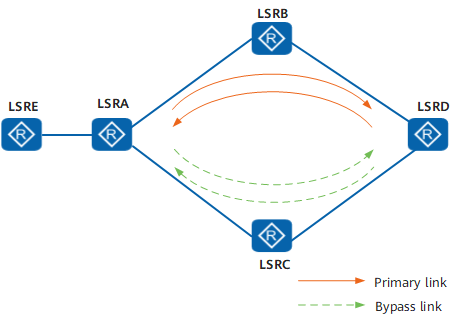
Synchronization between LDP and static routes is applicable to an MPLS network with primary and backup LSPs. On this type of MPLS network, LSRs establish LSPs based on static routes. When the LDP session of the primary link becomes faulty (the fault is not caused by a link failure) or the primary link recovers, synchronization between LDP and static routes minimizes traffic loss during traffic switchover and switchback. As shown in Figure 1, there is a static route between LSRA and LSRD, and an LSP is established between the two devices based on the static route. Normally, the link LSRA→LSRB→LSRD is preferred.
In a switchover scenario, when the LDP session of the primary link becomes faulty (the fault is not caused by a link failure), traffic transmitted through the static route is not switched to the backup link. As a result, MPLS traffic on the primary link is interrupted.
Normally, after an LDP session is established, MPLS traffic is forwarded along the primary link LSRA→LSRB→LSRD. If the LDP session between LSRA and LSRB is disconnected, the LSP is immediately switched to the backup link LSRA→LSRC→LSRD. Because the link between LSRA and LSRB works properly, traffic transmitted through the static route is not switched to the backup link. As a result, LDP is not synchronous with the static route, and MPLS traffic is interrupted.
After synchronization between LDP and static routes is enabled, when the LDP session goes Down, traffic is automatically switched to the backup link, ensuring non-stop traffic forwarding.
In a switchback scenario, when the primary link recovers, traffic transmitted through a static route is first switched back to the primary link because the static route converges faster than LDP. However, the backup LSP becomes unavailable, and the primary LSP has not been established. As a result, MPLS traffic is interrupted.
When the link between LSRA and LSRB becomes faulty, traffic is immediately switched to the backup link LSRA→LSRC→LSRD. After the link between LSRA and LSRB recovers, traffic transmitted through the static route is immediately switched to the primary link LSRA→LSRB→LSRD. However, the backup LSP becomes unavailable, and the primary LSP has not recovered. Therefore, traffic is interrupted.
After synchronization between LDP and static routes is enabled, when the primary LSP is established, traffic is switched back to the primary link, ensuring non-stop traffic forwarding.
Procedure
- Access the system view.
system-view
- Configure synchronization between LDP and static routes.
ip route-static ip-address { mask | mask-length } interface-type interface-number [ nexthop-address ] [ preference preference | tag tag ] * ldp-sync [ description text ]
By default, synchronization between LDP and static routes is not enabled.
- Optional: Setting a Hold-down Timer
Access the outbound interface view of the primary link of the static route.
interface interface-type interface-number
Set a Hold-down timer.
static-route timer ldp-sync hold-down { timer | infinite }
By default, a Hold-down timer is set to 10 seconds.
- If the Hold-down timer is set to 0 seconds, it indicates that synchronization between LDP and static routes is disabled on an interface.
- If the Hold-down timer is set to infinite, it indicates that the timer never expires. In this case, the static route becomes active and MPLS traffic is switched only after an LDP session is established.