Configuring Synchronization Between LDP and IGP
This section describes how to enable synchronization between LDP and IGP on the interfaces of both ends of the link between the crossing node of active and standby links and the LDP neighboring node.
Context
- If the primary LSP fails, IGP and LSP traffic is switched to a backup LSP. When the primary LSP recovers, IGP converges more rapidly than the creation of the LDP session. IGP traffic is switched back to the primary LSP before the LDP session is set up, which causes LSP traffic loss.
- When the primary LSP is working properly, whereas the LDP sessions between the nodes along the primary LSP fail, the LSP traffic is switched to the backup LSP. The IGP traffic is still transmitted along the primary LSP. As a result, LSP traffic is lost.
LDP-IGP synchronization delays IGP route advertisement so that the LDP session and IGP route can converge simultaneously.
LDP-IGP synchronization is configured on the LDP peer nodes (for example, LSR3 in Figure 1) on the active link and the cross node (for example, LSR2 in Figure 1) of the active and standby links.
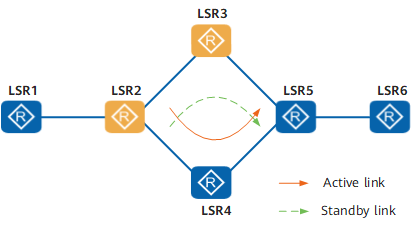
LDP-IGP synchronization can be enabled in either of the following modes:
Enable LDP-IGP synchronization on a specific interface.
This configuration mode allows LDP-IGP synchronization to take effect only on a specific interface, and therefore applies when only a few interfaces on a node must have LDP-IGP synchronization enabled.
Enable LDP-IGP synchronization in a specific IGP process.
This configuration mode allows LDP-IGP synchronization to take effect on all interfaces in the specified IGP process, and therefore applies when many interfaces on a node must have LDP-IGP synchronization enabled.

LDP-IGP synchronization can be enabled in IS-IS processes, not OSPF processes.
If the synchronization status between LDP and IS-IS is different on an interface and in an IS-IS process, the synchronization status on the interface takes effect.
Procedure
- If OSPF is used as an IGP, perform the following steps
on an interface:
Access the system view.
system-view
Access the interface view.
interface interface-type interface-number
Enable synchronization between LDP and OSPF on the specified interface.
ospf ldp-sync
- If IS-IS is used as an IGP, perform the following steps:
Enable synchronization between LDP and IS-IS on an interface.
Access the system view.
system-view
Access the interface view.
interface interface-type interface-number
Enable IS-IS.
isis enable [ process-id ]
Enable synchronization between LDP and IS-IS on the specified interface.
isis ldp-sync
Enable synchronization between LDP and IS-IS in an IS-IS process.
Access the system view.
system-view
Access the IS-IS process view.
isis [ process-id ]
Enable synchronization between LDP and IS-IS on all interfaces in the specified IS-IS process.
ldp-sync enable [ mpls-binding-only ]
If you want to enable synchronization between LDP and IS-IS on MPLS LDP-enabled interfaces, please specify the parameter mpls-binding-only.