Example for Configuring Basic PIM-DM Functions
In an AS with reachable unicast routes, you can enable basic functions of PIM-DM so that user hosts can receive multicast data from any multicast source.
Networking Requirements
In the test network shown in Figure 1, multicast and an IGP are deployed, and the unicast routes work normally. It is required to configure FWs correctly in the network to enable hosts to receive the Video On Demand (VOD) information in multicast mode.
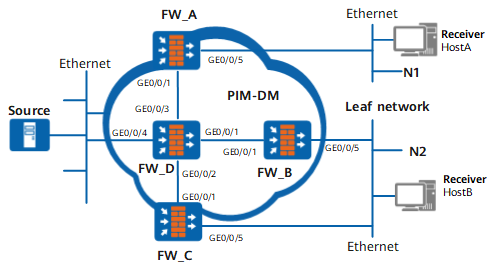
Device |
Interface |
IP address |
|---|---|---|
FW_A |
GE0/0/1 |
192.168.1.1/24 |
GE0/0/5 |
10.110.1.1/24 |
|
| FW_B | GE0/0/1 |
192.168.2.1/24 |
GE0/0/5 |
10.110.2.1/24 |
|
| FW_C | GE0/0/1 |
192.168.3.1/24 |
GE0/0/5 |
10.110.2.2/24 |
|
| FW_D | GE0/0/1 |
192.168.2.2/24 |
GE0/0/2 |
192.168.3.2/24 |
|
GE0/0/3 |
192.168.1.2/24 |
|
GE0/0/4 |
10.110.5.1/24 |
Configuration Roadmap
The network is a small-scale experiment network. Therefore, PIM-DM is adopted. Enable PIM silent on FW_A to prevent Hello message attack. The configuration roadmap is as follows:
Enable multicast on each FW.
Enable PIM-DM on each interface.
Enable PIM silent on the interface connected to hosts, and configure IGMP.
Procedure
- Enable multicast on each FW and PIM-DM on each interface.
# Enable multicast on FW_A and enable PIM-DM on each interface. The configuration procedures on FW_B, FW_C, and FW_D are similar to those on FW_A, and are not mentioned here.
[FW_A] multicast routing-enable[FW_A] interface GigabitEthernet 0/0/5
[FW_A-GigabitEthernet0/0/5] pim dm
[FW_A-GigabitEthernet0/0/5] quit
[FW_A] interface GigabitEthernet 0/0/1
[FW_A-GigabitEthernet0/0/1] pim dm
[FW_A-GigabitEthernet0/0/1] quit
- Enable PIM silent on the interface connected to hosts, and configure IGMP on the interface.
# On FW_A, enable PIM silent on the interface connected to hosts, and configure IGMP on the interface.
[FW_A] interface GigabitEthernet 0/0/5
[FW_A-GigabitEthernet0/0/5] pim silent
[FW_A-GigabitEthernet0/0/5] igmp enable
[FW_A-GigabitEthernet0/0/5] quit
# On FW_B, configure IGMP on the interface. The configurations of FW_C are the same as that of FW_B, and are not mentioned here.
[FW_B] interface GigabitEthernet 0/0/5
[FW_B-GigabitEthernet0/0/5] igmp enable
[FW_B-GigabitEthernet0/0/5] quit
- Verify the configuration.
# Run the display pim interface command to view the configuration and the running of PIM on the interface of the FW. Take the PIM configuration on FW_D as an example:
<FW_D> display pim interfaceVPN-Instance: public net
Interface State NbrCnt HelloInt DR-Pri DR-Address
GE0/0/4 up 0 30 1 10.110.5.1GE0/0/3 up 1 30 1 192.168.1.2GE0/0/1 up 1 30 1 192.168.2.2GE0/0/2 up 1 30 1 192.168.3.2# Run the display pim neighbor command to view the PIM neighbor relationship between FWs. Take the PIM neighbor relationship on FW_D as an example:
<FW_D> display pim neighborVPN-Instance: public net
Total Number of Neighbors = 3
Neighbor Interface Uptime Expires Dr-Priority BFD-Session
192.168.1.1 GE0/0/3 00:02:22 00:01:27 1 N192.168.2.1 GE0/0/1 00:00:22 00:01:29 1 N192.168.3.1 GE0/0/2 00:00:23 00:01:31 1 N# Run the display pim routing-table command, and you can view the PIM routing table. Assume that Host A requests the information of group G (225.1.1.1). After multicast source S (10.110.5.100) sends multicast packets to multicast group G (255.1.1.1), the MDT (Multicast Distribution Tree) is established by means of flooding. All PIM multicast FWs (including FW_A and FW_D) on the MDT have the (S, G) entry. Host A joins G, and FW_A generates an (*, G) entry. The display information on FW_B and FW_C is similar to that on FW_A.
<FW_A> display pim routing-tableVPN-Instance: public net
Total 1 (*, G) entry; 1 (S, G) entry
(*, 225.1.1.1)
Protocol: pim-dm, Flag: WC
UpTime: 03:54:19
Upstream interface: NULL
Upstream neighbor: NULL
RPF prime neighbor: NULL
Downstream interface(s) information:
Total number of downstreams: 1
1: GigabitEthernet0/0/5Protocol: igmp, UpTime: 01:38:19, Expires: never
(10.110.5.100, 225.1.1.1)
Protocol: pim-dm, Flag: ACT
UpTime: 00:00:44
Upstream interface: GigabitEthernet0/0/1Upstream neighbor: 192.168.1.2
RPF prime neighbor: 192.168.1.2
Downstream interface(s) information:
Total number of downstreams: 1
1: GigabitEthernet0/0/5Protocol: pim-dm, UpTime: 00:00:44, Expires: never
<FW_D> display pim routing-tableVPN-Instance: public net
Total 0 (*, G) entry; 1 (S, G) entry
(10.110.5.100, 225.1.1.1)
Protocol: pim-dm, Flag: LOC ACT
UpTime: 01:35:25
Upstream interface: GigabitEthernet0/0/4Upstream neighbor: NULL
RPF prime neighbor: NULL
Downstream interface(s) information:
Total number of downstreams: 3
1: GigabitEthernet0/0/3Protocol: pim-dm, UpTime: 00:03:27, Expires: never
2: GigabitEthernet0/0/1Protocol: pim-dm, UpTime: 00:03:27, Expires: never
3: GigabitEthernet0/0/2Protocol: pim-dm, UpTime: 00:03:27, Expires: never
Configuration Scripts
Configuration script of FW_A
#
sysname FW_A#
multicast routing-enable
#
interface GigabitEthernet0/0/5ip address 10.110.1.1 255.255.255.0
pim dm
pim silent
igmp enable
#
interface GigabitEthernet0/0/1ip address 192.168.1.1 255.255.255.0
pim dm
#
ospf 1
area 0.0.0.0
network 192.168.1.0 0.0.0.255
network 10.110.1.0 0.0.0.255
#
return
Configuration script of FW_B
#
sysname FW_B#
multicast routing-enable
#
interface GigabitEthernet0/0/5ip address 10.110.2.1 255.255.255.0
pim dm
igmp enable
#
interface GigabitEthernet0/0/1ip address 192.168.2.1 255.255.255.0
pim dm
#
ospf 1
area 0.0.0.0
network 192.168.2.0 0.0.0.255
network 10.110.2.0 0.0.0.255
#
return
Configuration script of FW_C
#
sysname FW_C#
multicast routing-enable
#
interface GigabitEthernet0/0/5ip address 10.110.2.2 255.255.255.0
pim dm
igmp enable
#
interface GigabitEthernet0/0/1ip address 192.168.3.1 255.255.255.0
pim dm
#
ospf 1
area 0.0.0.0
network 192.168.3.0 0.0.0.255
network 10.110.2.0 0.0.0.255
#
return
Configuration script of FW_D
#
sysname FW_D#
multicast routing-enable
#
interface GigabitEthernet0/0/4ip address 10.110.5.1 255.255.255.0
pim dm
#
interface GigabitEthernet0/0/1ip address 192.168.2.2 255.255.255.0
pim dm
#
interface GigabitEthernet0/0/2ip address 192.168.3.2 255.255.255.0
pim dm
#
interface GigabitEthernet0/0/3ip address 192.168.1.2 255.255.255.0
pim dm
#
ospf 1
area 0.0.0.0
network 192.168.2.0 0.0.0.255
network 192.168.3.0 0.0.0.255
network 192.168.1.0 0.0.0.255
network 10.110.5.0 0.0.0.255
#
return