About NAT66
NAT66 translates IPv6 addresses. NAT66 not only protects intranet IPv6 users' privacy, but also reduces IPv6 network maintenance and management costs. Based on translation modes, NAT66 can be classified into NPTv6 and static NAT66. An IPv6 address consists of a network prefix and an interface ID. NPTv6 and static NAT66 adjust IPv6 addresses in different ways: After the source or destination address is translated using NPTv6, the IPv6 network prefix is replaced by the new network prefix. The interface ID of the IPv6 address is adjusted according to RFC 6296. For details about the algorithm, see RFC 6296. After the source or destination address is translated using static NAT66, the IPv6 network prefix is replaced by the new network prefix, and the interface ID of the IPv6 address remains unchanged. Therefore, in the scenario where a large number of IPv6 addresses exist and that are insensitive to the translated IP addresses, for example, when a large number of IPv6 intranet users access the Internet, the NPTv6 mode is preferred. In the scenario where a small number of IPv6 addresses exist and that are sensitive to the translated IP addresses, for example, when IPv6 Internet users access an intranet server, the static NAT66 mode is preferred.
NAT66 Categories
NAT66 is divided into three categories based on the translation object.
Category |
Translated Item |
Port Translation |
Address Translation Relationship |
||
|---|---|---|---|---|---|
Source NAT |
Source NPTv6 |
Source IP address |
No |
One-to-one translation |
|
Source static NAT66 |
Source IP address |
No |
One-to-one translation |
||
Destination NAT |
Destination NPTv6 |
Destination IP address |
No |
One-to-one translation |
|
Destination static NAT66 |
Destination IP address |
Optional |
One-to-one, one-to-many, and many-to-one translation |
||
Bidirectional NAT |
Source NAT + destination NAT (NPTv6) |
Source IP address + destination IP address |
No |
One-to-one translation |
|
Source NAT + destination NAT (static NAT66) |
Source IP address + destination IP address |
Optional |
One-to-one, one-to-many, and many-to-one translation |
||
Source NAT
Figure 1 shows the mechanism of source IPv6 address translation in the source NAT scenario.
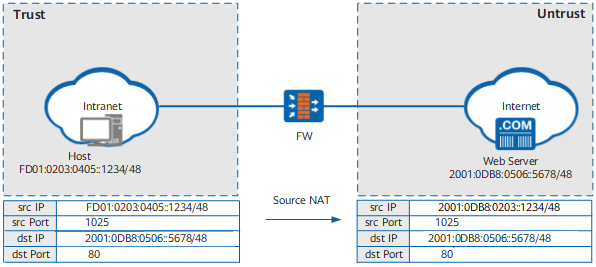
When a host accesses a web server, the FW processes the source IPv6 address as follows:
Upon receiving a packet from the host, the FW first checks the destination IP address, identifying that the packet is destined for the Trust zone from the Untrust zone. If the packet is permitted by a security policy, the FW searches for a matching NAT policy and then finds out that source address translation is required.
The FW performs NAT66 on the source IP address of the packet based on the source NAT policy. The translated IP address varies based on the NAT66 translation mode. If NPTv6 is selected, the FW replaces the prefix of the source address with the configured IPv6 prefix and converts the IPv6 interface ID according to RFC 6296. If static NAT66 is selected, the FW replaces only the prefix of the source address with the configured IPv6 prefix, establishes a session, and sends the packet to the Internet.
Upon receiving a response packet from the web server, the FW searches the session table and matches the entry created in step 2. Accordingly, the FW changes the destination address of the packet, and then forwards the packet to the intranet.
Destination NAT
Figure 2 shows the mechanism of destination IPv6 address translation in the destination NAT scenario.
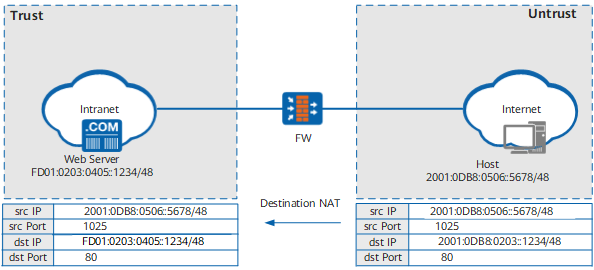
When an Internet user (host) accesses an internal web server, the FW processes the destination IPv6 address as follows:
Upon receiving a packet from the host, the FW matches the destination NAT policy, learning that the destination address of the packet needs to be translated.
The FW performs NAT66 on the destination IP address of the packet based on the destination NAT policy. The translated IP address varies based on the NAT66 translation mode. If NPTv6 is selected, the FW replaces the prefix of the destination address with the configured IPv6 prefix and converts the IPv6 interface ID according to RFC 6296. If static NAT66 is selected, the FW replaces only the prefix of the destination address with the configured IPv6 prefix. If the packet is permitted by a security policy, the FW establishes a session and forwards the packet to the web server.
Upon receiving a response packet from the web server, the FW searches the session table and matches the entry created in step 2. Accordingly, the FW changes the source address of the packet, and then forwards the packet to the host.
Bidirectional NAT
Figure 3 shows the mechanism of both source and destination IPv6 address translation in the bidirectional NAT scenario.
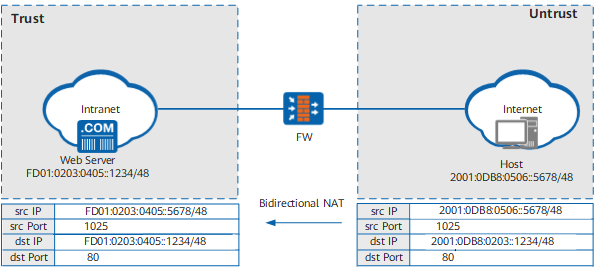
Upon receiving a packet from the host, the FW matches the NAT policy, learning that the address of the packet needs to be translated.
- The FW performs NAT66 on the destination IP address of the packet based on the destination NAT policy. The translated IP address varies based on the NAT66 translation mode. If NPTv6 is selected, the FW replaces the prefix of the destination address with the configured IPv6 prefix and converts the IPv6 interface ID according to RFC 6296. If static NAT66 is selected, the FW replaces only the prefix of the destination address with the configured IPv6 prefix. If the packet is permitted by a security policy, the FW searches for a matching NAT policy and then finds out that source address translation is required.
The FW performs NAT66 on the source IP address of the packet based on the source NAT policy. The translated IP address varies based on the NAT66 translation mode. If NPTv6 is selected, the FW replaces the prefix of the source address with the configured IPv6 prefix and converts the IPv6 interface ID according to RFC 6296. If static NAT66 is selected, the FW replaces only the prefix of the source address with the configured IPv6 prefix, establishes a session, and sends the packet to the web server.
Upon receiving a response packet from the web server, the FW searches the session table and matches the entry created in step 2 and step 3. Accordingly, the FW changes the source and destination addresses of the packet, and then forwards the packet to the host.