CLI: Example for Configuring Destination NAT for Mobile Phone Users to Access Wireless Networks (ACL-based destination NAT)
This section provides an example for configuring Destination NAT for mobile phone users to access wireless networks.
Networking Requirements
Mobile phone users need to access the Internet by logging in to a WAP gateway. If the IP address of a mobile phone for accessing the Internet is not that of the WAP gateway, configure rules on the FW to translate the destination IP address of the access request into the IP address of the WAP gateway.
As shown in Figure 1, the default gateway address of the mobile phone is 1.1.1.1, but that provided by the carrier is 2.2.2.2. The FW needs to change the gateway address of the packets from the mobile phone to the carrier gateway.
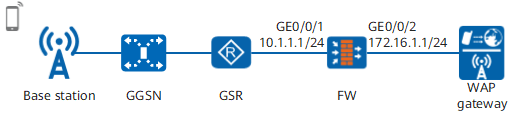
Data Planning
Item |
Data |
Description |
|
|---|---|---|---|
GigabitEthernet 0/0/1 |
IP address: 10.1.1.1/24 Security zone: Trust |
- |
|
GigabitEthernet 0/0/2 |
IP address: 172.16.1.1/24 Security zone: Untrust |
- |
|
Destination NAT |
ACL: permits traffic destined for 1.1.1.1. Security zone of mobile devices: Trust |
Translates destination address 1.1.1.1 to 2.2.2.2. |
|
Security policy |
Source zone: Trust Destination zone: Untrust Destination address: 2.2.2.2 |
Permits the traffic destined to the gateway address of the carrier to pass through the FW. | |
Configuration Roadmap
- Set interface IP addresses and assign the interfaces to security zones.
- Configure destination NAT to translate destination addresses.
- Configure a security policy to permit the traffic from mobile phone users to pass through the FW.
Procedure
- Complete the basic configurations of the FW.
# Set an IP address for GigabitEthernet 0/0/1.
<FW> system-view
[FW] interface GigabitEthernet 0/0/1
[FW-GigabitEthernet 0/0/1] ip address 10.1.1.1 24
[FW-GigabitEthernet 0/0/1] quit
# Set an IP address for GigabitEthernet 0/0/2.
[FW] interface GigabitEthernet 0/0/2
[FW-GigabitEthernet 0/0/2] ip address 172.16.1.1 24
[FW-GigabitEthernet 0/0/2] quit
# Add GigabitEthernet 0/0/1 to the trust zone.
[FW] firewall zone trust
[FW-zone-trust] add interface GigabitEthernet 0/0/1
[FW-zone-trust] quit
# Add GigabitEthernet 0/0/2 to the untrust zone.
[FW] firewall zone untrust
[FW-zone-untrust] add interface GigabitEthernet 0/0/2
[FW-zone-untrust] quit
- Configure the range for destination NAT.
# Configure the ACL rule to define the address range for destination NAT.
[FW] acl 3000
[FW-acl-adv-3000] rule permit ip destination 1.1.1.1 0
[FW-acl-adv-3000] quit
# Configure destination NAT.
[FW] firewall zone trust
[FW-zone-trust] destination-nat 3000 address 2.2.2.2
[FW-zone-trust] quit
# Configure a security policy.
[FW] security-policy
[FW-policy-security] rule name policy1
[FW-policy-security-rule-policy1] source-zone trust
[FW-policy-security-rule-policy1] destination-zone untrust
[FW-policy-security-rule-policy1] destination-address 2.2.2.2 32
[FW-policy-security-rule-policy1] action permit
[FW-policy-security-rule-policy1] quit
[FW-policy-security] quit
Verification
- Mobile phone users can access the Internet, indicating that destination NAT is configured successfully.
- Run the display firewall session table verbose command to view the entry whose destination address is 1.1.1.1 for detailed NAT information.
<FW> display firewall session table verbose
Current Total Sessions : 1
 http  VPN:public --> public  10.1.1.100:4194-->1.1.1.1:2048[2.2.2.2:2048]
The gateway address of the packets from mobile phone users is changed by the FW from 1.1.1.1 to the carrier gateway address (2.2.2.2). The content in [] is the translated carrier gateway address.
Configuration Scripts
Configuration script for the FW:
#
 sysname FW
#
interface GigabitEthernet0/0/1
 undo shutdown
 ip address 10.1.1.1 255.255.255.0
#
interface GigabitEthernet 0/0/2
 undo shutdown
 ip address 172.16.1.1 255.255.255.0
#
acl 3000
 rule permit ip destination 1.1.1.1 0
#
firewall zone trust
 set priority 85
 add interface GigabitEthernet0/0/1
 destination-nat 3000 address 2.2.2.2
#
firewall zone untrust
 set priority 5
 add interface GigabitEthernet 0/0/2
#
security-policy
  rule name policy1
    source-zone trust
    destination-zone untrust
    destination-address 2.2.2.2 32
    action permit
#
return