CLI: Example for Configuring Intranet Users to Access the Public Addresses of Intranet Servers
This section provides an example for configuring intranet users to access the public IP addresses of intranet servers.
Networking Requirements
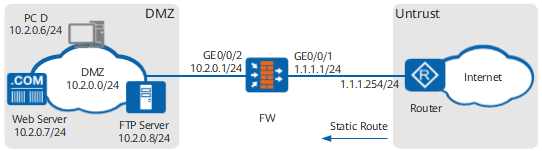
An enterprise has deployed a FW as a security gateway on the intranet border. NAT Server is configured on the FW for the intranet web and File Transfer Protocol (FTP) servers to provide services for Internet users. PC D on the same network segment and security zone with the two servers. Source NAT is configured on the FW so that PC D can use a public address to access the two intranet servers.
- 1.1.1.10 used by intranet servers.
- 1.1.1.11 into which PC D's private address is translated.
Data Planning
Item |
Data |
Description |
|
|---|---|---|---|
GigabitEthernet 0/0/1 |
IP address: 1.1.1.1/24 Security zone: Untrust |
1.1.1.1/24 is a public address provided by the ISP. |
|
GigabitEthernet 0/0/2 |
IP address: 10.2.0.1/24 Security zone: DMZ |
Intranet servers use 10.2.0.1 as the default gateway address. |
|
NAT Server |
Name: policy_web Public IP address: 1.1.1.10 Private IP address: 10.2.0.7 Public port: 8080 Private port: 80 |
When Internet users send traffic to 1.1.1.10 through port 8080, the FW can forward the traffic to the web server based on this mapping entry. On the web server, the private address is 10.2.0.7, and the private port number is 80. |
|
Name: policy_ftp Public IP address: 1.1.1.10 Private IP address: 10.2.0.8 Public port: 21 Private port: 21 |
When Internet users send traffic to 1.1.1.10 through port 21, the FW can forward the traffic to the FTP server based on this mapping entry. On the FTP server, the private address is 10.2.0.8, and the private port number is 21. |
||
Source NAT policy |
Name: policy_nat1 Private address that can access the Internet: 10.2.0.6 Address in a NAT address pool: 1.1.1.11 |
- |
|
Routing information |
Default route |
Destination address: 0.0.0.0 Next hop address: 1.1.1.254 |
Configure a default route on the FW to direct intranet traffic to the ISP network. |
Configuration Roadmap
The configuration roadmap is as follows:
- Assign IP addresses to interfaces, add the interfaces to security zones, and configure network connectivity.
- Configure a security policy for traffic between intranet users and intranet servers.
- Configure NAT Server. Configure two server mapping entries, one for the web server and the other for the FTP server.
- Configure a source NAT policy to allow PC D to access the intranet servers based on the servers' public address.
- Configure a default route on the FW to direct intranet traffic to the ISP router.
- Configure static routes destined for public addresses of intranet servers on the router.
Procedure
- Assign IP addresses to interfaces, add the interfaces to security zones, and configure network connectivity.
# Assign an IP address to GigabitEthernet 0/0/1.
<FW> system-view
[FW] interface GigabitEthernet 0/0/1
[FW-GigabitEthernet 0/0/1] ip address 1.1.1.1 24
[FW-GigabitEthernet 0/0/1] quit
# Assign an IP address to GigabitEthernet 0/0/2.
[FW] interface GigabitEthernet 0/0/2
[FW-GigabitEthernet 0/0/2] ip address 10.2.0.1 24
[FW-GigabitEthernet 0/0/2] quit
# Add GigabitEthernet 0/0/1 to the Untrust zone.
[FW] firewall zone untrust
[FW-zone-untrust] add interface GigabitEthernet 0/0/1
[FW-zone-untrust] quit
# Add GigabitEthernet 0/0/2 to the DMZ zone.
[FW] firewall zone dmz
[FW-zone-dmz] add interface GigabitEthernet 0/0/2
[FW-zone-dmz] quit
- Configure a security policy.
[FW] security-policy
[FW-policy-security] rule name policy1
[FW-policy-security-rule-policy1] source-zone dmz untrust
[FW-policy-security-rule-policy1] destination-zone dmz
[FW-policy-security-rule-policy1] destination-address 10.2.0.0 24
[FW-policy-security-rule-policy1] action permit
[FW-policy-security-rule-policy1] quit
[FW-policy-security] quit
- Configure a NAT address pool.
[FW] nat address-group addressgroup1
[FW-address-group-addressgroup1] mode pat
[FW-address-group-addressgroup1] section 0 1.1.1.11 1.1.1.11
[FW-address-group-addressgroup1] route enable
[FW-address-group-addressgroup1] quit
- Configure a source NAT policy.
[FW] nat-policy
[FW-policy-nat] rule name policy_nat1
[FW-policy-nat-rule-policy_nat1] source-zone dmz
[FW-policy-nat-rule-policy_nat1] destination-zone dmz
[FW-policy-nat-rule-policy_nat1] source-address 10.2.0.6 32
[FW-policy-nat-rule-policy_nat1] action source-nat address-group addressgroup1
[FW-policy-nat-rule-policy_nat1] quit
[FW-policy-nat] quit
- Configure NAT Server. Configure two server mapping entries, one for the web server and the other for the FTP server.
[FW] nat server policy_web protocol tcp global 1.1.1.10 8080 inside 10.2.0.7 www unr-route
[FW] nat server policy_ftp protocol tcp global 1.1.1.10 ftp inside 10.2.0.8 ftp unr-route
- Enable NAT ALG for FTP.
[FW] firewall zone dmz
[FW-zone-dmz] detect ftp
[FW-zone-dmz] quit
[FW] firewall interzone dmz untrust
[FW-interzone-dmz-untrust] detect ftp
[FW-interzone-dmz-untrust] quit
- Configure a default route to direct intranet traffic to the ISP router.
[FW] ip route-static 0.0.0.0 0.0.0.0 1.1.1.254 - Configure a blackhole route to prevent routing loops between the FW and router.
[FW] ip route-static 1.1.1.10 32 NULL 0 - On the router, configure a static route, in which the destination address is 1.1.1.10 and the next-hop address is 1.1.1.1. The router directs traffic destined for 1.1.1.10 to the FW based on the static route so that the FW can forward the traffic to the intranet server.
Contact your ISP administrator to perform this step.
Configuration Scripts
Configuration script for the FW:
#
 sysname FW
#
 nat server policy_web protocol tcp global 1.1.1.10 8080 inside 10.2.0.7 www unr-route
 nat server policy_ftp protocol tcp global 1.1.1.10 ftp inside 10.2.0.8 ftp unr-route

#
interface GigabitEthernet0/0/1
 undo shutdown
 ip address 1.1.1.1 255.255.255.0
#
interface GigabitEthernet0/0/2
 undo shutdown
 ip address 10.2.0.1 255.255.255.0
#
firewall zone untrust
 set priority 5
 add interface GigabitEthernet0/0/1
#
firewall zone dmz
 set priority 50
 add interface GigabitEthernet0/0/2
 detect ftp
#
firewall interzone dmz untrust
 detect ftp
#
 ip route-static 0.0.0.0 0.0.0.0 1.1.1.254
#
nat address-group addressgroup1 0
 mode pat
 route enable
 section 0 1.1.1.11 1.1.1.11
#
security-policy
  rule name policy1
    source-zone dmz
    source-zone untrust
    destination-zone dmz
    destination-address 10.2.0.0 24
    action permit
#
nat-policy
  rule name policy_nat1
    source-zone dmz
    destination-zone dmz
    source-address 10.2.0.6 32
    action source-nat address-group addressgroup1
#
return