NAT FAQs
This section describes frequently asked questions (FAQs) about NAT.
Does a FW Support Source NAT on a Switched Interface?
Yes. The FW only supports source NAT working in address pool mode on a switched interface. The switched mode is also called the transparent mode.
If Multiple NAT Policies Are Configured, How Does a FW Match Packets with Them?
A FW matches packets with NAT policies in the top-down sequence. If the packets match a NAT policy, the FW processes the packets based on the policy and stops matching the packets with other NAT policies.
What Is the Function of a Blackhole Route?
If addresses in a NAT address pool are on a different network segment from the IP address of the FW WAN interface, configure a blackhole route to prevent loops between the FW and the Internet.
The FW uses a blackhole route to implement the following functions:
Prevents loops between the FW and a routing device connected to the Internet.
As shown in Figure 1, when intranet users initiate connections to the Internet, the FW translates private addresses of the users into public addresses in an address pool. When Internet users send packets to the addresses in the address pool, the FW cannot find matching server-map entries for the packets. Therefore, the FW loops the packets to the router based on the routing table. The router then forwards the received packets to the FW again. As a result, the packets loop between the FW and router. After the time to live (TTL) values in packets decrease to 0, the packets are discarded. If malicious Internet users initiate a large number of connections to addresses in the address pool, the performance of both the FW and router deteriorates.
To prevent the routing loops, you can configure a 32-bit-mask blackhole route bound for addresses in the address pool on the FW. The FW discards packets whose destination addresses match the blackhole route.
Allows a dynamic routing protocol to import and advertise the blackhole route so that a router connecting the FW to the Internet can learn the blackhole route destined for addresses in an address pool.
Although the FW and its upstream router run a dynamic routing protocol, for example, Open Shortest Path First (OSPF), OSPF cannot automatically learn the routes destined for these addresses in the address pool.
To resolve the problem, configure a 32-bit-mask blackhole route destined for addresses in the address pool. OSPF can import the blackhole route and advertises it within a routing area. Routers in the routing area can learn the blackhole route to the addresses in the address pool.
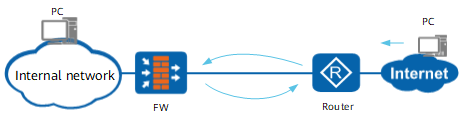
For Source NAT, the FW supports a user network route (UNR) for addresses in the NAT address pool. This UNR, like the blackhole route, can prevent routing loops and can be imported and advertised by dynamic routing protocols, such as OSPF. For NAT Server, no matter whether the protocol and port are specified, you are advised to configure a blackhole route with the destination address being a global IP address to discard packets that are destined to the global IP address but do not match any entry in the server mapping table, preventing routing loops.
Are There Special Requirements If I Configure Both NAT and VPN Correctly on a FW?
If you configure both NAT and virtual private network (VPN) functions on a FW, you need to configure a NAT policy to prevent the FW from performing NAT on data flows that are to be encapsulated using the VPN. In the following example, Figure 2 shows the networking for NAT and an Internet Protocol Security (IPSec) VPN.
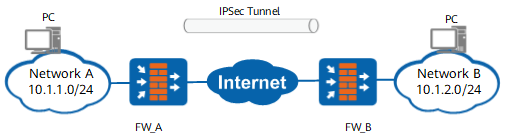
As shown in Figure 2, a FW connects networks A and B to the Internet. PCs on both networks communicate over an IPSec VPN tunnel.
After traffic from networks A and B arrives at FWs, the FWs use NAT to process data flows, except data flows to be transmitted over the IPSec VPN tunnel. NAT policies need to be configured to help the FW separate NAT traffic from IPSec VPN traffic.
The NAT policy configuration on FW_B is similar to that on FW_A. The difference is that FW_B has the source and destination addresses specified in the NAT policy to those specified on FW_A.
Must Contiguous Addresses Be Specified in a NAT Address Pool?
No.
The NAT address pool contains an address segment from a specific start address to a specific end address. You can configure address exclusion to exclude special addresses in this address segment. Therefore, the addresses in the NAT address pool can be non-contiguous.
In addition, the start address and end address can be the same. In this case, the NAT address pool contains only one IP address.
Which Source Address Shall I Specify in a Security Policy on a FW Configured with a Source NAT Policy?
Specify a private address (source address) in a security policy on a FW. The private address is the one that is used before source NAT is performed.
The FW matches packets with a security policy before enforcing a NAT policy. If the packets match the security policy, the FW performs source NAT for the packets. If the packets do not match the security policy, the FW discards the packets.
Which Destination Address Shall I Specify in a Security Policy on a FW Configured with NAT Server?
Specify a private address (destination address) in a security policy on a FW. The private address is the one used after NAT Server is performed.
The FW matches packets with server-map entries before enforcing a security policy. After the FW translates destination addresses based on the server-map entries, the FW processes the packets based on the security policy.
Can I Add the IP Address of a FW WAN Interface into a NAT Address Pool?
Yes.
Can Addresses in a NAT Address Pool Be Configured as Public Addresses Mapped to Private Addresses of Intranet Servers on a FW Enabled with NAT Server?
Yes.
When a User and a Server Are on the Same Intranet in the Same Security Zone, How Can I Configure a FW to Properly Forward Intranet User Packets Destined for the Public IP Address of the Intranet Server?
Perform the following operations on the FW:
Configure a source NAT policy, in which the source and destination security zones are the same as those of the intranet user and server. The source NAT policy translates the source IP address of the intranet user into the public IP address of the intranet server.
Configure a NAT Server to translate the public address into the private address of the intranet server. The packets sent by the user to the server carry the server's public address as the destination address.
Does a FW Support NAT If I Disable Stateful Inspection on the FW?
Yes. The FW supports NAT after stateful inspection is disabled on the FW.
Does NAT Take Effect on ESP Packets?
The Source NAT policies and NAT Server that allow port translation do not take effect on ESP packets. The Source NAT policies and NAT Server that do not allow port translation take effect on ESP packets.