Easy IP
Easy IP uses the public IP address of the outbound interface as the post-NAT address and translates both the IP address and port. Easy IP also applies to scenarios where the interface IP address is dynamically obtained.
When the outbound interface of the FW obtains the public IP address through dial-up, you cannot add the public IP address to the address pool because the public address is dynamically obtained. In this case, you need to configure the Easy IP mode so that the FW can translate addresses when the public IP address changes. Figure 1 shows its mechanism.
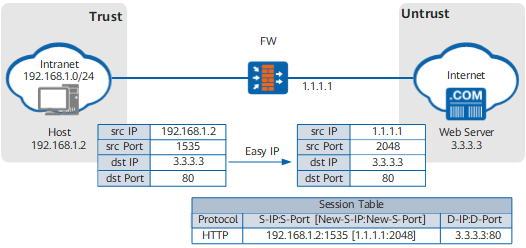
FW shows the Easy IP process when the host accesses the web server.
- After the host sends a packet to the FW, the FW finds that the packet needs to travel from the Trust zone to the Untrust zone and that the packet matches a security policy. The FW also finds that the packet matches a specific NAT policy so that NAT address translation must be performed.
- The FW replaces the source IP address in the packet with a public IP address of a WAN interface and replaces the source port number with a public port number. Then the FW creates a session entry in the session table and forwards the packet over the Internet.
- The web server sends a response packet destined for the host. The FW receives the response and searches the session table for the entry created in 2. The FW translates the destination address in the packet into the host IP address and the destination port number into the private port number based on the entry. The FW then forwards the packet to the host over the intranet.
As both addresses and ports are translated, multiple private users can share one public address to access the Internet. The FW can distinguish users based on ports, so more users can access the Internet at the same time.