Troubleshooting ARP
This section describes the procedure for troubleshooting ARP faults.
Symptom
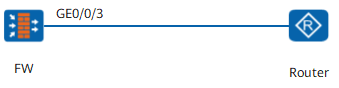
Figure 1 shows the typical networking. The connection and configuration of physical links are correct. The interface is in Up state, but cannot ping the remote device.
Procedure
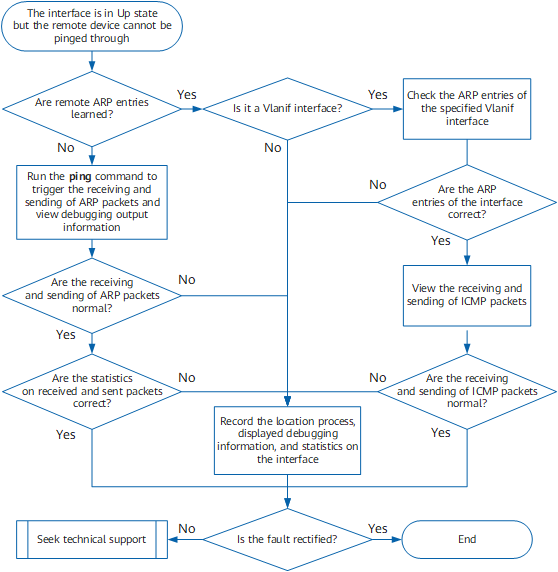
- Run the display arp command and check whether remote ARP entries are learned.
<FW> display arp
IP ADDRESS      MAC ADDRESS     EXPIRE(M) TYPE        INTERFACE   VPN-INSTANCE

                                          VLAN/PVC
------------------------------------------------------------------------------
10.1.196.208  0018-****-1e63            I           GE0/0/3
10.1.196.20   0021-****-cfc1  16        D           GE0/0/3
10.1.196.4    001e-****-154f  16        D           GE0/0/3
10.1.196.8    001e-****-405a  20        D           GE0/0/3
10.1.196.216  00e0-****-1010  20        D           GE0/0/3
------------------------------------------------------------------------------
Total:5         Dynamic:4       Static:0    Interface:1    Authorized:0         SNMP:0
The IP ADDRESS: IP address. The MAC ADDRESS: MAC address.
The TYPE field displays the following values:- I: a MAC address of the interface itself.
- D: a dynamic entry obtained using ARP packets
- Check whether ARP packets are properly sent and received.
Run the debugging arp packet command on the FW.
<FW> debugging arp packet
<FW> terminal monitor
Info:Current terminal monitor is on
<FW> terminal debugging
Info:Current terminal debugging is on
If ARP packets are correctly sent and received, the following information is displayed.
*0.1090420 FW ARP/7/arp_send:Send an ARP Packet, operation : 1, send
er_eth_addr : 0018-****-1e63,sender_ip_addr : 10.1.196.208, target_eth_addr :
00e0-****-0b04, target_ip_addr : 10.1.196.2

*0.1083955 FW ARP/7/arp_rcv:Receive an ARP Packet, operation : 2, se
nder_eth_addr : 00e0-****-1010, sender_ip_addr : 10.1.196.216, target_eth_addr
 : 0000-0000-0000, target_ip_addr : 10.1.196.216
If the remote end can be pinged, both request and reply packets are displayed. If a fault occurs, only the request packets are displayed, or none of the request or reply packets is displayed.
If packets are properly sent and received by the upper layer, run the debugging ethernet packet arp interface GigabitEthernet 0/0/3 command and check whether packets are properly sent at the data link layer.
<FW> debugging ethernet packet arp interface GigabitEthernet 0/0/3
<FW> terminal monitor
Info:Current terminal monitor is on
<FW> terminal debugging
Info:Current terminal debugging is on

*0.3743890 FW ETH/7/eth_rcv:Receive an Eth Packet, interface : GigabitEthernet 0/0/3, eth format: 0, length: 60, prototype: 0806 arp, src_eth_addr:
001e-****-405a, dst_eth_addr: 0018-****-1e63

*0.3743789 FW ETH/7/eth_send:Send an Eth Packet, interface : GigabitEthernet 0/0/3, eth format: 0, length: 42, prototype: 0806 arp, src_eth_addr : 0
018-****-1e63, dst_eth_addr : ffff-ffff-ffff
The previous information shows that ARP request packets are properly sent at the data link layer. Go to 3.
- Check whether statistics about sent and received packets are correct.
Run the display this interface command in the interface view or the display interface interface-type interface-number command in any view to view packet statistics.
<FW> display interface GigabitEthernet 0/0/3
GigabitEthernet0/0/3 current state : UP
Line protocol current state : UP
Description : Route Port
The Maximum Transmit Unit is 1500 bytes, Hold timer is 10(sec)
Internet Address is 10.1.1.1/24
IP Sending Frames' Format is PKTFMT_ETHNT_2, Hardware address is 0022-****-0e5b
Media type is twisted pair, loopback not set, promiscuous mode not set
1000Mb/s-speed mode, full-duplex mode, link type is auto negotiation
Max-bandwidth : 1000000 kbps
Last physical up time   : -
Last physical down time : 2018-01-16 20:33:13
Current system time: 2018-01-17 10:08:18
Top 3 input bit rate: 672688 bits/sec at 2018-01-15 11:11:41
                      20872 bits/sec at 2018-01-15 11:11:40
                      17456 bits/sec at 2018-01-14 19:23:00
Top 3 output bit rate: 672000 bits/sec at 2018-01-15 11:11:41
                       19568 bits/sec at 2018-01-15 11:11:40
                       9064 bits/sec at 2018-01-14 11:11:53
Top 3 input packet rate: 8008 packets/sec at 2018-01-15 11:11:41
                         248 packets/sec at 2018-01-15 11:11:40
                         216 packets/sec at 2018-01-14 11:11:56
Top 3 output packet rate: 8000 packets/sec at 2018-01-15 11:11:41
                          232 packets/sec at 2018-01-15 11:11:40
                          80 packets/sec at 2018-01-14 11:11:53
Last 300 seconds input rate 2619  bytes/sec, 16  packets/sec
Last 300 seconds output rate 28627  bytes/sec, 26  packets/sec
    Input: 277618 packets, 46890659 bytes
          275866 unicasts, 1740 broadcasts, 12 multicasts, 0 pauses
          0 overruns, 0 runts, 0 jumbos, 0 FCS errors
          0 length errors,  0 code errors, 0 align errors
          0 fragment errors,  0 giants, 0 jabber errors
          0 dribble condition detected,  0 other errors
    Output: 303774 packets, 157242945 bytes
          285539 unicasts, 6 broadcasts, 18229 multicasts, 0 pauses
          0 underruns, 0 runts, 0 jumbos, 0 FCS errors
          0 fragment errors, 0 giants, 0 jabber errors
          0 collisions, 0 late collisions
          0 ex. collisions, 0 deferred, * other errors
In the preceding command output, check the following fields:- Input: the number of received packets
- Output: the number of sent packets
- unicasts: the number of unicast packets
- broadcasts: the number of broadcast packets
- multicasts: the number of multicast packets
- On ARP request packets, view broadcast packet statistics.
- On ARP reply packets, view unicast packet statistics.
If either of the following fault occurs, record the locating process, debugging information (that is displayed), and statistics about the interface, and contact technical support personnel.
The upper layer does not send or incorrectly sends ARP request or replay packets.
The upper layer correctly sends ARP request or reply packets, but the data link layer does not send or incorrectly sends ARP packets.
The upper layer correctly sends ARP request or reply packets, and the data link layer properly sends and receives these packets. The interface, however, does not collect statistics about sent and received packets.
- Check the Vlanif interface.
On the Vlanif interface, synchronously update host routes. Run the display fib command to check whether the FIB table is updated. On physical interfaces and other logical interface, skip this step.
<FW> display fib
Fib Flags: B - blackhole, D - dynamic, G - gateway, H - host, S - static
           U - up
------------------------------------------------------------------------------
 FIB Table:
 Total number of Routes : 4
Destination/Mask   Nexthop         Flag TimeStamp     Interface     TunnelID
10.2.0.1/32       10.2.0.1       HU   t[77]         InLoop0       0x0
10.2.0.0/8        10.2.0.1       U    t[77]         InLoop0       0x0
10.3.1.1/32       10.2.0.1       HU   t[105]        InLoop0       0x0
10.3.1.0/24       10.3.1.1       U    t[105]        GE0/0/3       0x0
 Collect information, preserve the faulty scenario, and contact technical support personnel in either of the following situations:
- ARP entries on the main processing unit (MPU) of the Vlanif interface are inconsistent with those on a line interface processing unit (LPU).
- ARP entries are consistent but host routes are not updated.
- Check whether ICMP packets are properly sent and received.
Perform the following operations:
- Run the debugging ip packet acl acl-number command in the user view and check information about both sent and received IP packets.
- Run the debugging ip icmp command and collect more information to locate the fault.
If the fault persists, contact technical support personnel.