Understanding DHCP Snooping
This section describes the mechanism of Dynamic Host Configuration Protocol (DHCP) snooping.
Bogus DHCP Server Attacks
A bogus DHCP server receives a broadcast DHCPREQUEST message and replies to a DHCP client with a message with an incorrect gateway IP address, an incorrect Domain Name System (DNS) server address, or an incorrect client IP addresses. The bogus DHCP server uses this approach to launch denial of service (DoS) attacks. Figure 1 shows a bogus DHCP server attack.
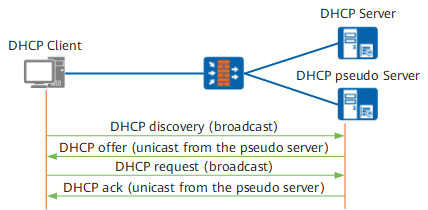
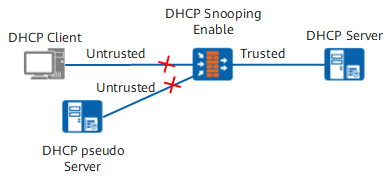
To prevent bogus DHCP server attacks, configure DHCP snooping, which works in either trusted or untrusted mode.
You can configure a trusted or untrusted physical or VLAN interface. DHCPRESPONSE messages (Offer, ACK, or NAK messages) received by an untrusted interface are directly discarded to prevent bogus DHCP server attacks. Figure 2 shows DHCP snooping that works in trusted or untrusted mode.
Middleman Attacks
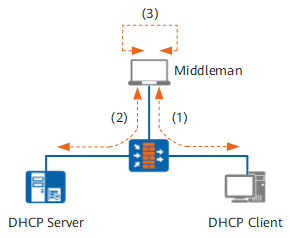
A middleman sends a packet carrying its own MAC address and the IP address of a DHCP server. Upon receipt, the client learns the IP and MAC addresses and considers the middleman as a DHCP server and sends all packets to the middleman, not the DHCP server. After receiving the packets, the middleman forwards the packet carrying its own MAC and IP addresses to the server. The DHCP server learns the IP and MAC address and considers the middleman a client. The DHCP server sends packets to the middleman, not the client. Figure 3 shows a middleman attack.
A middleman relays data between the DHCP server and client. The DHCP server and client assume that they have exchanged packets with each other.
IP/MAC Spoofing Attacks
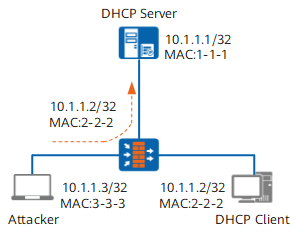
An attacker sends a packet carrying the valid IP and MAC addresses of a client to a DHCP server. The DHCP server mistakes the attacker as a legitimate client and learns the IP and MAC addresses. The actual client, however, cannot access services provided by the DHCP server. Figure 4 shows an IP/MAC spoofing attack.
A DHCP snooping binding table can be used to prevent IP/MAC spoofing and middleman attacks.
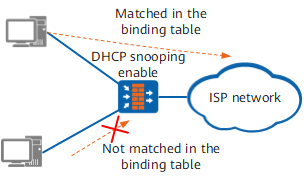
When an interface receives an ARP or IP packet, the interface matches the source IP and MAC addresses of the packet with entries in a local DHCP snooping binding table. Packets that match the entries are forwarded, whereas unmatched packets are discarded. Figure 5 shows data transmission based on a DHCP snooping binding table.
ARP packets or IP packets sent by clients with static IP addresses are discarded. This is because these clients do not obtain IP addresses by sending DHCPREQUEST messages, and no DHCP snooping binding entry exists for them. As a result, these clients are prevented from accessing the network illegally. To allow the users with statically allocated IP addresses to access the network, configuring a static DHCP snooping binding table is mandatory.
Similarly, packets from a client that embezzle a legal IP address of other clients are discarded. The client does not obtain IP addresses by sending DHCPREQUEST messages. Hence the MAC address and interface information in the DHCP snooping binding table corresponding to the IP address are inconsistent with those of the embezzler. In this way, these clients are prevented from accessing the network illegally.
Entries in a DHCP snooping binding table are classified into the following types:
Static entries: manually configured on a FW. These entries can only be manually deleted.
Dynamic entries: automatically learned by a FW using DHCP snooping. These entries age after IP address leases expire.
Dynamic entries in a DHCP snooping binding table are automatically generated based on DHCPACK messages sent by a DHCP server. The procedure for generating dynamic entries is as follows:
- On a Layer-2 device:
An Option 82-enabled Layer-2 device receives a DHCPREQUEST message and appends Option 82 to the message. The Layer-2 device determines an outbound interface to which a DHCPRESPONSE message is sent based on Option 82 and generates a DHCP snooping binding entry.
An Option 82-disabled Layer-2 device identifies interface information in messages based on a MAC address table.
On a Layer-3 device
A device obtains the IP address of an untrusted interface assigned by a DHCP server, the MAC address of the interface, and the interface through which messages pass by monitoring a DHCPRESPONSE message. An IP and MAC binding entry of the untrusted interface is then generated. The dynamic binding entry has the same lease as the IP address of the client. After the lease expires or the client releases the IP address, the entry is automatically deleted.
DoS Attacks Initiated by Changing CHADDRs
An attacker may change Client Hardware Addresses (CHADDRs), not source MAC addresses, in the frame header of DHCP messages in an attempt to continually apply for IP addresses. This approach causes a device to fail to verify packets because the device checks only source MAC addresses.
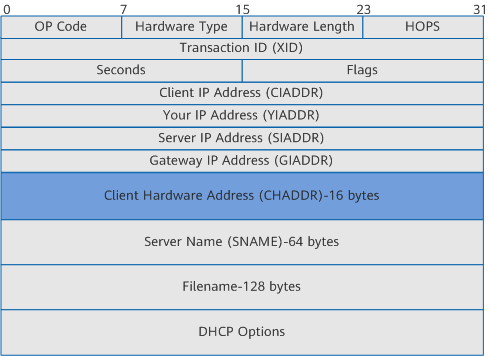
To prevent DoS attacks, enable DHCP snooping to check the CHADDR field in a DHCPREQUEST message. If the CHADDR field matches the source MAC address in the frame header, the message is forwarded. If the CHADDR field does not match the source MAC address, the message is discarded.
Option 82
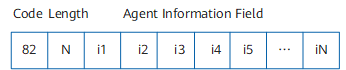
Format of a packet with an Option 82 field
Option 82 is a DHCP Relay Agent Information option that records location information about a DHCP client. It is a special field contained in a DHCP message.
When a DHCPREQUEST message sent by a DHCP client passes through a DHCP relay agent, the relay agent adds an Option 82 field to this DHCPREQUEST message. Upon receipt, a DHCP server replies with a DHCPRESPONSE message containing the same Option 82 field to the DHCP relay agent. The DHCP relay agent then determines for which interface the DHCPRESPONSE message is destined based on the Option 82 field.
Figure 7 shows the format of a DHCP message with Option 82 field.
The message contains the following fields:- Code field: 82, a fixed value.
- Length field: the total number of bytes in the Agent Information field.
- iN field: sub-options in the Agent Information field, and each sub-option is a SubOpt/Length/Value tuple.
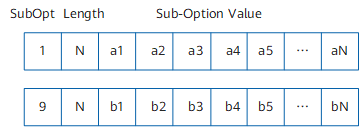
Figure 8 shows the format of the Agent Information field.
The Agent Information field contains the following fields:
- SubOpt field: a sub-option number.
- Length field: the number of bytes.
In an Option 82 field, at least one sub-option must be defined and can be set to null. The minimum length of an Option 82 field is 2 bytes.
The initially assigned DHCP relay agent sub-options are agent circuit ID sub-option and agent remote ID sub-option. A DHCP server uses the agent circuit ID sub-option for IP and other parameter assignment policies.
The device also supports Sub-option 9, in addition to Sub-option 1. Sub-option 9 is used to show added circuit IDs.
Sub-option 9 in a DHCPRESPONSE message supports the following functions:Enables a device to parse the Option 82 field and obtain interface information. The device strips the Device Identifier field off Sub-option 9 before forwarding the DHCPRESPONSE message.
Enables a device to create a DHCP snooping binding table based on interface information obtained from Sub-option 9.
Option 82 can be used on Layer-2 and Layer-3 devices. Layer-3 devices use Option 82 to define address assignment or other policies for a DHCP server. Layer-2 devices determine interfaces to which DHCPRESPONSE messages are sent and generate IP and MAC binding entries based on Option 82. The following describes how to use Option 82 on Layer-2 devices and Layer-3 devices.
Option 82 appended by a Layer-2 device
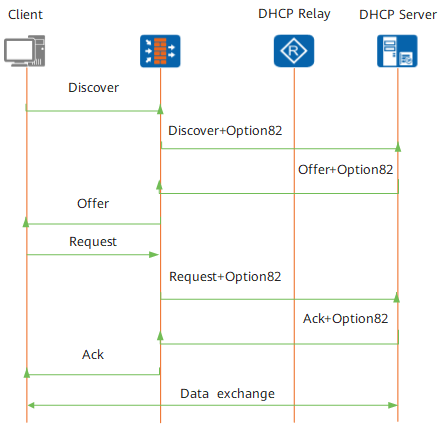
The client shown in Figure 9 accesses a Layer-2 device, and the Layer-2 device connects the client to the DHCP relay agent and server over a Layer-2 network.
If DHCP snooping is enabled on the Layer-2 device, the Layer-2 interface may receive broadcast DHCPRESPONSE messages. Upon receipt, the Layer-2 device performs the following operations:- Searches for a VLAN based on the MAC address carried in each message.
- Determines an outbound interface for the message.
- Generates an entry for the binding between the IP and MAC address.
If the DHCP Option 82 function is enabled, the Layer-2 device can monitor DHCP messages and append Option 82 to a DHCPDISCOVERY message. After receiving a DHCPDISCOVERY message, a DHCP server replies with the DHCPRESPONSE message carrying Option 82. The Layer-2 device determines the interface to which the DHCPRESPONSE message is sent based on Option 82 and generates DHCP snooping binding entries. The Layer-2 device removes Option 82 before forwarding the DHCPRESPONSE message to the client.
Option 82 appended by a Layer-3 device
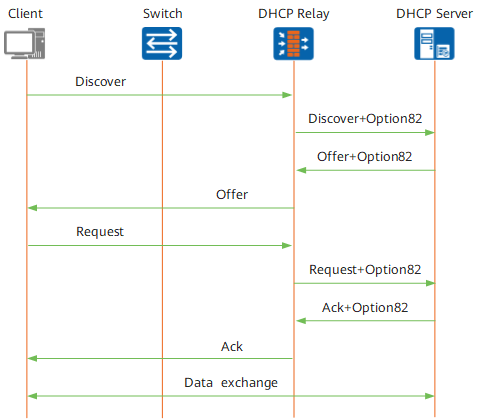
Option 82 can be appended to message by Layer-3 DHCP relay agents.
After Option 82 is enabled on the DHCP relay agent shown in Figure 10, the DHCP relay agent appends Option 82 to the DHCPREQUEST message to a DHCP server. The DHCP server assigns an IP address and delivers network parameters based on Option 82.
The DHCP server also adds Option 82 into a DHCPRESPONSE message sent to the DHCP relay agent. After the DHCPRESPONSE message arrives, the DHCP relay agent removes Option 82 before forwarding the message to a client.
Option 82 implementation
After the Option 82 function is enabled, a DHCP relay agent must check whether an Option 82 field is carried in a DHCPREQUEST message sent by a client.
If the DHCPREQUEST message does not contain an Option 82 field, the agent adds an Option 82 field with Sub-option 1, regardless of the Insert or Rebuild mode.
If the DHCPREQUEST message contains an Option 82 field, the agent checks the mode Option 82 information was added in:Rebuild mode: The agent does not trust the Option 82 field contained in the received message and modifies Sub-option 1 contained in the Option 82 field.
Insert mode: The agent trusts the Option 82 field contained in a received message and does not need to modify Sub-option 1 contained in the Option 82 field. The agent checks whether there is Sub-option 9. If Sub-option 9 is not contained, the agent adds Sub-option 9 to the message. If the message contains Sub-option 9, the agent checks whether this option contains the Device Identifier field. If there is no Device Identifier field, the agent adds the field that follows the manufacturer information field in the message.
The agent checks whether the message contains Sub-option 1 or Sub-option 9 and whether a sub-option contains the Device Identifier field. If the message contains Sub-option 1 or Sub-option 9 or if a sub-option contains the Device Identifier field, the agent properly parses the Option 82 field. It strips the Device Identifier field off Sub-option 1 or Sub-option 9 before forwarding the DHCPRESPONSE message.