CLI: Example for Configuring DHCP Snooping
This example describes how to adopt DHCP snooping to defend against DHCP packet attacks launched by the attacker connected to the Layer-3 interface.
Networking Requirements
DHCP clients access the DHCP relay agent on the network shown in Figure 1. DHCP snooping needs to be configured on Layer-3 interfaces GigabitEthernet 0/0/1 and GigabitEthernet 0/0/2 on FW. The interface on the DHCP client side is untrusted, and the interface on the DHCP server agent side is trusted.
In such a case, FW is capable of preventing the following attacks:
Bogus DHCP server attack
Middleman attack or IP/MAC address attack
DoS attack by changing CHADDR
Attack by generating bogus DHCP messages to extend IP leases
DHCP client1 uses the dynamically allocated IP address, and DHCP client2 uses the statically configured IP address.
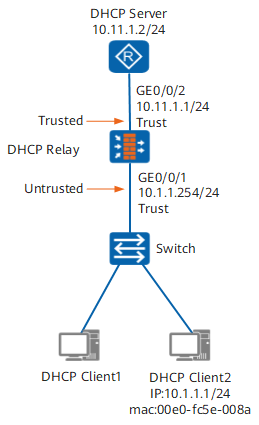
Configuration Roadmap
The configuration roadmap is as follows:
Enable DHCP snooping globally and in the interface view.
Configure interfaces to be trusted or untrusted to prevent bogus DHCP server attacks.
Configure DHCP snooping binding tables and enable matching ARP packets, IP packets, and DHCPREQUEST messages with entries in the DHCP snooping tables to prevent middleman attack or IP/MAC address attacks and bogus DHCP messages to extend IP leases.
Configure CHADDR check to prevent attackers from changing CHADDRs in the messages.
Configure Option 82 and create a binding table covering accurate interface information.
Configure the sending of alarms to the network management station (NMS).
Procedure
- Configure basic DHCP relay function.
# Assign an IP address to GigabitEthernet 0/0/2.
<FW> system-view
[FW] sysname DHCP-Relay
[DHCP-Relay] interface GigabitEthernet 0/0/2
[DHCP-Relay-GigabitEthernet0/0/2] ip address 10.11.1.1 24
[DHCP-Relay-GigabitEthernet0/0/2] quit
# Configure the sub-interface on which the DHCP relay agent is to be enabled and configure the IP address and mask for the sub-interface. Ensure that the sub-interface and the DHCP client must be at the same network segment.
[DHCP-Relay] interface GigabitEthernet 0/0/1
[DHCP-Relay-GigabitEthernet0/0/1] ip address 10.1.1.254 24
[DHCP-Relay-GigabitEthernet0/0/1] dhcp select relay
[DHCP-Relay-GigabitEthernet0/0/1] ip relay address 10.11.1.2
[DHCP-Relay-GigabitEthernet0/0/1] quit
- Enable DHCP snooping.
# Enable DHCP snooping in the system and interface views.
[DHCP-Relay] dhcp snooping enable
[DHCP-Relay] interface GigabitEthernet 0/0/1
[DHCP-Relay-GigabitEthernet0/0/1] dhcp snooping enable
[DHCP-Relay-GigabitEthernet0/0/1] quit
[DHCP-Relay] interface GigabitEthernet 0/0/2
[DHCP-Relay-GigabitEthernet0/0/2] dhcp snooping enable
- Configure the interface to be trusted.
# Configure the interface on the DHCP server side to be trusted and enable DHCP snooping on all interfaces on the DHCP client side. If the interfaces on the DHCP client side are not set to be trusted, they are untrusted by default after DHCP snooping is enabled. Configuring trusted or untrusted interfaces prevents bogus DHCP server attacks.
[DHCP-Relay-GigabitEthernet0/0/2] dhcp snooping trusted
[DHCP-Relay-GigabitEthernet0/0/2] quit
- Enable the interface to check specified types of packets and configure DHCP snooping binding tables.
# Check ARP and IP packets on the interfaces on the DHCP client side to prevent IP/MAC spoofing attacks.
[DHCP-Relay] interface GigabitEthernet 0/0/1
[DHCP-Relay-GigabitEthernet0/0/1] dhcp snooping check arp enable
[DHCP-Relay-GigabitEthernet0/0/1] dhcp snooping check ip enable
# Enable the interfaces on the DHCP client side to check DHCPREQUEST messages to prevent attackers from sending bogus DHCP messages to extend IP leases.
[DHCP-Relay-GigabitEthernet0/0/1] dhcp snooping check dhcp-request enable# Enable checking CHADDRs on the interfaces on the DHCP client side to prevent attackers from changing CHADDRs in the messages.
[DHCP-Relay-GigabitEthernet0/0/1] dhcp snooping check dhcp-chaddr enable# Configure static binding entries.
If you use the static IP address, configure static DHCP snooping entries.
[DHCP-Relay-GigabitEthernet0/0/1] dhcp snooping bind-table static ip-address 10.1.1.1 mac-address 00e0-fc5e-008a
[DHCP-Relay-GigabitEthernet0/0/1] quit
- Limit the rate at which DHCP messages are sent.
# Set the rate of sending DHCPREQUEST messages to the protocol stack to prevent excessive DHCPREQUEST messages.
[DHCP-Relay] dhcp snooping check dhcp-rate 90
[DHCP-Relay] dhcp snooping check dhcp-rate enable
- Configure Option 82.
# Configure interface information to be carried in DHCP messages to make the DHCP snooping table more accurate.
[DHCP-Relay] interface GigabitEthernet 0/0/1
[DHCP-Relay-GigabitEthernet0/0/1] dhcp option82 insert enable
[DHCP-Relay-GigabitEthernet0/0/1] quit
- Configure behaviors to process packets that do not match the entries.
# Configure the global behaviors to process ARP and IP packets that do not match the entries.
[DHCP-Relay] dhcp snooping nomatch-packet arp action discard
[DHCP-Relay] dhcp snooping nomatch-packet ip action discard
# Configure behaviors to process the ARP and IP packets that do not match the entries on the interface.
[DHCP-Relay] interface GigabitEthernet 0/0/1
[DHCP-Relay-GigabitEthernet0/0/1] dhcp snooping nomatch-packet arp action discard
[DHCP-Relay-GigabitEthernet0/0/1] dhcp snooping nomatch-packet ip action discard
- Enable the interface to send alarms to the NMS.
# Enable the interface to send specified alarms to the NMS.
[DHCP-Relay-GigabitEthernet0/0/1] dhcp snooping alarm dhcp-reply enable
[DHCP-Relay-GigabitEthernet0/0/1] dhcp snooping alarm arp enable
[DHCP-Relay-GigabitEthernet0/0/1] dhcp snooping alarm dhcp-chaddr enable
[DHCP-Relay-GigabitEthernet0/0/1] dhcp snooping alarm dhcp-request enable
[DHCP-Relay-GigabitEthernet0/0/1] quit
[DHCP-Relay] dhcp snooping check dhcp-rate alarm enable
# Set the alarm threshold.
[DHCP-Relay] interface GigabitEthernet 0/0/1
[DHCP-Relay-GigabitEthernet0/0/1] dhcp snooping alarm dhcp-reply threshold 10
[DHCP-Relay-GigabitEthernet0/0/1] dhcp snooping alarm arp threshold 10
[DHCP-Relay-GigabitEthernet0/0/1] dhcp snooping alarm dhcp-chaddr threshold 10
[DHCP-Relay-GigabitEthernet0/0/1] dhcp snooping alarm dhcp-request threshold 10
[DHCP-Relay-GigabitEthernet0/0/1] quit
[DHCP-Relay] dhcp snooping check dhcp-rate alarm threshold 40
- Assign interfaces to security zones.
[DHCP-Relay] firewall zone trust
[DHCP-Relay-zone-trust] add interface GigabitEthernet 0/0/1
[DHCP-Relay-zone-trust] add interface GigabitEthernet 0/0/2
[DHCP-Relay-zone-trust] quit
Configuration Verification
Run the display dhcp snooping global command on the DHCP relay agent. You can see that DHCP snooping is enabled in the system and interface views. You can also view statistics about alarms sent to the NMS.
[DHCP-Relay] display dhcp snooping global
 dhcp snooping enable
 dhcp snooping nomatch-packet ip action discard
 dhcp snooping nomatch-packet arp action discard
 dhcp snooping check dhcp-rate enable
 dhcp snooping check dhcp-rate alarm enable
 dhcp snooping check dhcp-rate 90
 dhcp snooping check dhcp-rate alarm threshold 40
View information about the binding table of DHCP snooping.
[DHCP-Relay] display dhcp snooping bind-table static
bind-table:
ifname         vrf  vsi  p/cvlan   mac-address    ip-address      tp lease
-------------------------------------------------------------------------
GE0/0/1        0000 -    0000/0000 00e0-fc5e-008a 10.1.1.1        S  0
-------------------------------------------------------------------------
binditem count:      1                   binditem total count: 1
View DHCP snooping information on the interface.
[DHCP-Relay] display dhcp snooping interface GigabitEthernet 0/0/1
 dhcp snooping enable
 dhcp snooping check arp enable
 dhcp snooping alarm arp enable
 dhcp snooping alarm arp threshold 10
 dhcp snooping nomatch-packet arp action discard
 dhcp snooping check ip enable
 dhcp snooping nomatch-packet ip action discard
 dhcp snooping alarm dhcp-reply enable
 dhcp snooping alarm dhcp-reply threshold 10
 dhcp snooping check dhcp-chaddr enable
 dhcp snooping alarm dhcp-chaddr enable
 dhcp snooping alarm dhcp-chaddr threshold 10
 dhcp snooping check dhcp-request enable
 dhcp snooping alarm dhcp-request enable
 dhcp snooping alarm dhcp-request threshold 10
 arp total                  0
 ip total                   0
 dhcp-request total         0
 chaddr&src mac total       0
 dhcp-reply total           0
[DHCP-Relay] display dhcp option82 interface GigabitEthernet 0/0/1 dhcp option82 insert enable[DHCP-Relay] display dhcp snooping interface GigabitEthernet 0/0/2 dhcp snooping enable dhcp snooping trusted arp total 0 ip total 0 dhcp-request total 0 chaddr&src mac total 0 dhcp-reply total 0
Configuration Script
#
 dhcp snooping enable
 dhcp snooping nomatch-packet ip action discard
 dhcp snooping nomatch-packet arp action discard
 dhcp snooping check dhcp-rate enable
 dhcp snooping check dhcp-rate 90
 dhcp snooping check dhcp-rate alarm threshold 40
#
 sysname DHCP-Relay
#
interface GigabitEthernet0/0/1
 ip address 10.1.1.254 255.255.255.0
 ip relay address 10.11.1.2
 dhcp select relay
 dhcp snooping enable
 dhcp snooping check arp enable
 dhcp snooping alarm arp enable
 dhcp snooping alarm arp threshold 10
 dhcp snooping nomatch-packet arp action discard
 dhcp snooping check ip enable
 dhcp snooping nomatch-packet ip action discard
 dhcp snooping alarm dhcp-reply enable
 dhcp snooping alarm dhcp-reply threshold 10
 dhcp snooping check dhcp-chaddr enable
 dhcp snooping alarm dhcp-chaddr enable
 dhcp snooping alarm dhcp-chaddr threshold 10
 dhcp snooping check dhcp-request enable
 dhcp snooping alarm dhcp-request enable
 dhcp snooping alarm dhcp-request threshold 10
 dhcp option82 insert enable
 dhcp snooping bind-table static ip-address 10.1.1.1 mac-address 00e0-fc5e-008a
#
interface GigabitEthernet0/0/2
 ip address 10.11.1.1 255.255.255.0
 dhcp snooping enable
 dhcp snooping trusted
#
firewall zone trust
 set priority 85
 add interface GigabitEthernet0/0/1
 add interface GigabitEthernet0/0/2
#