Configuration Procedure
This section describes how to configure Layer-3 Eth-Trunk interfaces, Layer-2 Eth-Trunk interfaces, Eth-Trunk sub-interfaces, and Eth-Trunk interfaces in static LACP mode.
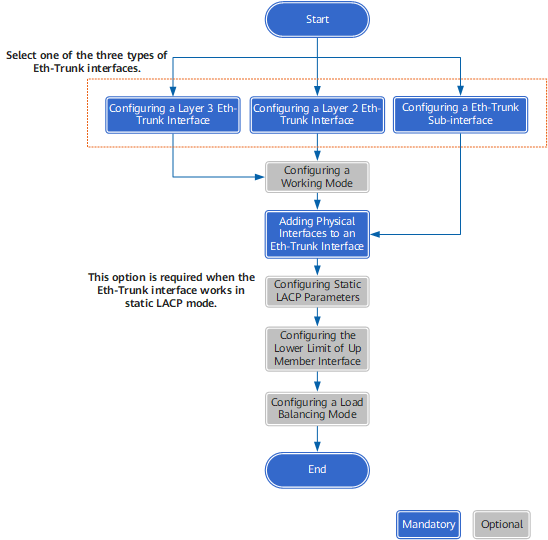
Figure 1 shows the procedure for configuring Eth-Trunk interfaces.
Eth-Trunk interfaces mainly include Layer-3 Eth-Trunk interfaces, Layer-2 Eth-Trunk interfaces, and Eth-Trunk sub-interfaces.
To use basic Eth-Trunk interface functions only, configure Layer-3 Eth-Trunk interfaces, Layer-2 Eth-Trunk interfaces, or Eth-Trunk sub-interfaces and add Ethernet interfaces to them.
To use Eth-Trunk interfaces in static LACP mode, configure the working mode of Eth-Trunk interfaces to static LACP and set LACP parameters. Note: Eth-Trunk sub-interfaces do not support the static LACP mode.
The FW allows you to configure a lower threshold for the number of member links in Up state of an Eth-Trunk link and load balancing among member interfaces of an Eth-Trunk interface.