You can configure Virtual eXtensible Local Area Network (VXLAN) interfaces for communication between VXLANs and between a VXLAN and a non-VXLAN.
Context
VXLAN is a network virtualization technology of Network Virtualization over Layer 3 (NVO3) and uses the MAC in UDP encryption mode. VXLAN uses VXLAN network IDs (VNIs) similar to VLAN IDs. A VNI consists of 24 bits. Theoretically,
16 M VXLAN segments are supported.
If hosts in a VXLAN need to communicate with VXLANs in other network segments or non-VXLAN devices, you can create VXLAN-based logical interfaces, namely, VXLAN interfaces. VXLAN interfaces provide almost all
functions supported by common Layer-3 physical interfaces and support multiple types of Layer-3 features, such as IPv4 address configuration.
As VXLAN interfaces are in a bridge domain (BD), they are also called BDIF interfaces.
Procedure
- Choose .
- Click Add.
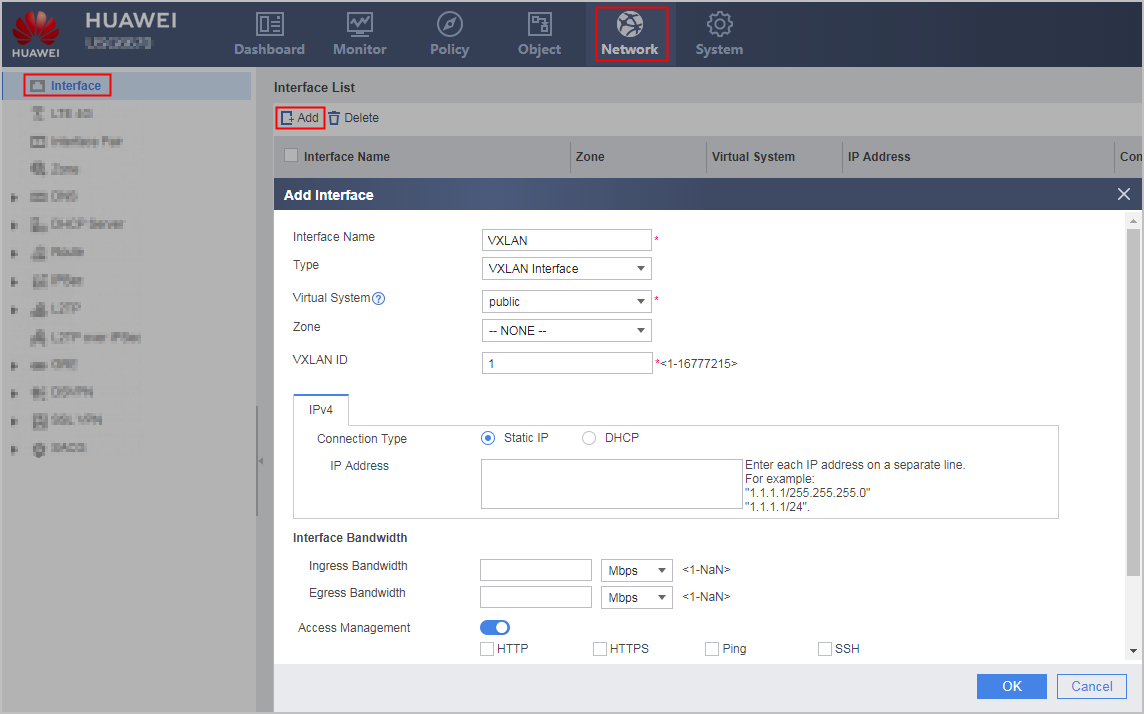
- Set the following VXLAN parameters.
Parameter
|
Description
|
Interface Name
|
Alias name for a VXLAN interface.
|
Type
|
Type of a VXLAN interface to be created.
When you create a VXLAN interface, set this parameter to VXLAN.
|
Virtual System
|
Name of a virtual system for a VXLAN interface.
The virtual system must exist.
|
Zone
|
Security zone to which a VLAN interface is to be assigned.
You can directly assign a VLAN interface to an existing security zone. If the desired security zone does not exist, create one and assign the VLAN interface to it.
|
VXLAN ID
|
VNI to which the VXLAN interface belongs. If the VNI does not exist on the device, the device creates a BD when creating a VXLAN interface, associates the VXLAN interface with the BD, and creates a VNI in the BD.
|
IPv4
|
Connection Type
|
Method used by a VXLAN interface to obtain an IPv4 address:
- Static IP: allows an administrator to specify an IPv4 address for the VXLAN interface.
- DHCP: uses DHCP to automatically obtain an IPv4 address.
|
IP Address
|
IPv4 address of an interface.
The IPv4 address must be unique on a network.
|
Interface Bandwidth
|
Ingress Bandwidth
|
Maximum bandwidth for inbound traffic on the interface.
|
Egress Bandwidth
|
Maximum bandwidth for outbound traffic on the interface.
|
Overload Protection Threshold
|
Bandwidth usage of the link.
After you select Multi-Egress Options, you can set overload protection thresholds for the inbound and Egress Bandwidths of the interface. If an interface is overloaded,
the interface no longer participates in intelligent uplink selection.
|
Access Management
|
Access Management
|
This function allows an administrator to access a FW using HTTP, HTTPS, ping, SSH, SNMP, NETCONF, or Telnet. Interface access control takes precedence over security policies. This means that an administrator can use an access control-enabled interface to access a FW even if no security policy is configured for communication between the zone of the interface and a local zone.
This parameter can only be set when Mode is set to Route. HTTP: allows an administrator to use the web browser (HTTP) to access a device through a VLAN interface. If HTTP is not selected, the interface discards HTTP packets after receiving them. This parameter takes effect only after the HTTP service is enabled.
HTTPS: allows an administrator to use the web browser (HTTPS) to access a device through a VLAN interface. If HTTPS is not selected, the interface discards HTTPS packets after receiving them. This parameter takes effect only after the HTTPS service is enabled.
- Ping: allows an interface to respond to ping requests. A ping checks interface connectivity. If Ping is not selected, the ping function is disabled.
- SSH: allows an administrator to use SSH to access a device. If SSH is not selected, the interface discards SSH packets after receiving them.
Telnet: allows an administrator to use Telnet to access a device. If Telnet is not selected, the interface discards them after receiving them.
- SNMP: allows administrators to use an SNMP NMS to access a device. If SNMP is not selected, the interface discards SNMP packets after receiving them.
NETCONF: allows an administrator to use NETCONF NMS to access a device. If NETCONF is not selected, the interface discards NETCONF packets after receiving them.
By default, the management interface (GigabitEthernet 0/0/0) allows HTTP, HTTPS, ping. access to a FW, and a non-management interface denies HTTP, HTTPS, ping, SSH, SNMP, NETCONF, or Telnet. access to a FW.
|
Advanced
|
| MAC Address |
By default, a VXLAN interface uses the system MAC address.
|
IPv4 MTU
|
Maximum transmission unit of the interface. After the MTU of an interface is modified, you need to restart the interface to validate the MTU.
This parameter can only be set when Mode is set to Route.
|
| Strict ARP learning |
Enable Strict ARP learning on the interface.
|
- Click OK.
If the operation is successful, the new interface is displayed in Interface List.
Repeat previous steps to create other VXLAN interfaces.