Example for Configuring the MAC Address Table Based on the Interface and VLAN
In this networking, the network administrator binds MAC addresses of user devices to the access interface, which can prevent invalid users from accessing the network through other switching devices.
Networking Requirements
A device learns source MAC addresses and then creates a MAC address table. MAC address learning, however, cannot identify whether the packets are from legal users or hackers, which brings security threats.
To improve interface security, a network administrator can manually add specific MAC address entries to the MAC address table. The MAC addresses of user devices and interfaces are then bound to prevent illegal users from obtaining data.
On the network shown in Figure 1, static MAC address entries can be configured to be bound to interfaces, preventing attacks.
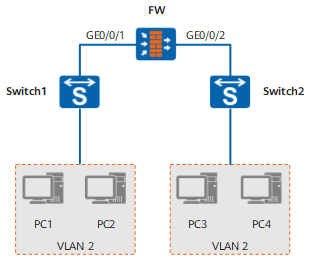
Configuration Roadmap
The configuration roadmap is as follows:
Configure the switch, and plan the VLAN where the users reside.
Configure interface attributes, and associate each interface with the VLAN on the FW.
Configure static MAC address entries on the FW, and bind them to interfaces.
Data Preparation
To complete the configuration, you need the following data:
User VLAN ID
MAC address of each CE
In this example, Switch1's MAC address is 0011-2233-44aa, and Switch2's MAC address is 0011-2233-44bb.
Procedure
- Configure the switch, and plan the VLAN where the users reside.
For details on switch configuration, refer to related product manuals.
- Configure interface attributes and associate the interface to the VLAN.
# Create VLAN 2.
<FW> system-view
[FW] vlan 2
[FW-vlan2] quit
# Configure the GigabitEthernet 0/0/1
[FW] interface GigabitEthernet 0/0/1
[FW-GigabitEthernet 0/0/1] portswitch
[FW-GigabitEthernet 0/0/1] port link-type trunk
[FW-GigabitEthernet 0/0/1] port trunk allow-pass vlan 2
[FW-GigabitEthernet 0/0/1] quit
# Configure the GigabitEthernet 0/0/2
[FW] interface GigabitEthernet 0/0/2
[FW-GigabitEthernet 0/0/2] portswitch
[FW-GigabitEthernet 0/0/2] port link-type trunk
[FW-GigabitEthernet 0/0/2] port trunk allow-pass vlan 2
[FW-GigabitEthernet 0/0/2] quit
- Configure static MAC address entries.
[FW] mac-address static 0011-2233-44aa GigabitEthernet 0/0/1 vlan 2
[FW] mac-address static 0011-2233-44bb GigabitEthernet 0/0/2 vlan 2
- Verify the configuration.
# After completing the preceding configurations, run the display mac-address static command on the PE. The configured static MAC address entries are displayed.
[FW] display mac-address static
MAC address table of slot 1:
-------------------------------------------------------------------------------
MAC Address    VLAN/       PEVLAN CEVLAN Port            Type      LSP/LSR-ID
               VSI/SI                                              MAC-Tunnel
-------------------------------------------------------------------------------
0011-2233-44aa 2           -      -      GigabitEthernet 0/0/1         static    -
0011-2233-44bb 2           -      -      GigabitEthernet 0/0/2         static    -

-------------------------------------------------------------------------------
Total matching items on slot 1 displayed = 2
Configuration Files
Configuration file of FW
#
 sysname FW
#
 vlan batch 2
#
interface GigabitEthernet 0/0/1
 portswitch
 undo shutdown
 port link-type trunk
 port trunk allow-pass vlan 2
#
interface GigabitEthernet 0/0/2
 portswitch
 undo shutdown
 port link-type trunk
 port trunk allow-pass vlan 2
#
 mac-address static 0011-2233-44aa GigabitEthernet 0/0/1 vlan 2
 mac-address static 0011-2233-44bb GigabitEthernet 0/0/2 vlan 2
#
return