Understanding PPP
This section describes the mechanism of Point-to-Point Protocol (PPP).
PPP Operation Process
The PPP link is established through a series of negotiation.
PPP-enabled devices on two ends of a link must send LCP packets to set up a P2P link. After the LCP configuration parameters have been negotiated, the two communicating devices choose the authentication mode according to the authentication parameters in the Configure-Request packets.
By default, the devices on the two ends do not authenticate each other. After the negotiation of the LCP configuration parameters, the devices negotiate NCP configuration parameters without any authentication. After all the negotiations, the two devices on the P2P link can transmit network-layer packets, and the whole link is available.
A link is torn down and a PPP session ends if one of the following situations occurs:
The device on either end receives an LCP or an NCP Terminate frame that aims at closing the link.
The physical layer cannot detect a carrier.
The network administrator shuts down the link.
Typically, NCP should not necessarily have the capability in closing links. Therefore, the packet used to close a link is usually sent during the LCP negotiation or application program session.
Figure 1 shows the setup process of a PPP session and status transition.
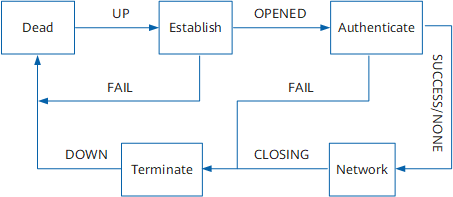
The PPP operation process is described as follows:
the Link Establishment phase is the first phase to set up a PPP link.
LCP negotiation is performed, during which the working mode, MRU, authentication mode, magic number, and asynchronous character mapping are negotiated. The working mode can be Single-link PPP (SP) or Multilink PPP (MP). If the LCP negotiation is successful, the LCP status turns to Opened.
If no authentication is configured, the communicating devices directly enter the NCP negotiation phase. If authentication is configured, the communicating devices enter the Authentication phase and perform CHAP or PAP authentication.
If the authentication fails, the devices enter the Terminate phase and disconnect the link, and LCP status becomes Down. If the authentication is successful, the devices enter the NCP negotiation phase. The LCP status remains Opened, whereas the NCP status changes from Initial to Starting.
The devices run an NCP protocol to negotiate parameters. The NCP suite includes the Internet Protocol Control Protocol (IPCP), Multiprotocol Label Switching Control Protocol (MPLSCP), and Open System Interconnection Control Protocol (OSCICP). Devices run IPCP to negotiate IP addresses. A network layer protocol is selected during NCP negotiation. The network layer protocol sends packets over the PPP link only after negotiation of the network layer protocol is successful.
The PPP link remains in Up until an LCP or NCP frame is generated to close the link or traffic is interrupted.
A PPP link undergoes the following phases:
Link Dead phase
The Link Dead phase is also called the unavailable phase. During this phase, there is no physical layer link established between two devices. PPP link setup always begins and ends with the Link Dead phase.
After the communicating devices on both ends detect that a physical link is activated, generally, the carrier signal is detected on the link, and the devices enter the Link Establishment phase.
In the Establish phase, link parameters are set mainly by using LCP. The state machine of LCP changes according to the events. If a link is in the Link Dead phase, the LCP status is Initial or Starting. After the link becomes available, the LCP status changes.
After a link is torn down, the link returns to the Link Dead phase. In real-world situations, this state does not last long and is only used to detect the existence of a peer device.
Link Establishment phase
The Link Establishment phase is the most complex PPP phase.
The two devices on both ends of a PPP link exchange packets, which do not include network layer protocol parameters. Both devices enter the next phase.
The next phase can be Authentication phase or Network-Layer Protocol phase. The next phase is selected according to the configuration on both the devices. It is usually configured by the user.
In the Link Establishment phase, the LCP state machine changes twice:
When the link is in the Link Dead phase, the LCP state machine is in the status of Initial or Starting. If the link is Up, the physical layer sends an Up event in a packet to the data link layer. The data link layer changes the LCP status to Request-Sent. LCP then sends Configure-Request packets to configure a data link.
After one end receives the Configure-Ack packet, the LCP status changes to Opened. The link enters the next phase.
Note that the link configurations on both ends are mutually independent. In the Link Establishment phase, devices discard non-LCP packets.
Authentication phase
Authentication is performed before devices on both ends enter the Network-Layer Protocol phase.
PPP authentication is disabled by default. To enable authentication, specify an authentication protocol in the Link Establishment phase.
PPP authentication is used on the following two types of links:
Non-leased lines between hosts and devices
Leased lines
PPP provides the following two authentication modes:
PAP: Password Authentication Protocol
CHAP: Challenge-Handshake Authentication Protocol
The authentication mode used is determined based on negotiation performed during the Link Establishment phase. Link quality detection is also performed in the Link Establishment phase. According to the PPP protocol, detection delays the authentication process within a specified period of time.
The link control protocol, authentication protocol, and quality detection packets are supported in the Authentication phase. The packets of other types are discarded. If a device receives a Configure-Request packet in the Authentication phase, the link restores the Link Establishment phase.
Network-Layer Protocol phase
Network protocols, such as IP, IPX, and AppleTalk, are negotiated using NCPs, which can be enabled or disabled during any phase. After an NCP state machine turns to Opened, PPP links can transmit network layer packets.
If a device receives a Configure-Request packet in the Network-Layer Protocol phase, the device and its peer device enter the Link Establishment phase.
Termination phase
PPP can terminate links at any time. In addition, a network administrator can manually disconnect links. Carrier connection loss, authentication failures, or link-quality detection failures can cause link disconnections. When devices exchange LCP Terminate frames during the Link Establishment phase, the link in question is torn down. Therefore, NCP does not need to close a PPP link.
PAP
PAP supports two-way handshake authentication and simple passwords. The authentication process is performed in the Link Establishment phase.
After the Link Establishment phase is complete, the user name and password of a supplicant are repeatedly sent to the authenticator until authentication is successful or the link is ended.
PAP authentication is the optimal option when a password transmitted in plain text must be used to simulate logging into a remote host.
Figure 2 shows the PAP authentication process.
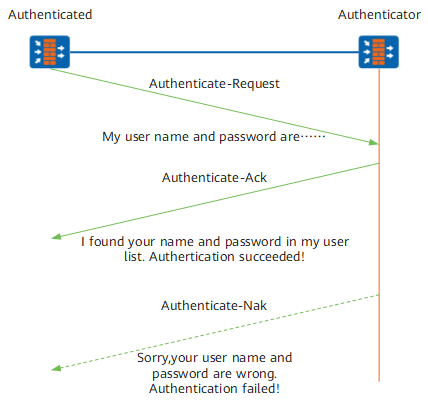
The PAP authentication process is as follows:
The supplicant sends the local user name and password to the authenticator.
The authenticator checks the user list for the user name and whether the password is correct and returns an appropriate response.
PAP is an unsecured protocol. Simple passwords are sent over links. After a PPP link is established, the supplicant repeatedly sends the user name and password until authentication is complete, which could leave the system vulnerable to malicious attacks.
CHAP
CHAP is a three-way handshake authentication protocol. CHAP authentication only allows user names to be transmitted over a network. Compared with PAP, CHAP provides higher security because passwords are not transmitted.
CHAP authentication is generally performed before the link is set up. However, it can be performed at any time using CHAP negotiation packets.
After the Link Establishment phase ends, an authenticator sends a Challenge packet to a supplicant. After performing the "one-way hash" algorithm, the supplicant returns a calculated value to the authenticator.
The authenticator compares the value it itself has calculated using the hash algorithm with the value provided by the supplicant. If the two values match, authentication is successful. If the values do not match, the authentication fails, and the link is torn down.
Figure 3 shows the CHAP authentication process.
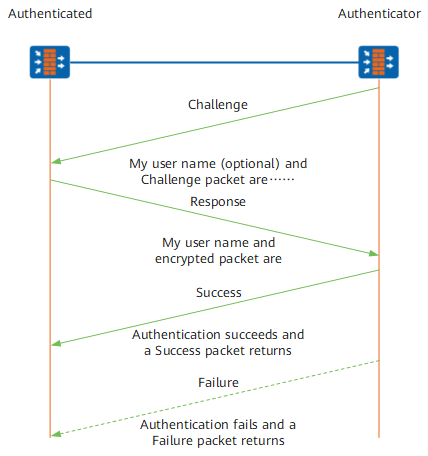
CHAP authentication is performed in either of the following modes:
Unidirectional: One end acts as the authenticator, while the other end acts as a supplicant.
Bidirectional: Two ends act as both the authenticator and supplicant.
Unidirectional authentication is usually used.
There are two possible scenarios for unidirectional CHAP authentication: the authenticator is configured with a user name and the authenticator is not configured with a user name. Configuring a user name for the authenticator is recommended for improved connection security.
When the authenticator is configured with a user name, the authentication process is as follows:
The authenticator sends a randomly generated Challenge packet and the host name to the supplicant.
The supplicant searches for the local password in the local user list according to the user name of the authenticator. Based on the found password and the Challenge packet, a supplicant obtains a value calculated using the message digest algorithm 5 (MD5) algorithm. The supplicant then sends its host name and the calculated value in a response packet to the authenticator.
After receiving the response packet, the authenticator searches for the supplicant's password in the local user list based on the supplicant's host name. After locating the password, the authenticator uses the Challenge packet and the password of the authenticated to obtain a value through the MD5 algorithm, compares the value with that in the received Response packet, and then returns the authentication result, that is, allow or deny.
When the authenticator is not configured with a user name, the authentication process is as follows:
- The authenticator sends the Challenge packet to a supplicant.
- The supplicant uses the message digest algorithm 5 (MD5) algorithm to calculate a value based on the local password and the Challenge packet. The supplicant then sends its host name and the calculated value in a response packet to the authenticator.
- The authenticator searches for the supplicant's password in the local user list based on the supplicant's host name.