Example for Configuring the Device as a PPPoE Client (Dual-Stack Access)
Networking Requirements
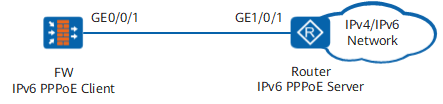
As shown in Figure 1, the FW functions as a PPPoE client to obtain an IPv4 and IPv6 address from the PPPoE server and access the external network.
Configuration Roadmap
- Configure the FW as a PPPoE client for connecting to the PPPoE server.
- Configure the IPv6 forwarding capability of the FW so that the FW can forward IPv6 traffic.
- Configure a PPPoE session on the FW to allow the PPPoE server and PPPoE client to establish sessions.
- Configure interface security zones and security policies on the FW to ensure smooth traffic forwarding.
Configure a router for connecting the PPPoE server to the PPPoE client and assigning an IP address to the PPPoE client.
Procedure
- Configure the FW.
# Configure the FW as an PPPoE client.
<FW> system-view
[FW] interface Dialer1
[FW-Dialer1] link-protocol ppp
[FW-Dialer1] ppp pap local-user admin-example password cipher Admin@123
[FW-Dialer1] ip address ppp-negotiate
[FW-Dialer1] dialer user admin-example
[FW-Dialer1] dialer bundle 1
[FW-Dialer1] dialer-group 1
[FW-Dialer1] quit
# Enable the IPv6 forwarding capability on the device.
[FW] ipv6# Configure the dialer interface to automatically generate a link-local IPv6 address.
[FW]interface Dialer1
[FW-Dialer1] ipv6 enable
[FW-Dialer1] ipv6 address auto link-local
# Enable stateless address autoconfiguration.
[FW-Dialer1] ipv6 address auto global
[FW-Dialer1] quit
# Configure a PPPoE session.
[FW] interface GigabitEthernet 0/0/1
[FW-GigabitEthernet0/0/1] pppoe-client dial-bundle-number 1
[FW-GigabitEthernet0/0/1] quit
#Add interfaces to the security zone.
[FW] firewall zone trust
[FW-zone-trust] add interface GigabitEthernet 0/0/1
[FW-zone-trust] add interface Dialer 1
[FW-zone-trust] quit
# Configure a security policy.
[FW] security-policy
[FW-policy-security] rule name policy_sec_1
[FW-policy-security-rule-policy] source-zone trust local
[FW-policy-security-rule-policy] destination-zone local trust
[FW-policy-security-rule-policy] action permit
- Configure the PPPoE server. The NE router (V600R009) is used as an example. The actual configuration varies depending on the device.
# Configure IPv4 and an IPv6 address pools.
[HUAWEI] ip pool huawei1 bas local
[HUAWEI-ip-pool-huawei1] gateway 1.1.1.1 255.255.255.0
[HUAWEI-ip-pool-huawei1] section 0 1.1.1.2 1.1.1.3
[HUAWEI] ipv6 prefix prefixtest local
[HUAWEI-ipv6-prefix-prefixtest] prefix prefix 2001:DB8::/48
[HUAWEI-ipv6-prefix-prefixtest] quit
[HUAWEI] ipv6 pool huawei2 bas local
[HUAWEI-ipv6-pool-huawei2] prefix prefixtest
# Configure account authentication, authorization, and accounting.
[HUAWEI] aaa
[HUAWEI-aaa] authentication-scheme test
[HUAWEI-aaa-authen-test] authentication-mode none
[HUAWEI-aaa] authorization-scheme test
[HUAWEI-aaa-author-test] authentication-mode none
[HUAWEI-aaa] accounting-scheme test
[HUAWEI-aaa-accounting-test] authentication-mode none
# Configure the authentication domain.
[HUAWEI] aaa
[HUAWEI-aaa] domain huawei
[HUAWEI-aaa-domain-huawei] authentication-scheme test
[HUAWEI-aaa-domain-huawei] authorization-scheme test
[HUAWEI-aaa-domain-huawei] accounting-scheme test
[HUAWEI-aaa-domain-huawei] ip-pool huawei1
[HUAWEI-aaa-domain-huawei] ipv6-pool huawei2
# Configure the BAS function.
[HUAWEI] license
[HUAWEI-license] active bas slot 1 //The license of the board in slot 1 must be activated.
# Configure the VT interface.
[HUAWEI]interface Virtual-Template 1
[HUAWEI-Virtual-Template1] ppp authentication-mode pap
# Bind GE1/0/1 to the VT interface.
[HUAWEI]interface GigabitEthernet 1/0/1
[HUAWEI-GigabitEthernet1/0/1] pppoe-server bind Virtual-Template 1
[HUAWEI-GigabitEthernet1/0/1] ipv6 enable
[HUAWEI-GigabitEthernet1/0/1] ipv6 address auto link-local
[HUAWEI-GigabitEthernet1/0/1] bas
[HUAWEI-GigabitEthernet1/0/1-bas] access-type layer2-subscriber default-domain authentication huawei
Verifying the Configuration
- Check PPPoE sessions on the firewall.
<FW> display pppoe-client session summary
PPPoE Client Session:
ID   Bundle  Dialer  Intf             Client-MAC    Server-MAC    State
1    1       1     GE0/0/1      c81fbe95d1dc  d4b110af845c  PPPUP
Check the access users on the router.
[HUAWEI] display  access-user username admin-example
  ------------------------------------------------------------------------------
  UserID  Username                Interface      IP address       MAC
          Vlan          IPv6 address             Access type
  ------------------------------------------------------------------------------
  0     admin-example            GE1/0/1        1.1.1.2     c81f-be95-d1dc
          -/-           2001:DB8::C49D:AD11:8B2B:1  PPPoE
  ------------------------------------------------------------------------------
  Normal users                       : 1
  RUI Local users                    : 0
  RUI Remote users                   : 0
  Total users                        : 1
Configuration Scripts
#
 sysname FW
#
ipv6
#
interface Dialer1
 link-protocol ppp
 ppp pap local-user admin-example password cipher %$%$(TT8F ] Y\5SQ=^Q`MAF4<1!!%$%$
 ip address ppp-negotiate
 ipv6 enable
 dialer user admin-example
 dialer bundle 1
 dialer-group 1
 ipv6 address auto link-local
 ipv6 address auto global
#
interface GigabitEthernet0/0/1
 pppoe-client dial-bundle-number 1
 undo shutdown
#
firewall zone trust
 set priority 85
 add interface GigabitEthernet0/0/1
 add interface Dialer1
#
security-policy
  rule name policy
    source-zone trust local
    destination-zone local trust
    action permit
#
return