CLI: Example for Dividing a LAN into VLANs Based on Ports
It is easy to divide a LAN into VLANs based on ports. After ports are added to different VLANs, users in the same VLAN can directly communicate with each other, whereas users in different VLANs cannot directly communicate with each other.
Networking Requirements
It is required that on the network shown in Figure 1, employees in the same group be able to communicate with each other, whereas employees in different groups not communicate with each other.
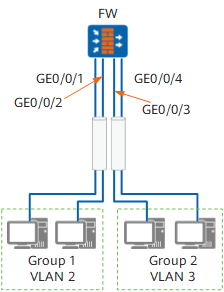
Configuration Roadmap
The configuration roadmap is as follows:
- Create VLANs and determine mappings between employees and VLANs.
- Configure port types to determine the device connected to each port.
- Add the port connected to group 1 to VLAN 2 and the port connected to group 2 to VLAN 3 to prevent employees in group 1 from communicating with employees in group 2.
Data Preparation
To complete the configuration, you need the following data:
- Number of each port connecting a switch to a PC
- ID of each VLAN
Procedure
- Create VLANs.
<FW> system-view[FW] vlan batch 2 3 - Configure port types.
[FW] interface GigabitEthernet 0/0/1
[FW-GigabitEthernet 0/0/1] portswitch
[FW-GigabitEthernet 0/0/1] undo shutdown
[FW-GigabitEthernet 0/0/1] port link-type access
[FW-GigabitEthernet 0/0/1] quit
[FW] interface GigabitEthernet 0/0/2
[FW-GigabitEthernet 0/0/2] portswitch
[FW-GigabitEthernet 0/0/2] undo shutdown
[FW-GigabitEthernet 0/0/2] port link-type access
[FW-GigabitEthernet 0/0/2] quit
[FW] interface GigabitEthernet 0/0/3
[FW-GigabitEthernet 0/0/3] portswitch
[FW-GigabitEthernet0/0/4] undo shutdown
[FW-GigabitEthernet 0/0/3] port link-type access
[FW-GigabitEthernet 0/0/3] quit
[FW] interface GigabitEthernet 0/0/4
[FW-GigabitEthernet0/0/4] portswitch
[FW-GigabitEthernet0/0/4] undo shutdown
[FW-GigabitEthernet0/0/4] port link-type access
[FW-GigabitEthernet0/0/4] quit
- Add ports to VLANs.
# Add GE0/0/1 and GE0/0/2 to VLAN 2.
[FW] vlan 2
[FW-vlan2] port GigabitEthernet 0/0/1 to 0/0/2
[FW-vlan2] quit
# Add GE0/0/3 and GE0/0/4 to VLAN 3.
[FW] vlan 3
[FW-vlan3] port GigabitEthernet 0/0/3 to 0/0/4
[FW-vlan3]quit
- Verify the configuration.
After the configurations are complete, run the display vlan command to view the VLAN status.
[FW] display vlan
The total number of vlans is : 2
VLAN ID Status   Unknown-Unicast Description
------------------------------------------
2       enable   forward         VLAN 0010
3       enable   forward         VLAN 0020
Ping a PC in group 2 from a PC in group 1. The ping fails. PCs in the same group can ping each other successfully.
Configuration Scripts
#
 sysname FW
#
 vlan batch 2 3
#
interface GigabitEthernet 0/0/1
portswitch
 undo shutdown
 port link-type access
 port default vlan 2
#
interface GigabitEthernet 0/0/2
 portswitch
 undo shutdown
 port link-type access
 port default vlan 2
#
interface GigabitEthernet 0/0/3
 portswitch
 undo shutdown
 port link-type access
 port default vlan 3
#
interface GigabitEthernet0/0/4
 portswitch
 undo shutdown
 port link-type access
 port default vlan 3
#
return