Example:Configuring an FTP Download Test
The FW serves as an NQA client to measure the speed at which the client downloads a specified file from an FTP server.
Networking Requirements
As shown in Figure 1, the FW serves as the NQA client. The test is to measure the speed of file download from the FTP server.
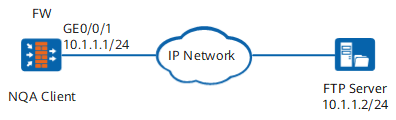
Data Planning
| Item | Data |
|---|---|
User name and password of the FTP server |
User name: user1 Password: hello@123 |
File to be downloaded from the FTP server |
test.txt |
Procedure
- Set an IP address for an interface and assign the interface to a security zone.
# Set an IP address for the interface.
<FW> system-view
[FW] interface GigabitEthernet 0/0/1
[FW-GigabitEthernet0/0/1] ip address 10.1.1.1 24
[FW-GigabitEthernet0/0/1] quit
# Assign the interface to the Untrust zone.
[FW] firewall zone untrust
[FW-untrust] add interface GigabitEthernet 0/0/1
[FW-untrust] quit
- Configure a security policy.
[FW] security-policy
[FW-policy-security] rule name nqa
[FW-policy-security-rule-nqa] source-zone local
[FW-policy-security-rule-nqa] destination-zone untrust
[FW-policy-security-rule-nqa] destination-address 10.1.1.2 32
[FW-policy-security-rule-nqa] action permit
[FW-policy-security-rule-nqa] quit
[FW-policy-security] quit
- Configure an FTP download test instance.
[FW] nqa test-instance admin ftpdownload
[FW-nqa-admin-ftp] test-type ftp
[FW-nqa-admin-ftp] destination-address ipv4 10.1.1.2
[FW-nqa-admin-ftp] ftp-operation get
[FW-nqa-admin-ftp] ftp-username user1
[FW-nqa-admin-ftp] ftp-password hello@123
[FW-nqa-admin-ftp] ftp-filename test.txt
- Immediately start the test.
[FW-nqa-admin-ftp] start now
Verification
Run the display nqa results command to view the test results.
<FW> display nqa results
 NQA entry(admin, ftpdownload) :testFlag is inactive ,testtype is  ftp
  1 . Test 1 result   The test is finished
   SendProbe:1                          ResponseProbe:1
   Completion:success                   RTD OverThresholds number: 0
   MessageBodyOctetsSum: 167201         Stats errors number: 0
   Operation timeout number: 0          System busy operation number:0
   Drop operation number:0              Disconnect operation number: 0
   CtrlConnTime Min/Max/Average: 26/26/26
   DataConnTime Min/Max/Average: 115/115/115
   SumTime Min/Max/Average: 141/141/141
   Average RTT:141
   Lost packet ratio:0 %
Configuration Scripts
#
sysname FW
#
interface GigabitEthernet 0/0/1
 undo shutdown
 ip address 10.1.1.1 255.255.255.0
#
firewall zone untrust
 set priority 5
 add interface GigabitEthernet 0/0/1
#
security-policy
 rule name nqa
  source-zone local
  destination-zone untrust
  destination-address 10.1.1.2 32
  action permit
#
nqa test-instance admin ftpdownload
 test-type ftp
 destination-address ipv4 10.1.1.2
 ftp-operation get
 ftp-username user1
 ftp-password hello@123
 ftp-filename test.txt
 start now /*This command is a one-time action. Therefore, the result is not saved in the configuration file.*/