Feb 23 2016 11:58:25+08:00 FW Example: Configuring the Function of Sending NQA Threshold-Exceeding Traps to the NMS
For a UDP-jitter test, you can configure the function of sending traps to the NMS when the RTD exceeds a specified threshold or the test fails.
Networking Requirements
As shown in Figure 1, when configuring a UDP-jitter test instance, set a threshold and enable the trap function. After the UDP-jitter test ends, FW_A sends a trap to the NMS if the RTD exceeds the specified threshold or the test fails. You can view the cause of the trap on the NMS.
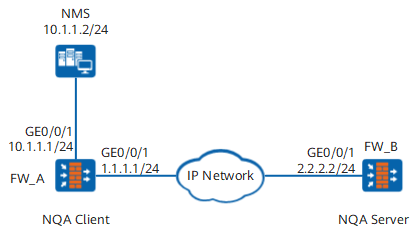
Procedure
- Set IP addresses for interfaces and assign the interfaces to security zones.
# Set an IP address for the interface on FW_A.
<FW_A> system-view
[FW_A] interface GigabitEthernet 0/0/1
[FW_A-GigabitEthernet0/0/1] ip address 1.1.1.1 24
[FW_A-GigabitEthernet0/0/1] quit
[FW_A] interface GigabitEthernet 0/0/2
[FW_A-GigabitEthernet0/0/2] ip address 10.1.1.1 24
[FW_A-GigabitEthernet0/0/2] quit
# Assign the interface on FW_A to the Untrust zone.
[FW_A] firewall zone untrust
[FW_A-untrust] add interface GigabitEthernet 0/0/1
[FW_A-untrust] quit
[FW_A] firewall zone trust
[FW_A-trust] add interface GigabitEthernet 0/0/2
[FW_A-trust] quit
# Set an IP address for the interface on FW_B.
<FW_B> system-view
[FW_B] interface GigabitEthernet 0/0/1
[FW_B-GigabitEthernet0/0/1] ip address 2.2.2.2 24
[FW_B-GigabitEthernet0/0/1] quit
# Assign the interface on FW_B to the Untrust zone.
[FW_B] firewall zone untrust
[FW_B-untrust] add interface GigabitEthernet 0/0/1
[FW_B-untrust] quit
- Configure security policies.
# Configure a security policy on FW_A.
[FW_A] security-policy
[FW_A-policy-security] rule name nqa
[FW_A-policy-security-rule-nqa] source-zone local
[FW_A-policy-security-rule-nqa] destination-zone untrust
[FW_A-policy-security-rule-nqa] source-address 1.1.1.1 32
[FW_A-policy-security-rule-nqa] destination-address 2.2.2.2 32
[FW_A-policy-security-rule-nqa] action permit
[FW_A-policy-security-rule-nqa] quit
[FW_A-policy-security] rule name nms1
[FW_A-policy-security-rule-nms1] source-zone local
[FW_A-policy-security-rule-nms1] destination-zone trust
[FW_A-policy-security-rule-nms1] source-address 10.1.1.1 32
[FW_A-policy-security-rule-nms1] destination-address 10.1.1.2 32
[FW_A-policy-security-rule-nms1] action permit
[FW_A-policy-security-rule-nms1] quit
[FW_A-policy-security] rule name nms2
[FW_A-policy-security-rule-nms2] source-zone trust
[FW_A-policy-security-rule-nms2] destination-zone local
[FW_A-policy-security-rule-nms2] source-address 10.1.1.2 32
[FW_A-policy-security-rule-nms2] destination-address 10.1.1.1 32
[FW_A-policy-security-rule-nms2] action permit
[FW_A-policy-security-rule-nms2] quit
[FW_A-policy-security] quit
# Configure a security policy on FW_B.
[FW_B] security-policy
[FW_B-policy-security] rule name nqa
[FW_B-policy-security-rule-nqa] source-zone untrust
[FW_B-policy-security-rule-nqa] destination-zone local
[FW_B-policy-security-rule-nqa] source-address 1.1.1.1 32
[FW_B-policy-security-rule-nqa] destination-address 2.2.2.2 32
[FW_B-policy-security-rule-nqa] action permit
[FW_B-policy-security-rule-nqa] quit
[FW_B-policy-security] quit
- Configure SNMPv3 on FW_A and use default parameter values, so that FW_A sends traps to the NMS.
# Configure the SNMPv3 user group and user to authenticate the user and encrypt the user's data.
[FW_A] snmp-agent group v3 testgroup privacy
[FW_A] snmp-agent usm-user v3 testuser group testgroup
[FW_A] snmp-agent usm-user v3 testuser authentication-mode md5
Please configure the authentication password (8-64)
Enter Password: hello123
Confirm Password: hello123
[FW_A] snmp-agent usm-user v3 testuser privacy-mode aes128
Please configure the authentication password (8-64)
Enter Password: user87654321
Confirm Password: user87654321
# Configure the SNMP trap function.
[FW_A] snmp-agent target-host trap address udp-domain 10.1.1.2 params securityname testuser - Configure the NMS.
Refer to the related NMS configuration manual. Make sure that the configuration of authentication parameters on the NMS is consistent with the configuration on FW_A. Otherwise, the NMS cannot manage FW_A.
- Configure FW_B as the NQA server.
# Set an IP address and a port number for listening to UDP connection requests.
[FW_B] nqa-server udpecho 2.2.2.2 6000 - Configure FW_A as the NQA client.
# Configure a UDP-jitter test instance.
[FW_A] nqa test-instance admin jitter
[FW_A-nqa-admin-jitter] test-type jitter
[FW_A-nqa-admin-jitter] destination-address ipv4 2.2.2.2
[FW_A-nqa-admin-jitter] destination-port 6000
[FW_A-nqa-admin-jitter] jitter-packetnum 1000
[FW_A-nqa-admin-jitter] datasize 172
[FW_A-nqa-admin-jitter] probe-count 3
# Set an RTD threshold.
[FW_A-nqa-admin-jitter] threshold rtd 20# Enable the trap sending function.
[FW_A-nqa-test-jitter] send-trap rtd
[FW_A-nqa-test-jitter] send-trap testfailure
# Immediately start the test.
[FW_A-nqa-admin-jitter] start now
Verification
Run the display nqa results command on FW_A to view the test results.
<FW_A> display nqa results NQA entry(admin, jitter) :testflag is inactive ,testtype is jitter 1 . Test 1 result The test is finished SendProbe:3000 ResponseProbe:3000 Completion:success RTD OverThresholds number:0 Min/Max/Avg/Sum RTT:5/48/8/23008 RTT Square Sum:192244 NumOfRTT:3000 Drop operation number:0 Operation sequence errors number:0 RTT Stats errors number:0 System busy operation number:0 Operation timeout number:0 Min Positive SD:1 Min Positive DS:1 Max Positive SD:30 Max Positive DS:39 Positive SD Number:765 Positive DS Number:728 Positive SD Sum:1553 Positive DS Sum:775 Positive SD Square Sum:7873 Positive DS Square Sum:2299 Min Negative SD:1 Min Negative DS:1 Max Negative SD:18 Max Negative DS:38 Negative SD Number:726 Negative DS Number:723 Negative SD Sum:1557 Negative DS Sum:776 Negative SD Square Sum:7569 Negative DS Square Sum:2246 Min Delay SD:0 Min Delay DS:0 Avg Delay SD:3 Avg Delay DS:3 Max Delay SD:39 Max Delay DS:47 Packet Loss SD:0 Packet Loss DS:0 Packet Loss Unknown:0 Average of Jitter:1 Average of Jitter SD:2 Average of Jitter DS:1 Jitter out value:1.0328811 Jitter in value:0.5140466 NumberOfOWD:3000 OWD SD Sum:11523 OWD DS Sum:10065 TimeStamp unit: ms Packet Rewrite Number: 0 Packet Rewrite Ratio: 0% Packet Disorder Number: 0 Packet Disorder Ratio: 0% Fragment-disorder Number: 0 Fragment-disorder Ratio: 0% Start time: 2016-02-23 11:58:00+08:00 End time: 2016-02-23 11:59:01+08:00- Check whether traps are generated in the trap buffer of FW_A.
<FW_A> display trapbuffer #Feb 23 2016 11:58:25+08:00 FW NQA/4/THRESHOLD:OID 1.3.6.1.4.1.2011.5.25.111.6.4 NQA entry over threshold. (OwnerIndex=admin, TestName=jitter) #Feb 23 2016 11:51:20+08:00 FW NQA/4/JITTERTESTFAIL:OID 1.3.6.1.4.1.2011.5.25.111.6.10 NQA entry test failed. (OwnerIndex=admin, TestName=jitter) - You can view traps on the NMS if the RTD exceeds the threshold or the test fails.
Configuration Scripts
Configuration script of FW_A
#
sysname FW_A
#
interface GigabitEthernet 0/0/1
 undo shutdown
 ip address 1.1.1.1 255.255.255.0
#
interface GigabitEthernet 0/0/2
 undo shutdown
 ip address 10.1.1.1 255.255.255.0
#
firewall zone trust
 set priority 85
 add interface GigabitEthernet 0/0/2
#
firewall zone untrust
 set priority 5
 add interface GigabitEthernet 0/0/1
#
security-policy
 rule name nqa
  source-zone local
  destination-zone untrust
  source-address 1.1.1.1 32
  destination-address 2.2.2.2 32
  action permit
 rule name nms1
  source-zone local
  destination-zone trust
  source-address 10.1.1.1 32
  destination-address 10.1.1.2 32
  action permit
 rule name nms2
  source-zone trust
  destination-zone local
  source-address 10.1.1.2 32
  destination-address 10.1.1.1 32
  action permit
#
nqa test-instance admin jitter
 test-type jitter
 destination-address ipv4 2.2.2.2
 destination-port 6000
 jitter-packetnum 1000
 datasize 172
 threshold rtd 20
 send-trap rtd
 send-trap testfailure
 start now /*This command is a one-time action. Therefore, the result is not saved in the configuration file.*/
Configuration script of FW_B
#
sysname FW_B
#
interface GigabitEthernet 0/0/1
 undo shutdown
 ip address 2.2.2.2 255.255.255.0
#
firewall zone untrust
 set priority 5
 add interface GigabitEthernet 0/0/1
#
security-policy
 rule name nqa
  source-zone untrust
  destination-zone local
  source-address 1.1.1.1 32
  destination-address 2.2.2.2 32
  action permit
#
nqa-server udpecho 2.2.2.2 6000