CLI: Example for Configuring NTP Peer Mode
In peer mode, clocks on the two peers synchronize with each other.
Prerequisites
Before the configuration, ensure that the time zone of the client , server and peer are the same. If they are inconsistent, run the clock timezone time-zone-name { add | minus } offset command to adjust the time zone.
Networking Requirements
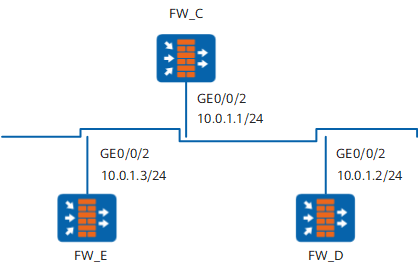
As shown in Figure 1, three devices are located in a LAN.
Configure the clock on FW_C to be a primary NTP clock with the stratum being 2.
FW_D takes FW_C as its NTP server. That is, FW_D functions as the client.
FW_E takes FW_D as its symmetric passive end. That is, FW_E is the symmetric active end.
Configuration Roadmap
The configuration roadmap is as follows:
Configure the clock on FW_C to be the NTP primary clock. The clock on FW_D should be synchronized to the clock on FW_C.
Configure FW_E and FW_D to be NTP peer so that FW_E should send clock synchronization requests to FW_D
Finally, the clocks on FW_C, FW_D and FW_E can be synchronized.
Procedure
- Configure the IP addresses and route based on Figure 1, add interfaces to corresponding security zones and configure security policy between security zones to ensure normal network communication. The detailed procedures are not mentioned here.
- Configure the NTP client/server mode.
# Configure the clock on FW_C to be its own reference clock with the stratum being 2.
<FW_C> system-view
[FW_C] ntp-service refclock-master 2
# Enable the NTP server function.
[FW_C] undo ntp-service server disable# On FW_D, configure FW_C to be its NTP server.
<FW_D> system-view
[FW_D] ntp-service unicast-server 10.0.1.1
After the configuration is complete, the clock on FW_D can be synchronized with the clock on FW_C.
View the NTP status on FW_D and find that the clock is synchronized. The stratum of the clock on FW_D is 3, one stratum lower than that on FW_C.
[FW_D] display ntp-service status clock status: synchronized clock stratum: 3 reference clock ID: 10.0.1.1 nominal frequency: 64.0029 Hz actual frequency: 64.0029 Hz clock precision: 2^7 clock offset: 0.0000 ms root delay: 62.50 ms root dispersion: 0.20 ms peer dispersion: 7.81 ms reference time: 06:52:33.465 UTC Mar 7 2006(C7B7AC31.773E89A8) synchronization state: spike (clock will be set in 1010 secs) - Configure the unicast NTP peer mode.
# On FW_E, configure FW_D to be the symmetric passive end.
<FW_E> system-view
[FW_E] ntp-service unicast-peer 10.0.1.2
Because the active clock is not configured on FW_E, and its stratum is lower than FW_D, FW_E is synchronized to FW_D.
- Verify the configuration.
View the status of FW_E after clock synchronization and you can find that the status is "synchronized". That is, clock synchronization completes. You can also find that the stratum of the clock on FW_E is 4, one stratum lower than that on FW_D.
[FW_E] display ntp-service status
 clock status: synchronized
 clock stratum: 4
 reference clock ID: 10.0.1.2
 nominal frequency: 64.0029 Hz
 actual frequency: 64.0029 Hz
 clock precision: 2^7
 clock offset: 0.0000 ms
 root delay: 124.98 ms
 root dispersion: 0.15 ms
 peer dispersion: 10.96 ms
 reference time: 06:55:50.784 UTC Mar 7 2006(C7B7ACF6.C8D002E2)
synchronization state: spike (clock will be set in 1010 secs)
Configuration Scripts
Configuration script of FW_C
#
 sysname FW_C
#
ntp-service refclock-master 2
undo ntp-service server disable
#
interface GigabitEthernet 0/0/2
 undo shutdown
 ip address 10.0.1.1 255.255.255.0
#
return
Configuration script of FW_D
#
 sysname FW_D
#
 ntp-service unicast-server 10.0.1.1
#
interface GigabitEthernet 0/0/2
 undo shutdown
 ip address 10.0.1.2 255.255.255.0
#
return
Configuration script of FW_E
#
 sysname FW_E
#
 ntp-service unicast-peer 10.0.1.2
#
interface GigabitEthernet 0/0/2
 undo shutdown
 ip address 10.0.1.3 255.255.255.0
#
return