Configuring PoE Using the Web UI
The FW allows you to configure PoE on the web UI. You can enable PoE and set the power supply mode and maximum output power.
Procedure
- Choose .
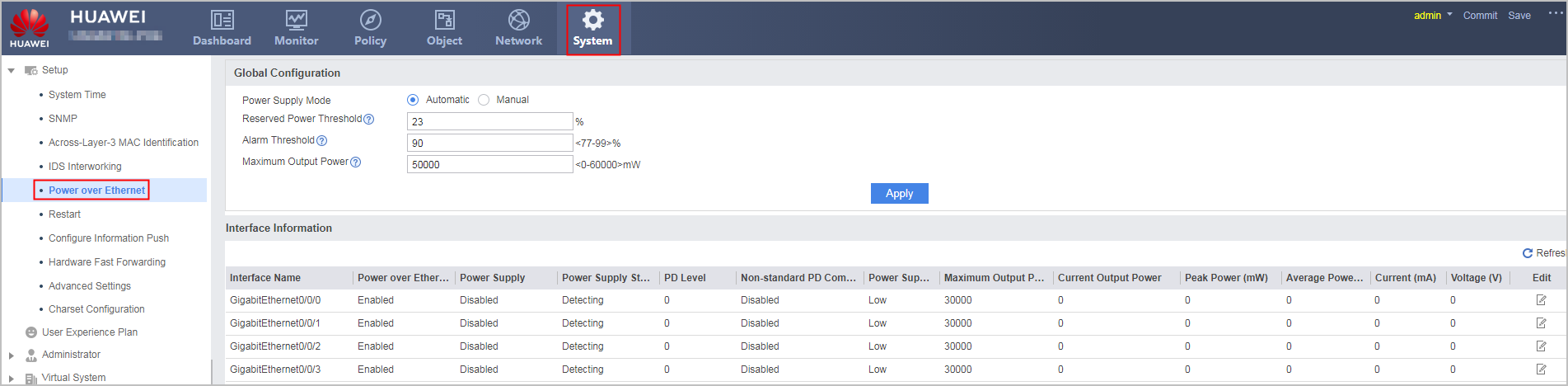
- Set the power supply mode and maximum output power. After
the configuration is complete, click Apply.
Parameter
Description
Value
Power Supply Mode
PoE mode, which can be automatic or manual. Power Supply Modes describes the two modes in detail.
By default, the automatic mode is used.
Reserved Power Threshold
Reserved PoE power ratio.
Properly set the reserved power of the system. The reserved power supports sharply increasing power requirements, so that the PSE has time to power off the PDs connected to interfaces with low priorities.
The reserved power threshold determines the available power of the system. The available power is calculated using the following formula: Available power = Maximum output power x (100% - Reserved power threshold).
By default, 20% of the maximum output power is reserved.
Alarm Threshold
Upper alarm threshold for PoE power consumption. When the consumed power reaches 90% of the total power, the POE_1.3.6.1.4.1.2011.5.25.195.40.17 hwPoePowerOverUtilizationThreshold alarm is generated.
The alarm threshold must be greater than or equal to 100% minus the reserved power threshold.
Maximum Output Power
Maximum output power of the PoE power supply.
By default, the maximum output power of PoE power supply on the device is 60000 mW.
- Configure power supply information for the PoE interface.
Select a power supply interface, click
 under the interface,
and configure the interface as shown in the following figure.
under the interface,
and configure the interface as shown in the following figure.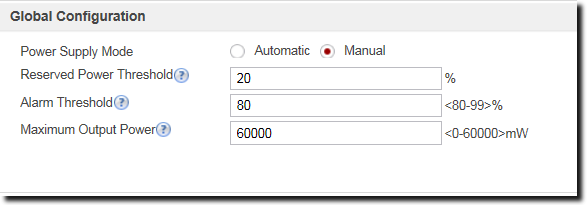 The following table describes the meanings of parameters.
Parameter
Description
Value
PoE
The PoE function is enabled or disabled.
-
Maximum Output Power
Maximum output power of an interface
The value is an integer ranging from 0 to 30000, in mW. The default value is 30000.
Power Supply Priority
Power supply priority of an interface. The value can be Critical, High, or Low. For the application of the priorities, see Power Supply Modes.
-
Manual Power Supply
Manual power supply mode of an interface.- Not configured: Manual power supply is disabled for an interface when Power Supply Mode is Automatic.
- Power-on: Manually power on an interface.
- Power-off: Manually power off an interface.
-
Power-Off Period
Period of time during which an interface is powered off.
The period can be preset or newly created.
-
Non-standard PD Compatibility Detection
Non-standard PD compatibility detection is enabled or disabled.- Enable: After non-standard PD compatibility detection is enabled, the device can detect and supply power to PDs that do not comply with 802.3af or 802.3at.
- Disable: The device cannot supply power to PDs that do not comply with 802.3af or 802.3at.
By default, the device does not supply power to PDs that do not comply with 802.3af or 802.3at.
-
Follow-up Procedure
to modify the configuration.
The following table lists the parameters involved in Interface
Information.
Parameter |
Description |
|---|---|
Interface Name |
Name of an interface. |
PoE |
Status of the PoE function: enabled or disabled. |
Power Supply |
Whether PoE power supply is manually enabled. |
Power Supply Status |
Power supply status of an interface. |
PD Level |
Power level of a PD. The system automatically classifies PDs based on their maximum power. The PDs are classified into levels 0 to 4. If an interface does not have PDs connected, the value is -. |
Non-standard PD Compatibility Detection |
Whether compatibility detection is enabled on an interface. |
Power Supply Priority |
Power supply priority of an interface. The value can be Critical, High, or Low. |
Maximum Output Power |
Maximum output power of interface . |
Current Output Power (mW) |
Current power of the PD on an interface. |
Peak Power (mW) |
Peak power of the PD on an interface. This is a statistical value, which corresponds to the actual maximum power consumption of the PD. |
Average Power (mW) |
Average power of the PD on an interface. This is a statistical value, which corresponds to the average power consumption of the interface from the time when the PD was powered on. |
Current |
Current of PoE power supply, in mA. |
Voltage |
Voltage of PoE power supply, in V. |