CLI: Example for Configuring PoE
This section describes how to use the CLI to configure PoE on the FW.
Networking Requirements
As shown in Figure 1, a FW is deployed at the network border as an enterprise gateway. The IP phone and AP connected to the FW do not have power supply. The customer wants the FW to supply power to the terminals to reduce costs. AP 1 serves the office network of a bank, so it requires the highest power supply priority to avoid power outage. IP phone 1 has heavy traffic and therefore requires a high power supply priority. Its power supply should not be cut off unless in special circumstances. The power of IP phone 1 is 15 W, and the power of AP 1 is 20 W.
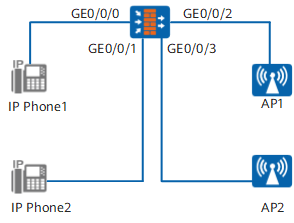
Configuration Roadmap
A PoE-supported FW is required. The PoE configuration roadmap is as follows:
- Set the automatic power supply management mode, so that the FW can flexibly manage the connected PDs.
- Set power supply priorities for GigabitEthernet 0/0/0 and GigabitEthernet 0/0/2 to ensure power supply for AP 1 and IP phone 1.
- Set the maximum output power of GigabitEthernet 0/0/0, GigabitEthernet 0/0/1, and GigabitEthernet 0/0/2 to limit the interface power and protect the device from overload.
Procedure
- Enable PoE on each interface.
[sysname] interface GigabitEthernet 0/0/0
[sysname-GigabitEthernet0/0/0] poe enable
[sysname-GigabitEthernet0/0/0] quit
[sysname] interface GigabitEthernet 0/0/1
[sysname-GigabitEthernet0/0/1] poe enable
[sysname-GigabitEthernet0/0/1] quit
[sysname] interface GigabitEthernet 0/0/2
[sysname-GigabitEthernet0/0/2] poe enable
[sysname-GigabitEthernet0/0/2] quit
- Set the automatic power supply management mode.
[sysname] poe power-management auto
- Set the maximum output power of PoE power supply to 60
W.
[sysname] poe max-power 60000
- Set the maximum output power of GigabitEthernet 0/0/0, GigabitEthernet 0/0/1, and GigabitEthernet 0/0/2 to 15 W, 15 W, and 20 W,
respectively. The power is measured in mW.
[sysname] interface GigabitEthernet 0/0/0
[sysname-GigabitEthernet0/0/0] poe max-port-power 15000
[sysname-GigabitEthernet0/0/0] quit
[sysname] interface GigabitEthernet 0/0/1
[sysname-GigabitEthernet0/0/1] poe max-port-power 15000
[sysname-GigabitEthernet0/0/1] quit
[sysname] interface GigabitEthernet 0/0/2
[sysname-GigabitEthernet0/0/2] poe max-port-power 20000
[sysname-GigabitEthernet0/0/2] quit
- Set the power supply priority of GigabitEthernet 0/0/2 to critical.
[sysname] interface GigabitEthernet 0/0/2
[sysname-GigabitEthernet0/0/2] poe priority critical
- Set the power supply priority of GigabitEthernet 0/0/0 to high.
[sysname] interface GigabitEthernet 0/0/0
[sysname-GigabitEthernet0/0/0] poe priority high
Verification
Run the display poe power-state command to view the status of PoE power supply on the device. In
this example, the PoE power supply status of GigabitEthernet 0/0/2 is checked. Run the display
poe power-state interface GigabitEthernet 0/0/2 command. The command output indicates that power supply to AP
1 is normal.
Port legacy detect           : Disable
 Port power enabled           : Enable
 Port power ON/OFF            : On
 Port power status            : Delivering-power
 Port PD class                : 3
 Port reference power(mW)     : 15400
 Port power priority          : Critical
 Port max power(mW)           : 20000
 Port current power(mW)       : 3575
 Port peak power(mW)          : 3630
 Port average power(mW)       : 3601
 Port current(mA)             : 65.0
 Port voltage(V)              : 55.0