Configuring an IP Address Pool Using the Web UI
This section describes how to use the Web UI to configure an IP address pool.
- Choose .
- Click Add.
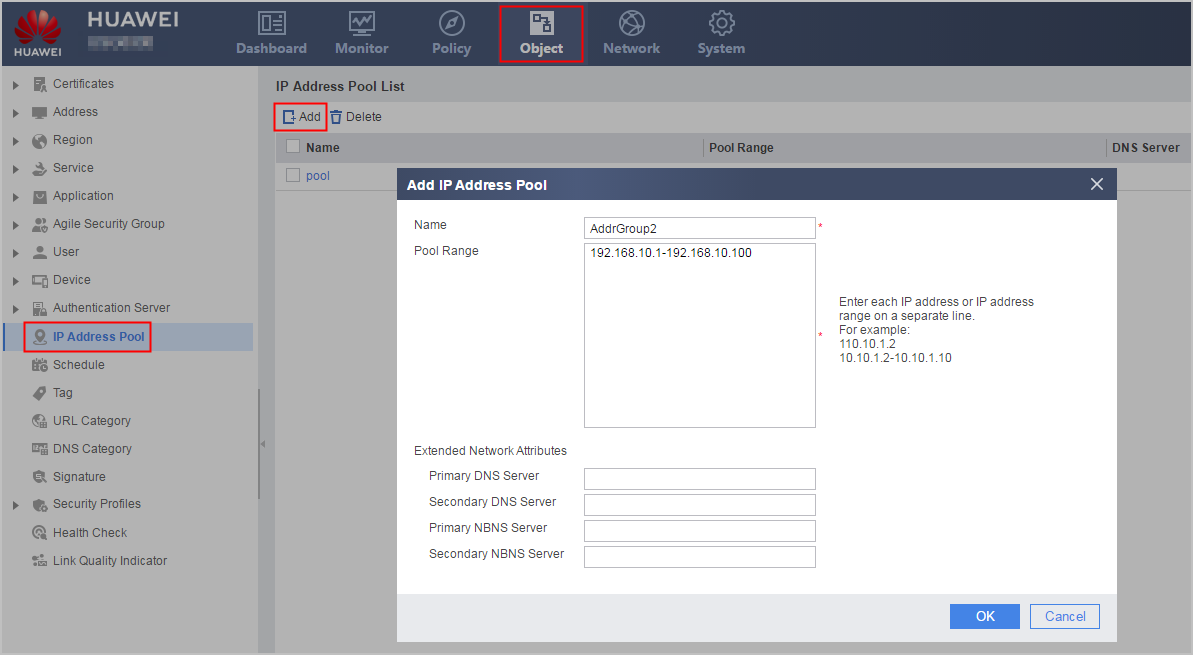
- Configure a name, IP address range, and extended network
attributes for the IP address pool.
Parameter
Description
Name
Name of an IP address pool.
Pool Range
Configure an IP address or an IP address range.
Extended Network Attributes
Primary/Secondary DNS Server: Specify a primary or secondary DNS server IP address.
Primary/Secondary NBNS Server: Specify a primary or secondary NBNS server IP address.
The priority of extended network attributes configured in an address pool is higher than the priority of extended network attributes configured in other modules, such as the user module, L2TP module, and L2TP over IPsec module.
- Click .