Example for Configuring Basic BGP4+ Functions
This section provides an example for configuring the Border Gateway Protocol for IPv6 (BGP4+) to enable communication between devices in two autonomous systems (ASs).
Networking Requirements
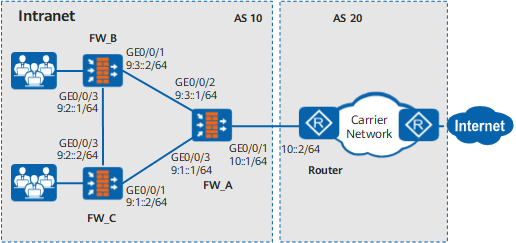
As shown in Figure 1, FW_A is a firewall and functions as an egress gateway on the IPv6 intranet. FW_A is connected to the Internet through an IPv6 carrier network. Intranet devices run the Internal Border Gateway Protocol (IBGP) to establish peer relationships with each other.
BGP is configured on the border router of the carrier network.
An External Border Gateway Protocol (EBGP) peer relationship is established between FW_A and the router.
Item |
Data |
|---|---|
| FW_A | Interface name: GigabitEthernet 0/0/1 IP address: 10::1/64 Zone: Untrust |
Interface name: GigabitEthernet 0/0/2 IP address: 9:3::1/64 Zone: Trust |
|
Interface name: GigabitEthernet 0/0/3 IP address: 9:1::1/64 Zone: Trust |
|
| FW_B | Interface name: GigabitEthernet 0/0/1 IP address: 9:3::2/64 Zone: Untrust |
Interface name: GigabitEthernet 0/0/3 IP address: 9:2::1/64 Zone: Trust |
|
| FW_C | Interface name: GigabitEthernet 0/0/1 IP address: 9:1::2/64 Zone: Untrust |
Interface name: GigabitEthernet 0/0/3 IP address: 9:2::2/64 Zone: Trust |
Configuration Roadmap
The configuration roadmap is as follows:
- Set basic parameters of each interface to implement link connectivity.
- Configure interzone security policies so that intranet PCs can access the Internet.
Establish IBGP peer relationships between FWs.
Establish an EBGP peer relationship between FW_A and the router.
Procedure
- Assign an IPv6 address to each interface shown in Figure 1.
# Configure FW_A.
<FW> system-view
[FW] sysname FW_A
[FW_A] ipv6
[FW_A] interface GigabitEthernet0/0/1
[FW_A-GigabitEthernet0/0/1] ipv6 enable
[FW_A-GigabitEthernet0/0/1] ipv6 address 10::1 64
[FW_A-GigabitEthernet0/0/1] quit
[FW_A] interface GigabitEthernet0/0/2
[FW_A-GigabitEthernet0/0/2] ipv6 enable
[FW_A-GigabitEthernet0/0/2] ipv6 address 9:3::1 64
[FW_A-GigabitEthernet0/0/2] quit
[FW_A] interface GigabitEthernet0/0/3
[FW_A-GigabitEthernet0/0/3] ipv6 enable
[FW_A-GigabitEthernet0/0/3] ipv6 address 9:1::1 64
[FW_A-GigabitEthernet0/0/3] quit
# Configure FW_B.
<FW> system-view
[FW] sysname FW_B
[FW_B] ipv6
[FW_B] interface GigabitEthernet0/0/1
[FW_B-GigabitEthernet0/0/1] ipv6 enable
[FW_B-GigabitEthernet0/0/1] ipv6 address 9:3::2 64
[FW_B-GigabitEthernet0/0/1] quit
[FW_B] interface GigabitEthernet0/0/3
[FW_B-GigabitEthernet0/0/3] ipv6 enable
[FW_B-GigabitEthernet0/0/3] ipv6 address 9:2::1 64
[FW_B-GigabitEthernet0/0/3] quit
# Configure FW_C.
<FW> system-view
[FW] sysname FW_C
[FW_C] ipv6
[FW_C] interface GigabitEthernet0/0/1
[FW_C-GigabitEthernet0/0/1] ipv6 enable
[FW_C-GigabitEthernet0/0/1] ipv6 address 9:1::2 64
[FW_C-GigabitEthernet0/0/1] quit
[FW_C] interface GigabitEthernet0/0/3
[FW_C-GigabitEthernet0/0/3] ipv6 enable
[FW_C-GigabitEthernet0/0/3] ipv6 address 9:2::2 64
[FW_C-GigabitEthernet0/0/3] quit
- Add interfaces to security zones shown in Figure 1.
# Configure FW_A.
[FW_A] firewall zone trust
[FW_A-zone-trust] add interface GigabitEthernet0/0/2
[FW_A-zone-trust] add interface GigabitEthernet0/0/3
[FW_A-zone-trust] quit
[FW_A] firewall zone untrust
[FW_A-zone-untrust] add interface GigabitEthernet0/0/1
[FW_A-zone-untrust] quit
# Configure FW_B.
[FW_B] firewall zone trust
[FW_B-zone-trust] add interface GigabitEthernet0/0/3
[FW_B-zone-trust] quit
[FW_B] firewall zone untrust
[FW_B-zone-untrust] add interface GigabitEthernet0/0/1
[FW_B-zone-untrust] quit
# Configure FW_C.
[FW_C] firewall zone trust
[FW_C-zone-trust] add interface GigabitEthernet0/0/3
[FW_C-zone-trust] quit
[FW_C] firewall zone untrust
[FW_C-zone-untrust] add interface GigabitEthernet0/0/1
[FW_C-zone-untrust] quit
- Configure interzone security policies. The following example shows the configuration on FW_A. The configurations on other FWs are similar to the configuration
on FW_A and are not described.
 The following example provides basic security policy parameters. You can set other parameters to the desired values.
# Configure security policies so that traffic can be forwarded from the Trust zone to the Untrust zone and exchanged between the Local and Untrust zones.
[FW_A] security-policy
[FW_A-policy-security] rule name policy_sec_1
[FW_A-policy-security-rule-policy_sec_1] source-zone trust
[FW_A-policy-security-rule-policy_sec_1] destination-zone untrust
[FW_A-policy-security-rule-policy_sec_1] action permit
[FW_A-policy-security-rule-policy_sec_1] quit
[FW_A-policy-security] rule name policy_sec_2
[FW_A-policy-security-rule-policy_sec_2] source-zone local untrust
[FW_A-policy-security-rule-policy_sec_2] destination-zone local untrust
[FW_A-policy-security-rule-policy_sec_2] action permit
[FW_A-policy-security-rule-policy_sec_2] quit
[FW_A-policy-security] quit
- Configure IBGP.
# Configure FW_A.
[FW_A] ipv6
[FW_A] bgp 10
[FW_A-bgp] router-id 2.2.2.2
[FW_A-bgp] peer 9:1::2 as-number 10
[FW_A-bgp] peer 9:3::2 as-number 10
[FW_A-bgp] ipv6-family
[FW_A-bgp-af-ipv6] peer 9:1::2 enable
[FW_A-bgp-af-ipv6] peer 9:3::2 enable
[FW_A-bgp-af-ipv6] network 9:1:: 64
[FW_A-bgp-af-ipv6] network 9:3:: 64
# Configure FW_B.
[FW_B] ipv6
[FW_B] bgp 10
[FW_B-bgp] router-id 3.3.3.3
[FW_B-bgp] peer 9:3::1 as-number 10
[FW_B-bgp] peer 9:2::2 as-number 10
[FW_B-bgp] ipv6-family
[FW_B-bgp-af-ipv6] peer 9:3::1 enable
[FW_B-bgp-af-ipv6] peer 9:2::2 enable
[FW_B-bgp-af-ipv6] network 9:3:: 64
[FW_B-bgp-af-ipv6] network 9:2:: 64
# Configure FW_C.
[FW_C] ipv6
[FW_C] bgp 10
[FW_C-bgp] router-id 4.4.4.4
[FW_C-bgp] peer 9:1::1 as-number 10
[FW_C-bgp] peer 9:2::1 as-number 10
[FW_C-bgp] ipv6-family
[FW_C-bgp-af-ipv6] peer 9:1::1 enable
[FW_C-bgp-af-ipv6] peer 9:2::1 enable
[FW_C-bgp-af-ipv6] network 9:2:: 64
[FW_C-bgp-af-ipv6] network 9:1:: 64
- Configure EBGP on FW_A.
[FW_A] bgp 10
[FW_A-bgp] peer 10::2 as-number 20
[FW_A-bgp] ipv6-family
[FW_A-bgp-af-ipv6] peer 10::2 enable
[FW_A-bgp-af-ipv6] network 10:: 64
Configuration Verification
View the status of the BGP4+ peer relationship. The following example shows the display on FW_A.
The command output shows that a BGP4+ peer relationship has been established between FW_A and each device.
[FW_A] display bgp ipv6 peer BGP local router ID : 2.2.2.2 Local AS number : 10 Total number of peers : 3 Peers in established state : 3 Peer V AS MsgRcvd MsgSent OutQ Up/Down State PrefRcv 9:1::2 4 10 8 9 0 00:05:37 Established 0 9:3::2 4 10 2 2 0 00:00:09 Established 0 10::2 4 20 9 7 0 00:05:38 Established 0- The preceding command output shows that the router has learned routes destined for devices in AS 10.
Configuration Scripts
Configuration script for FW_A:
#
 sysname FW_A
#
 ipv6
#
interface GigabitEthernet 0/0/1
 ipv6 enable
 ipv6 address 10::1/64
#
interface GigabitEthernet 0/0/2
 ipv6 enable
 ipv6 address 9:3::1/64
#
interface GigabitEthernet 0/0/3
 ipv6 enable
 ipv6 address 9:1::1/64
#
firewall zone trust
 set priority 85
 add interface GigabitEthernet 0/0/2
 add interface GigabitEthernet 0/0/3
#
firewall zone untrust
 set priority 5
 add interface GigabitEthernet 0/0/1
#
bgp 10
 router-id 2.2.2.2
 peer 9:1::2 as-number 10
 peer 9:3::2 as-number 10
 peer 10::2 as-number 20
 ipv4-family
  undo synchronization
#
 ipv6-family
  network 9:1:: 64
  network 9:3:: 64
  network 10:: 64
  peer 9:1::2 enable
  peer 9:3::2 enable
  peer 10::2 enable
#
security-policy
  rule name policy_sec_1
    source-zone trust
    destination-zone untrust
    action permit
  rule name policy_sec_2
    source-zone local
    source-zone untrust
    destination-zone local
    destination-zone untrust
    action permit
Configuration script for FW_B:
#
 sysname FW_B
#
 ipv6
#
interface GigabitEthernet 0/0/1
 ipv6 enable
 ipv6 address 9:3::2/64
#
interface GigabitEthernet 0/0/3
 ipv6 enable
 ipv6 address 9:2::1/64
#
firewall zone trust
 set priority 85
 add interface GigabitEthernet 0/0/3
#
firewall zone untrust
 set priority 5
 add interface GigabitEthernet 0/0/1
#
bgp 10
router-id 3.3.3.3
 peer 9:2::2 as-number 10
 peer 9:3::1 as-number 10
#
 ipv4-family
  undo synchronization
#
 ipv6-family
  network 9:2:: 64
  network 9:3:: 64
  peer 9:2::2 enable
  peer 9:3::1 enable
#
security-policy
  rule name policy_sec_1
    source-zone trust
    destination-zone untrust
    action permit
  rule name policy_sec_2
    source-zone local
    source-zone untrust
    destination-zone local
    destination-zone untrust
    action permit
Configuration script for FW_C:
#
 sysname FW_C
#
 ipv6
#
interface GigabitEthernet 0/0/1
 ipv6 enable
 ipv6 address 9:1::2/64
#
interface GigabitEthernet 0/0/3
 ipv6 enable
 ipv6 address 9:2::2/64
#
firewall zone trust
 set priority 85
 add interface GigabitEthernet 0/0/3
#
firewall zone untrust
 set priority 5
 add interface GigabitEthernet 0/0/1
#
bgp 10
 router-id 4.4.4.4
 peer 9:1::1 as-number 10
 peer 9:2::1 as-number 10
#
 ipv4-family
  undo synchronization
#
 ipv6-family
  network 9:1:: 64
  network 9:2:: 64
  peer 9:1::1 enable
  peer 9:2::1 enable
#
security-policy
  rule name policy_sec_1
    source-zone trust
    destination-zone untrust
    action permit
  rule name policy_sec_2
    source-zone local
    source-zone untrust
    destination-zone local
    destination-zone untrust
    action permit