Configuring BGP Using the Web UI
This chapter describes how to configure BGP on the web UI.
Creating a BGP Process
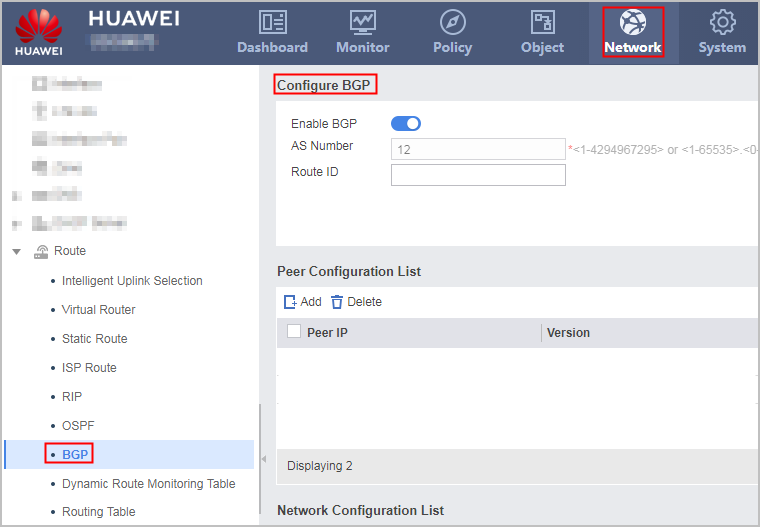
- Choose .
- Select the Enable BGP check box.
- Enter AS Number and Route ID.
Modifying the router ID interrupts services and leads to re-negotiation.
- Click Apply.
If a message indicating the successful operation is displayed, the function is successfully enabled.
Configuring a BGP Peer
- Choose .
- Click Add in Peer Configuration List.
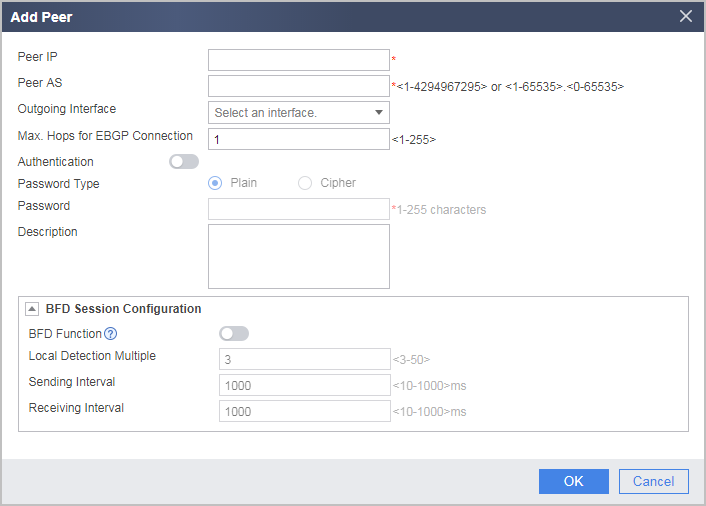
- Set the parameters as follows:
Parameter
Description
Peer IP
Indicates the IP address of a BGP peer.
Peer AS
Indicates the number of the autonomous system (AS) to which the BGP peer belongs.
If the value is the same as the local AS number, the BGP peer is an IBGP peer. If no, it is an EBGP peer.
Outgoing Interface
If the IP address of the specified BGP peer is the IP address of a loopback interface or a sub-interface, you must configure the local interface for the BGP connection to correctly establish a BGP peer.
When two devices use multi-links to set up multiple BGP peers, specify the outgoing interface of the BGP connection.
Maximum EBGP connection hops
Generally, directly-connected physical links exist between EBGP peers. If no directly-connected physical link exists, you must configure the maximum number of EBGP connection hops to ensure that a TCP connection can be set up between the EBGP peers through multiple hops.
The default value is 1. If the value is 1, no EBGP connection can be set up between non-directly-connected peers.
Authentication
Select Authentication to enable the authentication function.
Password Type
Indicates the type of a password. The value can be Plain or Cipher.
This parameter is available only after Authentication is selected.
Password
Indicates the password for verifying a BGP peer.
This parameter is available only after Authentication is selected.
Confirm Password
The password must be confirmed when Password Type is set to Cipher.
Description
Describes a BGP peer.
You are advised to enter a univocal description for each BGP peer.
BFD Session Configuration
BFD Function
Indicates the BFD function for link detection.
Local Detection Multiple
Indicates the local detection multiple for BFD sessions.
If the local end does not receive the BFD packet sent from the peer end within the given interval (Receiving Interval x Local Detection Multiple), it declares that the peer end is Down.
Sending Interval
Indicates the minimum interval at which the local end sens the BFD packet to the peer end.
Receiving Interval
Indicates the minimum interval at which the local end expects to receive the BFD packet from the peer end.
Indicates the minimum interval at which the local end sends the BFD packet to the peer end.
The local Receiving Interval must be consistent with the peer Sending Interval.
- Click OK.
Configuring Local Route Advertising Through BGP
- Choose .
- Click Add in Network Configuration List.
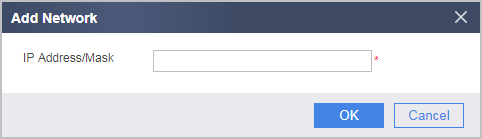
- Enter the IP address and mask to be added to the BGP routing table.
- Click OK.
Configuring BGP to Import Routes
By importing IGP routes, BGP obtains the routes in the AS and advertises the routes to peers. Before you configure IGP route importing, allow BGP to import default routes.
During the importing of IGP routes, you can filter routing information based on different routing protocols.
- Choose .
- Click Add in Route Import Configuration List.
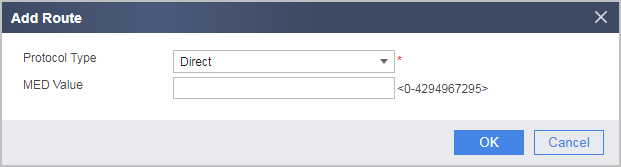
- Set the parameters as follows:
Parameter
Description
Protocol Type
Indicates the protocol type for route importing.
Currently, exportable external routing protocols include OSPF, static routing, direct routing, RIP, ISIS, and UNR.
Process ID
Indicates the process ID for importing OSPF, RIP, and ISIS routes.
MED Value
Indicates the MED value for route-importing protocols.
The MED value is used to determine the optimal route leading traffic to the AS. When multiple next hops are available, the route with the smallest MED value is selected.
- Click OK.