Configuring a BGP Device to Send a Default Route to Its Peer
After a BGP device is configured to send a default route to its peer, the BGP device sends a default route with the local address as the next-hop address to a specified peer, regardless of whether there are default routes in the local routing table. This greatly reduces the number of routes on the network.
Context
The BGP routing table of a device on a medium or large BGP network contains a large number of routing entries. Storing the routing table consumes a large number of memory resources, and transmitting and processing routing information consume lots of network resources. If a device needs to send multiple routes to its peer, the device can be configured to send only a default route with the local address as the next-hop address to its peer, regardless of whether there are default routes in the local routing table. This greatly reduces the number of routes on the network and the consumption of memory resources on the peer and network resources.
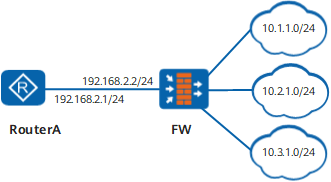
On the network shown in Figure 1, Router A and FW have established a BGP peer relationship. FW has imported routes to network segments 10.1.1.0/24, 10.2.1.0/24, and 10.3.1.0/24 to its BGP routing table. Router A needs to learn these routes from FW. To reduce the consumption of memory resources of Router A and bandwidth used by FW for sending routing information to Router A, configure FW to send a default route to its peer (Router A) and use a routing policy to prevent all the routes to network segments 10.1.1.0/24, 10.2.1.0/24, and 10.3.1.0/24 from being sent to Router A. Then, Router A stores only one default route but can still send traffic to the three network segments.
Procedure
- Access the system view.
- Access the BGP view.
bgp { as-number-plain | as-number-dot }
- Access the BGP IPv4 unicast address family view.
- Configure the device to send a default route to a peer
or a peer group.
peer { group-name | ipv4-address } default-route-advertise [ route-policy route-policy-name ] [ conditional-route-match-all { ipv4-address1 { mask1 | mask-length1 } } &<1-4> | conditional-route-match-any { ipv4-address2 { mask2 | mask-length2 } } &<1-4> ]
If route-policy route-policy-name is set, the BGP device changes attributes of a default route based on the specified route policy.
If conditional-route-match-all { ipv4-address1 { mask1 | mask-length1 } } &<1-4> is set, the BGP device sends a default route to the peer only when all specified routes exist in the local routing table.
If conditional-route-match-any { ipv4-address2 { mask2 | mask-length2 } } &<1-4> is set, the local device sends a default route to the peer when one of the specified routes exists in the local routing table.

After the peer default-route-advertise command is used on a device, the device sends a default route with the local address as the next-hop address to a specified peer, regardless of whether there is a default route in the routing table.