Basic Concepts of IS-IS
IS-IS Areas
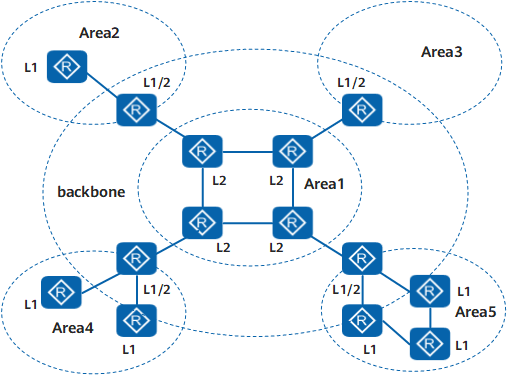
Level-1 router
A Level-1 router manages intra-area routing. It establishes neighbor relationships with only the Level-1 and Level-1-2 routers in the same area. It maintains a Level-1 LSDB. The LSDB contains routing information of the local area. A packet to a destination outside this area is forwarded to the nearest Level-1-2 router.
Level-2 router
A Level-2 router manages inter-area routing. It can establish neighbor relationships with Level-2 routers or Level-1-2 routers in other areas. It maintains a Level-2 LSDB. The LSDB contains inter-area routing information.
All Level-2 routers form the backbone network of the routing domain. They are responsible for communications between areas. The Level-2 routers in the routing domain must be in succession to ensure the continuity of the backbone network. Only Level-2 routers can exchange data packets or routing information with routers outside the routing domain.
Level-1-2 router
A router that belongs to both a Level-1 area and a Level-2 area is called a Level-1-2 router. It can establish Level-1 neighbor relationships with Level-1 routers and Level-1-2 routers in the same area. It can also establish Level-2 neighbor relationships with Level-2 routers and Level-1-2 routers in other areas. A Level-1 router must be connected to other areas through a Level-1-2 router.
A Level-1-2 router maintains two LSDBs: Level-1 and Level-2. The Level-1 LSDB is used for intra-area routing and the Level-2 LSDB is used for inter-area routing.

Level-1 routers in different areas cannot establish neighbor relationships. Level-2 routers can establish neighbor relationships with each other, regardless of the areas to which the Level-2 routers belong.
Interface level
A Level-1-2 router may need to establish only a Level-1 neighbor relationship with the remote end and only a Level-2 neighbor relationship with the other remote end. You can set the level of an interface to restrict the setup of adjacencies on the interface. For example, only a Level-1 adjacency can be established on a Level-1 interface and only a Level-2 adjacency can be established on a Level-2 interface.
Address Structure of IS-IS
In OSI, the NSAP is an address used to locate resources. The ISO has adopted the NSAP address structure shown in Figure 2. NSAP is composed of the Initial Domain Part (IDP) and the Domain Specific Part (DSP). The IDP is equal to the network ID in an IP address, and DSP is equal to the subnet number and host address in an IP address.
As defined by the ISO, the IDP consists of the Authority and Format Identifier (AFI) and the Initial Domain Identifier (IDI). The AFI specifies the address assignment mechanism and address format; the IDI identifies a domain.
The DSP consists of the High Order DSP (HODSP), system ID, and NSAP Selector (SEL). The HODSP is used to divide areas, the system ID identifies a host, and the SEL indicates the service type.
The lengths of the IDP and the DSP are variable. The maximum length of the NSAP is 20 bytes and its minimum length is 8 bytes.
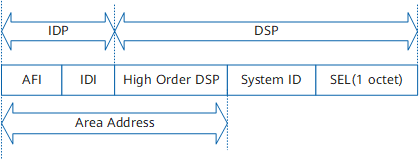
Area address
Together with the HODSP of the DSP, the IDP can identify a routing domain and the areas in a routing domain. The combination of the IDP and HODSP is referred to as an area address, which is equal to an area number in OSPF. An area address is used to uniquely identify the area in the routing domain. The area addresses of routers in the same Level-1 area must be the same.
In general, a router can be configured with only one area address. The area address of all nodes in an area must be the same. In the implementation of a device, an IS-IS process can be configured with a maximum of three area addresses to support seamless combination, division, and transformation of areas.
System ID
A system ID uniquely identifies a host or a router in an area. In the device, the fixed length of the system ID is 48 bits (6 bytes).
In actual applications, a router ID corresponds to a system ID. If a router takes the IP address 192.168.1.1 of Loopback 0 as its router ID, its system ID used in IS-IS can be obtained in the following way:
To extend each part of the IP address 192.168.1.1 to 3 digits, add 0 to the front of any part that is shorter than 3 digits.
Divide the extended address 192.168.001.001 into three parts, with each part consisting of four decimal digits.
The reconstructed address 1921.6800.1001 is the system ID.
You can specify a system ID in many ways. You need to ensure that the system ID uniquely identifies a host or a router.
SEL
The role of an SEL (also referred to as NSAP Selector or N-SEL) is similar to that of the "protocol identifier" of IP. A transport protocol matches an SEL. The SEL is always "00" in IP.
NET
A Network Entity Title (NET) indicates the network layer information of an IS itself. It does not contain the transport layer information (SEL = 0). A NET can be regarded as a special NSAP. The length of the NET field is the same as that of an NSAP. Its maximum length is 20 bytes and its minimum length is 8 bytes. When configuring IS-IS on a router, you can configure only a NET instead of an NSAP.
In general, an IS-IS process is configured with only one NET. When an area needs to be redefined, such as being combined with other areas or divided into sub-areas, you can configure the router with multiple NETs to ensure the correctness of routes.
A maximum of three area addresses can be configured in an IS-IS process, and therefore, you can configure only a maximum of three NETs. When you configure multiple NETs, ensure that their system IDs are the same.
The routers in an area must have the same area address.
IS-IS Network Types
Broadcast network
Point-to-point (P2P) network