< Home

CLI Example for Configuring OSPFv3 to Connect Network Devices

This section provides an example for configuring OSPFv3 to implement connectivity between IPv6 devices across departments.

Networking Requirements

As shown in Figure 1, an enterprise deploys FWs to connect to the research and development, marketing, and financial departments respectively. The enterprise also deploys a FW on the network border as a security gateway to connect the intranet to the IPv6 network through an ISP network.

The networking requirements are as follows:

  • OSPFv3 runs on the intranet to implement connectivity between IPv6 devices across departments.
  • Routers in the department belong to a totally stub area. These routers can only use a default route to access the IPv6 network. They cannot learn external area routes. The totally stub area minimizes external routing information distribution and improves router performance and Research network quality.
  • FW_A and the ISP router establish an OSPFv3 neighbor relationship so that FW_A can learn IPv6 network routes.
  • Devices in all departments can access the IPv6 network through the ISP router.
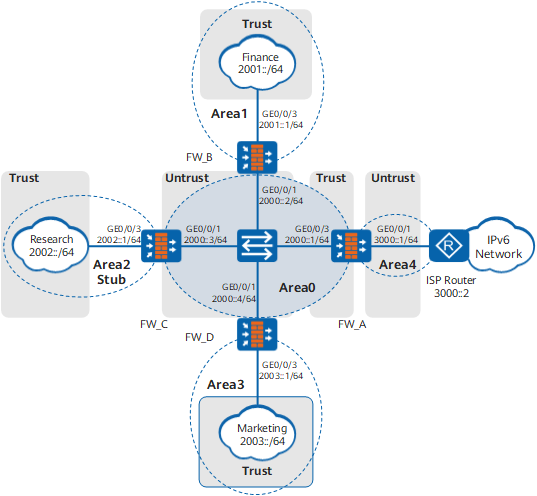
Figure 1 OSPFv3 networking

Configuration Roadmap

The configuration roadmap is as follows:

  1. Configure OSPFv3 on each FW:
    • FW_A: connects the ISP router in Area4 to the switch in Area0.
    • FW_B: connects devices of the financial department in Area1 to the switch in Area0.
    • FW_C: connects devices of the research and development department in Area2 to the switch in Area0.
    • FW_D: connects devices of the marketing department in Area3 to the switch in Area0.
  2. Assign IPv6 addresses to FW interfaces and add interfaces to security zones.
  3. Configure security policies on FWs so that devices in all departments can exchange OSPFv3 packets and access the IPv6 network.

Procedure

  1. Configure FW_A.
    1. Create an OSPFv3 process.

      Before enabling IPv6 on an OSPFv3 interface, ensure that an OSPFv3 process has been created. Otherwise, the OSPFv3 interface cannot be configured.

      # Enable OSPFv3 and set the router ID to 1.1.1.1.

      [FW_A] ospfv3
      [FW_A-ospfv3-1] router-id 1.1.1.1 
      [FW_A-ospfv3-1] quit

    2. Configure an IPv6 address for each interface and assign interfaces to specific security zones.

      # Configure an IPv6 address for each interface.

      <FW> system-view
      [FW] sysname FW_A
      [FW_A] ipv6
      [FW_A] interface GigabitEthernet 0/0/1
      [FW_A-GigabitEthernet0/0/1] ipv6 enable
      [FW_A-GigabitEthernet0/0/1] ipv6 address 3000::1/64
      [FW_A-GigabitEthernet0/0/1] quit
      [FW_A] interface GigabitEthernet 0/0/3
      [FW_A-GigabitEthernet0/0/3] ipv6 enable
      [FW_A-GigabitEthernet0/0/3] ipv6 address 2000::1/64
      [FW_A-GigabitEthernet0/0/3] quit
      

      # Assign interfaces to security zones.

      [FW_A] firewall zone trust
      [FW_A-zone-trust] add interface GigabitEthernet 0/0/3
      [FW_A-zone-trust] quit
      [FW_A] firewall zone untrust
      [FW_A-zone-untrust] add interface GigabitEthernet 0/0/1
      [FW_A-zone-untrust] quit

    3. Configure OSPFv3 interfaces.

      # Enable OSPFv3 on each interface.

      [FW_A] interface GigabitEthernet 0/0/1
      [FW_A-GigabitEthernet0/0/1] ospfv3 1 area 0.0.0.4
      [FW_A-GigabitEthernet0/0/1] quit
      [FW_A] interface GigabitEthernet 0/0/3
      [FW_A-GigabitEthernet0/0/3] ospfv3 1 area 0.0.0.0
      [FW_A-GigabitEthernet0/0/3] quit

    4. Configure an interzone security policy to allow devices to exchange OSPFv3 packets and the R&D, marketing, and finance departments to access the IPv6 network.

      This section provides only required security policy parameters. Set other security policy parameters as required.
      [FW_A] security-policy
      [FW_A-policy-security] rule name policy_sec_1
      [FW_A-policy-security-rule-policy_sec_1] source-zone local trust
      [FW_A-policy-security-rule-policy_sec_1] destination-zone local trust
      [FW_A-policy-security-rule-policy_sec_1] action permit
      [FW_A-policy-security-rule-policy_sec_1] quit
      [FW_A-policy-security] rule name policy_sec_2
      [FW_A-policy-security-rule-policy_sec_2] source-zone local untrust
      [FW_A-policy-security-rule-policy_sec_2] destination-zone local untrust
      [FW_A-policy-security-rule-policy_sec_2] action permit
      [FW_A-policy-security-rule-policy_sec_2] quit
      [FW_A-policy-security] rule name policy_sec_3
      [FW_A-policy-security-rule-policy_sec_3] source-zone trust
      [FW_A-policy-security-rule-policy_sec_3] destination-zone untrust
      [FW_A-policy-security-rule-policy_sec_3] source-address 2001:: 64
      [FW_A-policy-security-rule-policy_sec_3] source-address 2002:: 64
      [FW_A-policy-security-rule-policy_sec_3] source-address 2003:: 64
      [FW_A-policy-security-rule-policy_sec_3] action permit
      [FW_A-policy-security-rule-policy_sec_3] quit
      [FW_A-policy-security] quit

  2. Configure FW_B.
    1. Create an OSPFv3 process.

      # Enable OSPFv3 and set the router ID to 2.2.2.2.

      [FW_B] ospfv3
      [FW_B-ospfv3-1] router-id 2.2.2.2 
      [FW_B-ospfv3-1] quit

    2. Configure an IPv6 address for each interface and assign interfaces to specific security zones.

      # Configure an IPv6 address for each interface.

      <FW> system-view
      [FW] sysname FW_B
      [FW_B] ipv6
      [FW_B] interface GigabitEthernet 0/0/1
      [FW_B-GigabitEthernet0/0/1] ipv6 enable
      [FW_B-GigabitEthernet0/0/1] ipv6 address 2000::2/64
      [FW_B-GigabitEthernet0/0/1] quit
      [FW_B] interface GigabitEthernet 0/0/3
      [FW_B-GigabitEthernet0/0/3] ipv6 enable
      [FW_B-GigabitEthernet0/0/3] ipv6 address 2001::1/64
      [FW_B-GigabitEthernet0/0/3] quit
      

      # Assign interfaces to security zones.

      [FW_B] firewall zone trust
      [FW_B-zone-trust] add interface GigabitEthernet 0/0/3
      [FW_B-zone-trust] quit
      [FW_B] firewall zone untrust
      [FW_B-zone-untrust] add interface GigabitEthernet 0/0/1
      [FW_B-zone-untrust] quit

    3. Configure OSPFv3 interfaces.

      # Enable OSPFv3 on each interface.

      [FW_B] interface GigabitEthernet 0/0/1
      [FW_B-GigabitEthernet0/0/1] ospfv3 1 area 0.0.0.0
      [FW_B-GigabitEthernet0/0/1] quit
      [FW_B] interface GigabitEthernet 0/0/3
      [FW_B-GigabitEthernet0/0/3] ospfv3 1 area 0.0.0.1
      [FW_B-GigabitEthernet0/0/3] quit

    4. Configure an interzone security policy to allow devices to exchange OSPFv3 packets and the finance department to access the R&D department, marketing department, and IPv6 network.

      This section provides only required security policy parameters. Set other security policy parameters as required.
      [FW_B] security-policy
      [FW_B-policy-security] rule name policy_sec_1
      [FW_B-policy-security-rule-policy_sec_1] source-zone local trust
      [FW_B-policy-security-rule-policy_sec_1] destination-zone local trust
      [FW_B-policy-security-rule-policy_sec_1] action permit
      [FW_B-policy-security-rule-policy_sec_1] quit
      [FW_B-policy-security] rule name policy_sec_2
      [FW_B-policy-security-rule-policy_sec_2] source-zone local untrust
      [FW_B-policy-security-rule-policy_sec_2] destination-zone local untrust
      [FW_B-policy-security-rule-policy_sec_2] action permit
      [FW_B-policy-security-rule-policy_sec_2] quit
      [FW_B-policy-security] rule name policy_sec_3
      [FW_B-policy-security-rule-policy_sec_3] source-zone trust
      [FW_B-policy-security-rule-policy_sec_3] destination-zone untrust
      [FW_B-policy-security-rule-policy_sec_3] source-address 2001:: 64
      [FW_B-policy-security-rule-policy_sec_3] action permit
      [FW_B-policy-security-rule-policy_sec_3] quit
      [FW_B-policy-security] quit

  3. Configure FW_C.
    1. Create an OSPFv3 process.

      # Enable OSPFv3 and set the router ID to 3.3.3.3.

      [FW_C] ospfv3
      [FW_C-ospfv3-1] router-id 3.3.3.3
      [FW_C-ospfv3-1] quit

    2. Configure an IPv6 address for each interface and assign interfaces to specific security zones.

      # Configure an IPv6 address for each interface.

      <FW> system-view
      [FW] sysname FW_C
      [FW_C] ipv6
      [FW_C] interface GigabitEthernet 0/0/1
      [FW_C-GigabitEthernet0/0/1] ipv6 enable
      [FW_C-GigabitEthernet0/0/1] ipv6 address 2000::3/64
      [FW_C-GigabitEthernet0/0/1] quit
      [FW_C] interface GigabitEthernet 0/0/3
      [FW_C-GigabitEthernet0/0/3] ipv6 enable
      [FW_C-GigabitEthernet0/0/3] ipv6 address 2002::1/64
      [FW_C-GigabitEthernet0/0/3] quit
      

      # Assign interfaces to security zones.

      [FW_C] firewall zone trust
      [FW_C-zone-trust] add interface GigabitEthernet 0/0/3
      [FW_C-zone-trust] quit
      [FW_C] firewall zone untrust
      [FW_C-zone-untrust] add interface GigabitEthernet 0/0/1
      [FW_C-zone-untrust] quit

    3. Configure Area2 as an Stub area.

      [FW_C] ospfv3
      [FW_C-ospfv3-1] area 0.0.0.2
      [FW_C-ospfv3-1-area-0.0.0.2] stub no-summary
      [FW_C-ospfv3-1-area-0.0.0.2] quit

    4. Configure OSPFv3 interfaces.

      # Enable OSPFv3 on each interface.

      [FW_C] interface GigabitEthernet 0/0/1
      [FW_C-GigabitEthernet0/0/1] ospfv3 1 area 0.0.0.0
      [FW_C-GigabitEthernet0/0/1] quit
      [FW_C] interface GigabitEthernet 0/0/3
      [FW_C-GigabitEthernet0/0/3] ospfv3 1 area 0.0.0.2
      [FW_C-GigabitEthernet0/0/3] quit

    5. Configure an interzone security policy to allow devices to exchange OSPFv3 packets and the R&D department to access the finance department, marketing department, and IPv6 network.

      This section provides only required security policy parameters. Set other security policy parameters as required.
      [FW_C] security-policy
      [FW_C-policy-security] rule name policy_sec_1
      [FW_C-policy-security-rule-policy_sec_1] source-zone local trust
      [FW_C-policy-security-rule-policy_sec_1] destination-zone local trust
      [FW_C-policy-security-rule-policy_sec_1] action permit
      [FW_C-policy-security-rule-policy_sec_1] quit
      [FW_C-policy-security] rule name policy_sec_2
      [FW_C-policy-security-rule-policy_sec_2] source-zone local untrust
      [FW_C-policy-security-rule-policy_sec_2] destination-zone local untrust
      [FW_C-policy-security-rule-policy_sec_2] action permit
      [FW_C-policy-security-rule-policy_sec_2] quit
      [FW_C-policy-security] rule name policy_sec_3
      [FW_C-policy-security-rule-policy_sec_3] source-zone trust
      [FW_C-policy-security-rule-policy_sec_3] destination-zone untrust
      [FW_C-policy-security-rule-policy_sec_3] source-address 2002:: 64
      [FW_C-policy-security-rule-policy_sec_3] action permit
      [FW_C-policy-security-rule-policy_sec_3] quit
      [FW_C-policy-security] quit

  4. Configure FW_D.
    1. Create an OSPFv3 process.

      # Enable OSPFv3 and set the router ID to 4.4.4.4.

      [FW_D] ospfv3
      [FW_D-ospfv3-1] router-id 4.4.4.4
      [FW_D-ospfv3-1] quit

    2. Configure an IPv6 address for each interface and assign interfaces to specific security zones.

      # Configure an IPv6 address for each interface.

      <FW> system-view
      [FW] sysname FW_D
      [FW_D] ipv6
      [FW_D] interface GigabitEthernet 0/0/1
      [FW_D-GigabitEthernet0/0/1] ipv6 enable
      [FW_D-GigabitEthernet0/0/1] ipv6 address 2000::4/64
      [FW_D-GigabitEthernet0/0/1] quit
      [FW_D] interface GigabitEthernet 0/0/3
      [FW_D-GigabitEthernet0/0/3] ipv6 enable
      [FW_D-GigabitEthernet0/0/3] ipv6 address 2003::1/64
      [FW_D-GigabitEthernet0/0/3] quit
      

      # Assign interfaces to security zones.

      [FW_D] firewall zone trust
      [FW_D-zone-trust] add interface GigabitEthernet 0/0/3
      [FW_D-zone-trust] quit
      [FW_D] firewall zone untrust
      [FW_D-zone-untrust] add interface GigabitEthernet 0/0/1
      [FW_D-zone-untrust] quit

    3. Configure OSPFv3 interfaces.

      # Enable OSPFv3 on each interface.

      [FW_D] interface GigabitEthernet 0/0/1
      [FW_D-GigabitEthernet0/0/1] ospfv3 1 area 0.0.0.0
      [FW_D-GigabitEthernet0/0/1] quit
      [FW_D] interface GigabitEthernet 0/0/3
      [FW_D-GigabitEthernet0/0/3] ospfv3 1 area 0.0.0.3
      [FW_D-GigabitEthernet0/0/3] quit

    4. Configure an interzone security policy to allow devices to exchange OSPFv3 packets and the marketing department to access the finance department, R&D department, and IPv6 network.

      This section provides only required security policy parameters. Set other security policy parameters as required.
      [FW_D] security-policy
      [FW_D-policy-security] rule name policy_sec_1
      [FW_D-policy-security-rule-policy_sec_1] source-zone local trust
      [FW_D-policy-security-rule-policy_sec_1] destination-zone local trust
      [FW_D-policy-security-rule-policy_sec_1] action permit
      [FW_D-policy-security-rule-policy_sec_1] quit
      [FW_D-policy-security] rule name policy_sec_2
      [FW_D-policy-security-rule-policy_sec_2] source-zone local untrust
      [FW_D-policy-security-rule-policy_sec_2] destination-zone local untrust
      [FW_D-policy-security-rule-policy_sec_2] action permit
      [FW_D-policy-security-rule-policy_sec_2] quit
      [FW_D-policy-security] rule name policy_sec_3
      [FW_D-policy-security-rule-policy_sec_3] source-zone trust
      [FW_D-policy-security-rule-policy_sec_3] destination-zone untrust
      [FW_D-policy-security-rule-policy_sec_3] source-address 2003:: 64
      [FW_D-policy-security-rule-policy_sec_3] action permit
      [FW_D-policy-security-rule-policy_sec_3] quit
      [FW_D-policy-security] quit

Configuration Verification

  1. View the OSPFv3 neighbor status on the FW. The following command output shows the OSPFv3 neighbor status on FW_A.

    [FW_A] display ospfv3 peer
    
    OSPFv3 Process (1)
    OSPFv3 Area (0.0.0.1)
    Neighbor ID     Pri   State                Dead Time   Interface  Instance ID  
    2.2.2.2           1   2-Way/DROther        00:00:34    GE0/0/3           0
    3.3.3.3           1   Full/Backup          00:00:32    GE0/0/3           0
    4.4.4.4           1   Full/DR              00:00:32    GE0/0/3           0
    OSPFv3 Area (0.0.0.4)
    Neighbor ID     Pri   State                Dead Time   Interface  Instance ID  
    5.5.5.5           1   Full/-               00:00:34    GE0/0/1           0
    

  2. View the OSPFv3 routing table on the FW. The following command output shows the OSPFv3 routing table on FW_A.

    [FW_A] display ospfv3 routing
    
    Codes : E2 - Type 2 External, E1 - Type 1 External, IA - Inter-Area,
    N - NSSA, U - Uninstalled, D - Denied by Import Policy
    OSPFv3 Process (1)
       Destination                                   Metric
         Next-hop
      IA 2000::/64                                     1
               directly-connected, GE0/0/3
      IA 2001::/64                                     2
               via 2000::2, GE0/0/3
      IA 2002::/64                                     2
               via 2000::3, GE0/0/3
         2003::/64                                     2
               via 2000::4, GE0/0/3
      IA 3000::/64                                     1
               directly-connected, GE0/0/1
    

    The preceding command output shows that FW_A learns the network segment routes of the R&D, marketing, and finance departments and the IPv6 routes to the Internet.

Configuration Scripts

Configuration script for FW_A:

#
 ipv6
#                                                                               
 sysname FW_A                                      
#                                                                               
ospfv3 1                                                                        
 router-id 1.1.1.1                                                              
#                                                                               
interface GigabitEthernet0/0/1                                                  
 ipv6 enable                                                                    
 ipv6 address 3000::1 64 
 ospfv3 1 area 0.0.0.4
#                                                                               
interface GigabitEthernet0/0/3                                                  
 ipv6 enable                                                                    
 ipv6 address 2000::1 64 
 ospfv3 1 area 0.0.0.0
#                                                                               
firewall zone trust                                                             
 set priority 85                                                                
 add interface GigabitEthernet0/0/3                                             
#                                                                               
firewall zone untrust                                                           
 set priority 5                                                                 
 add interface GigabitEthernet0/0/1                                             
#                                                                                
security-policy                                                                 
  rule name policy_sec_1                                                        
    source-zone local                                                           
    source-zone trust                                                         
    destination-zone local                                                      
    destination-zone trust                                                    
    action permit                                                               
  rule name policy_sec_2                                                        
    source-zone local                                                           
    source-zone untrust                                                         
    destination-zone local                                                      
    destination-zone untrust                                                    
    action permit                                                               
  rule name policy_sec_3                                                        
    source-zone trust                                                           
    destination-zone untrust                                                    
    source-address 2001:: 64                                                    
    source-address 2002:: 64                                                    
    source-address 2003:: 64 
    action permit                                                               
#                                                                               
return

Configuration script for FW_B:

#
 ipv6
#                                                                               
 sysname FW_B                                      
#                                                                               
ospfv3 1                                                                        
 router-id 2.2.2.2                                                              
#                                                                               
interface GigabitEthernet0/0/1                                                  
 ipv6 enable                                                                    
 ipv6 address 2000::2 64 
 ospfv3 1 area 0.0.0.0
#                                                                               
interface GigabitEthernet0/0/3                                                  
 ipv6 enable                                                                    
 ipv6 address 2001::1 64 
 ospfv3 1 area 0.0.0.1
#                                                                               
firewall zone trust                                                             
 set priority 85                                                                
 add interface GigabitEthernet0/0/3                                             
#                                                                               
firewall zone untrust                                                           
 set priority 5                                                                 
 add interface GigabitEthernet0/0/1                                             
#                                                                                
security-policy                                                                 
  rule name policy_sec_1                                                        
    source-zone local                                                           
    source-zone trust                                                         
    destination-zone local                                                      
    destination-zone trust                                                    
    action permit                                                               
  rule name policy_sec_2                                                        
    source-zone local                                                           
    source-zone untrust                                                         
    destination-zone local                                                      
    destination-zone untrust                                                    
    action permit                                                               
  rule name policy_sec_3                                                        
    source-zone trust                                                           
    destination-zone untrust                                                    
    source-address 2001:: 64                                                    
    action permit                                                               
#                                                                               
return

Configuration script for FW_C:

#
 ipv6
#                                                                               
 sysname FW_C                                      
#                                                                               
ospfv3 1                                                                        
 router-id 3.3.3.3                                                              
 area 0.0.0.2                                                                   
  stub no-summary 
#                                                                               
interface GigabitEthernet0/0/1                                                  
 ipv6 enable                                                                    
 ipv6 address 2000::3 64 
 ospfv3 1 area 0.0.0.0
#                                                                               
interface GigabitEthernet0/0/3                                                  
 ipv6 enable                                                                    
 ipv6 address 2002::1 64 
 ospfv3 1 area 0.0.0.2
#                                                                               
firewall zone trust                                                             
 set priority 85                                                                
 add interface GigabitEthernet0/0/3                                             
#                                                                               
firewall zone untrust                                                           
 set priority 5                                                                 
 add interface GigabitEthernet0/0/1                                             
#                                                                                
security-policy                                                                 
  rule name policy_sec_1                                                        
    source-zone local                                                           
    source-zone trust                                                         
    destination-zone local                                                      
    destination-zone trust                                                    
    action permit                                                               
  rule name policy_sec_2                                                        
    source-zone local                                                           
    source-zone untrust                                                         
    destination-zone local                                                      
    destination-zone untrust                                                    
    action permit                                                               
  rule name policy_sec_3                                                        
    source-zone trust                                                           
    destination-zone untrust                                                    
    source-address 2002:: 64                                                    
    action permit                                                               
#                                                                               
return

Configuration script for FW_D:

#
 ipv6
#                                                                               
 sysname FW_D                                      
#                                                                               
ospfv3 1                                                                        
 router-id 4.4.4.4                                                              
#                                                                               
interface GigabitEthernet0/0/1                                                  
 ipv6 enable                                                                    
 ipv6 address 2000::4 64 
 ospfv3 1 area 0.0.0.0
#                                                                               
interface GigabitEthernet0/0/3                                                  
 ipv6 enable                                                                    
 ipv6 address 2003::1 64 
 ospfv3 1 area 0.0.0.3
#                                                                               
firewall zone trust                                                             
 set priority 85                                                                
 add interface GigabitEthernet0/0/3                                             
#                                                                               
firewall zone untrust                                                           
 set priority 5                                                                 
 add interface GigabitEthernet0/0/1                                             
#                                                                                
security-policy                                                                 
  rule name policy_sec_1                                                        
    source-zone local                                                           
    source-zone trust                                                         
    destination-zone local                                                      
    destination-zone trust                                                    
    action permit                                                               
  rule name policy_sec_2                                                        
    source-zone local                                                           
    source-zone untrust                                                         
    destination-zone local                                                      
    destination-zone untrust                                                    
    action permit                                                               
  rule name policy_sec_3                                                        
    source-zone trust                                                           
    destination-zone untrust                                                    
    source-address 2003:: 64                                                    
    action permit                                                               
#                                                                               
return
Copyright © Huawei Technologies Co., Ltd.
< Previous topic
