Understanding Routing Policy
Routing policies are used to filter routes and control the receiving and advertising of routes. By changing the route attributes such as reachability, you can change the path that the traffic passes through.
Implementation
- Define rules: Define features of routes to which routing policies are applied. Users define a set of matching rules based on different attributes of routes, such as the destination address and the address of the router that advertises the routes.
- Implement the rules: Apply the matching rules to routing policies for advertising, receiving, and importing routes.
Filter
A filter is the core of a routing policy and is defined using a set of matching rules. The FW provides the filters listed in Table 1.
Filter |
Applicable Scope |
Matching Rules |
|---|---|---|
Dynamic routing protocols |
Inbound interface, source or destination IP address, protocol type, and source or destination port number |
|
Dynamic routing protocols |
Source and destination IP addresses and next hop address |
|
BGP |
AS_Path attribute |
|
BGP |
Community attribute |
|
VPN |
Extended community attribute RT |
|
VPN |
RD attribute |
|
Dynamic routing protocols |
Destination IP address, next hop address, cost, interface information, route type, ACL, IP prefix list, AS_Path filter, and community filter, extcommunity filter, and RD filter |
The ACL, IP prefix list, AS_Path filter, and community filter, extcommunity filter, and RD filter can be used only to filter routes but not modify attributes of the filtered routes. A Route-Policy is a comprehensive filter, and it can use the matching rules of the ACL, IP prefix list, AS_Path filter, and community filter, extcommunity filter, and RD filter to filter routes. In addition, attributes of the filtered routes can be modified using the Route-Policy. The following section describes the filters in more detail.
ACL
An ACL is a set of sequential filtering rules. Users can define rules based on packet information, such as inbound interfaces, source or destination IP addresses, protocol types, or source or destination port numbers and specify an action to deny or permit packets. After an ACL is configured, the system classifies received packets based on the rules defined in the ACL and denies or permits the packets accordingly.
An ACL only classifies packets based on defined rules and can be used to filter packets only when it is applied to a routing policy.
ACLs can be configured for both IPv4 packets and IPv6 packets. Based on the usage, ACLs are classified into two types: basic ACLs, and advanced ACLs. Users can specify the IP address and subnet address range in an ACL to match the source IP address, destination network segment address, or the next hop address of a route.
- Protect the devices against IP, TCP, and Internet Control Message Protocol (ICMP) packet attacks.
- Control network access. For example, ACLs can be used to control the access of enterprise network users to external networks, the specific network resources that users can access, and the period for which users can access networks.
- Limit network traffic and improve network performance. For example, ACLs can be used to limit bandwidth for upstream and downstream traffic, charge for the bandwidth that users have applied for, and fully use high-bandwidth network resources.
IP Prefix List
An IP prefix list contains a group of route filtering rules. Users can specify the prefix and mask length range to match the destination network segment address or the next hop address of a route. An IP prefix list is used to filter routes that are advertised and received by various dynamic routing protocols.
An IP prefix list is easier and more flexible than an ACL. However, if a large number of routes with different prefixes need to be filtered, configuring an IP prefix list to filter the routes is complex.
- Mask length: An IP prefix list filters routes based on IP address prefixes. An IP address prefix is defined by an IP address and the mask length. For example, in a route to 10.1.1.1/16, the mask length is 16 bits, and the valid prefix is 16 bits (10.1.0.0).
- Mask length range: Routes with the IP address prefix and mask length within the range defined in the IP prefix list meet the matching rules.

- If a mask is specified, all routes with the mask are permitted or denied as required.
- If a mask length range is specified, all routes with the mask length in the range are permitted or denied as required.
AS_Path Filter
An AS_Path filter is used to filter BGP routes based on AS_Path attributes contained in the BGP routes. The AS_Path attribute is used to record numbers of all ASs that a BGP route passes through from the local end to the destination in the distance-vector (DV) order. Therefore, filtering rules defined based on AS_Path attributes can be used to filter BGP routes.
The matching condition of an AS_Path filter is specified using a regular expression. For example, ^30 indicates that only the AS_Path attribute starting with 30 is matched. Using a regular expression can simplify configurations.
The AS_Path attribute is a private attribute of BGP and is therefore used to filter BGP routes only.
Community Filter
A community filter is used to filter BGP routes based on the community attributes contained in the BGP routes. The community attribute is a set of destination addresses with the same characteristics. Therefore, filtering rules defined based on community attributes can be used to filter BGP routes.
In addition to the well-known community attributes, users can define community attributes using digits. The matching condition of a community filter can be specified using a community ID or a regular expression.
Like AS_Path filters, community filters are used to filter only BGP routes because the community attribute is also a private attribute of BGP.
Extcommunity Filter
VPN target: A VPN target controls route learning between VPN instances, isolating routes of VPN instances from each other. A VPN target may be either an import or export VPN target. Before advertising a Virtual Private Network version 4 (VPNv4) or Virtual Private Network version 6 (VPNv6) route to a remote Multi-protocol Extension for Border Gateway Protocol (MP-BGP) peer, a PE adds an export VPN target to the route. After receiving a VPNv4 or VPNv6 route, the remote MP-BGP peer compares the received export VPN target with the local import VPN target. If they are the same, the remote MP-BGP peer adds the route to the routing table of the local VPN instance.
Source of Origin (SoO): Several CEs at a VPN site may be connected to different PEs. The VPN routes advertised from the CEs to the PEs may be re-advertised to the VPN site where the CEs reside after the routes have traversed the backbone network. This may cause route loops at the VPN site. In this situation, configure an SoO attribute for VPN routes. With the SoO attribute, routes advertised from different VPN sites can be distinguished and will not be advertised to the source VPN site, preventing route loops.
The formats of a VPN target attribute and an SoO attribute are the same. Currently, the FW supports only the VPN target attribute. The matching condition of an extcommunity filter can be specified using an extended community ID or a regular expression.
An extcommunity filter is used to filter only BGP routes because the extended community attribute is also a private attribute of BGP.
RD Filter
An RD filter is used to filter BGP routes based on RDs in VPN routes. RDs are used to distinguish IPv4 and IPv6 prefixes in the same address segment in VPN instances. RD filters specify matching rules regarding RD attributes.
Route-Policy
A Route-Policy is a complex filter. It is used to match attributes of specified routes and change route attributes when specific conditions are met. A Route-Policy can use the preceding six filters to define its matching rules.
Composition of a Route-Policy
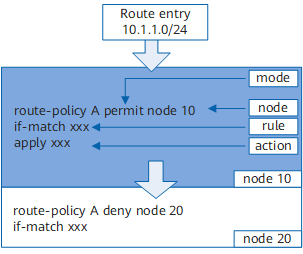
As shown in Figure 1, a Route-Policy consists of node IDs, matching mode, if-match clauses, and apply clauses.Node ID
A Route-Policy consists of one or more nodes. Node IDs are specified as indexes in the IP prefix list. In a Route-Policy, routes are filtered based on the following rules:- Sequential matching: The system checks entries based on node IDs in ascending order. Therefore, specifying the node IDs in the required sequence is recommended.
- One-time matching: The relationship between the nodes of a Route-Policy is "OR". If a route matches one node, the route matches the Route-Policy and will not be matched against the next node.
Matching mode
Either of the following matching modes can be used:- permit: specifies the permit mode of a node. If a route matches the if-match clauses of a node, all the actions defined by apply clauses are performed, and the matching is complete. If a route does not match the if-match clauses of the node, the route continues to match the next node.
- deny: specifies the deny mode of a node. In the deny mode, the apply clauses are not used. If a route matches all the if-match clauses of the node, the route is denied by the node and the next node is not matched. If the entry does not match all the if-match clauses, the next node is matched.
To allow other routes to pass through, a Route-Policy that contains no if-match or apply clause in the permit mode needs to be configured for a node next to multiple nodes that are in the deny mode.if-match clause
The if-match clause defines the matching rules.
Each node of a Route-Policy can comprise multiple if-match clauses or no if-match clause at all. If no if-match clause is configured for a node in the permit mode, all routes match the node.
apply clause
The apply clauses specify actions. When a route matches a Route-Policy, the system sets some attributes for the route based on the apply clause.
Each node of a Route-Policy can comprise multiple apply clauses or no apply clause at all. The apply clause is not used when routes need to be filtered but attributes of the routes do not need to be set.
Matching results of a Route-Policy
The matching results of a Route-Policy are obtained based on the following aspects:- Matching mode of the node, either permit or deny
- Matching rules (either permit or deny) contained in the if-match clause (such as ACLs or IP prefix lists)
Table 2 Matching results of a Route-Policy Rule (Matching Rule Contained in if-match Clauses) Mode (Matching Mode of a Node) Matching Result permit permit - Routes matching the if-match clauses of the node match the Route-Policy, and the matching is complete.
- Routes not matching the if-match clauses of the node continue to match the next node of the Route-Policy.
deny - Routes matching the if-match clauses of the node are denied by the Route-Policy, and the matching is complete.
- Routes not matching the if-match clauses of the node continue to match the next node of the Route-Policy.
deny permit - Routes matching the if-match clauses of the node are denied by the Route-Policy and continue to match the next node.
- Routes not matching the if-match clauses of the node continue to match the next node of the Route-Policy.
deny - Routes matching the if-match clauses of the node are denied by the Route-Policy and continue to match the next node.
- Routes not matching the if-match clauses of the node continue to match the next node of the Route-Policy.
NOTE:If all if-match clauses and nodes of the Route-Policy are in the deny mode, all the routes to be filtered are denied by the Route-Policy.
On the FW, all unmatched routes are denied by the Route-Policy by default. If more than one node is defined in a Route-Policy, at least one of them must be in the permit mode. The reason is as follows:- If a route fails to match any of the nodes, the route is denied by the Route-Policy.
- If all the nodes in the Route-Policy are set in the deny mode, all the routes to be filtered are denied by the Route-Policy.
Other Functions
In addition to the preceding functions, routing policies have an enhanced feature: BGP to IGP.
In some scenarios, when an IGP uses a routing policy to import BGP routes, route attributes, the cost for example, can be set based on private attributes such as the community in BGP routes. However, without the BGP to IGP feature, BGP routes are denied because the IGP fails to identify private attributes such as community attributes in these routes. As a result, apply clauses used to set route attributes do not take effect.
With the BGP to IGP feature, route attributes can be set based on private attributes, such as the community, extcommunity, and AS_Path attributes in BGP routes. The BGP to IGP implementation process is as follows:
When an IGP imports BGP routes through a routing policy, route attributes can be set based on private attributes such as the community attribute in BGP routes.
If BGP routes carry private attributes such as community attributes, the system uses the private attributes to filter the BGP routes. If the BGP routes meet the matching rules, the routes match the routing policy, and apply clauses take effect.
If BGP routes do not carry private attributes such as community attributes, the BGP routes mismatch the routing policy and are denied, and apply clauses do not take effect.