Example for Applying the Routing Policy When Importing Routes
You can filter routes by applying route attributes. When the routes learned by other routing protocols are imported, you can import only the routing information meeting conditions by applying the route filter.
Networking Requirements
As shown in Figure 1, theFW exchanges routing information with Router_A through OSPF and with Router_C through IS-IS.
It is required to configure the route importing function on theFW to import the IS-IS route to OSPF and use the routing policy to configure routing attributes. You need to set the cost of the route to 172.17.1.0/24 to 100, and set the tag attribute of the route to 172.17.2.0/24 to 20.
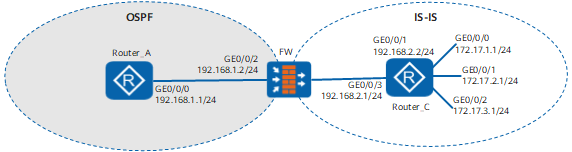
Item |
Data |
|
|---|---|---|
| Router_A | (1) | Interface: GigabitEthernet 0/0/0 IP address: 192.168.1.1/24 Security zone: Trust |
| FW | (2) | Interface: GigabitEthernet 0/0/2 IP address: 192.168.1.2/24 Security zone: Trust |
| (3) | Interface: GigabitEthernet 0/0/1 IP address: 192.168.2.2/24 Security zone: Trust |
|
| Router_C | (4) | Interface: GigabitEthernet 0/0/0 IP address: 172.17.1.1/24 Security zone: Trust |
| (5) | Interface: GigabitEthernet 0/0/1 IP address: 172.17.2.1/24 Security zone: Trust |
|
| (6) | Interface: GigabitEthernet 0/0/2 IP address: 172.17.3.1/24 Security zone: Trust |
|
| (7) | Interface: GigabitEthernet 0/0/3 IP address: 192.168.2.1/24 Security zone: Trust |
|
Configuration Roadmap
The configuration roadmap is as follows:
Configure basic IS-IS functions on theFW and Router_C.
Configure OSPF on Router_A and the FW and import the IS-IS route.
Configure the routing policy on theFW, apply the routing policy when importing the IS-IS route to OSPF, and check the routing information.
Procedure
- Set the IP addresses for the interfaces.
# Configure Router_A and configure Router_C. (Omitted)
# Configure FW.
<FW> system-view
[FW] sysname FW
[FW] interface GigabitEthernet0/0/1
[FW-GigabitEthernet0/0/1] ip address 192.168.2.2 24
[FW-GigabitEthernet0/0/1] quit
[FW] interface GigabitEthernet0/0/2
[FW-GigabitEthernet0/0/2] ip address 192.168.1.2 24
[FW-GigabitEthernet0/0/2] quit
- Add interfaces to corresponding security zones and configure
security policy between security zones.
# Configure FW.
[FW] firewall zone trust
[FW-zone-trust] add interface GigabitEthernet0/0/1
[FW-zone-trust] add interface GigabitEthernet0/0/2
[FW-zone-trust] quit
[FW] security-policy
[FW-policy-security] rule name policy_sec_1
[FW-policy-security-rule-policy_sec_1] source-zone local trust
[FW-policy-security-rule-policy_sec_1] destination-zone local trust
[FW-policy-security-rule-policy_sec_1] action permit
[FW-policy-security-rule-policy_sec_1] quit
[FW-policy-security] quit
- Configure IS-IS.
# Configure IS-IS on Router_C. (Omitted)
# Configure the FW.
[FW] isis 1
[FW-isis-1] is-level level-2
[FW-isis-1] network-entity 10.0000.0000.0002.00
[FW-isis-1] quit
[FW] interface GigabitEthernet 0/0/1
[FW-GigabitEthernet 0/0/1] isis enable 1
[FW-GigabitEthernet 0/0/1] quit
- Configure OSPF and route importing.
# Configure Router_A and enable OSPF.(Omitted)
# Configure the FW, enable OSPF, and import the IS-IS route.
[FW] ospf
[FW-ospf-1] area 0
[FW-ospf-1-area-0.0.0.0] network 192.168.1.0 0.0.0.255
[FW-ospf-1-area-0.0.0.0] quit
[FW-ospf-1] import-route isis 1
[FW-ospf-1] quit
# Display the OSPF routing table on Router_A, and you can see the imported routes.
[Router_A] display ospf routing OSPF Process 1 with Router ID 192.168.1.1 Routing Tables Routing for Network Destination Cost Type NextHop AdvRouter Area 192.168.1.0/24 1 Stub 192.168.1.1 192.168.1.1 0.0.0.0 Routing for ASEs Destination Cost Type Tag NextHop AdvRouter 172.17.1.0/24 1 Type2 1 192.168.1.2 192.168.1.2 172.17.2.0/24 1 Type2 1 192.168.1.2 192.168.1.2 172.17.3.0/24 1 Type2 1 192.168.1.2 192.168.1.2 192.168.2.0/24 1 Type2 1 192.168.1.2 192.168.1.2 Routing for NSSAs Destination Cost Type Tag NextHop AdvRouter Total Nets: 5 Intra Area: 1 Inter Area: 0 ASE: 4 NSSA: 0 - Configure ACLs for packet filtering.
# Configure ACL 2002 to permit the packets destined for 172.17.2.0/24.
[FW] acl number 2002
[FW-acl-basic-2002] rule permit source 172.17.2.0 0.0.0.255
[FW-acl-basic-2002] quit
Configure IP-prefix list prefix-a to permit the packets destined for 172.17.1.0/24.
[FW_B] ip ip-prefix prefix-a index 10 permit 172.17.1.0 24 - Configure the routing policy.
[FW] route-policy isis2ospf permit node 10
[FW-route-policy] if-match ip-prefix prefix-a
[FW-route-policy] apply cost 100
[FW-route-policy] quit
[FW] route-policy isis2ospf permit node 20
[FW-route-policy] if-match acl 2002
[FW-route-policy] apply tag 20
[FW-route-policy] quit
[FW] route-policy isis2ospf permit node 30
[FW-route-policy] quit
- Apply the routing policy for route importing.
# Configure the routing policy for route importing on theFW, so that the routing policy can be applied when the route is imported.
[Router_A] display ospf routing

          OSPF Process 1 with Router ID 192.168.1.1
                   Routing Tables
 Routing for Network
 Destination        Cost  Type       NextHop         AdvRouter       Area
 192.168.1.0/24     1  Stub       192.168.1.1     192.168.1.1     0.0.0.0

 Routing for ASEs
 Destination        Cost      Type       Tag         NextHop         AdvRouter
 172.17.1.0/24      100       Type2      1           192.168.1.2     192.168.1.2
 172.17.2.0/24      1         Type2      20          192.168.1.2     192.168.1.2
 172.17.3.0/24      1         Type2      1           192.168.1.2     192.168.1.2
 192.168.2.0/24     1         Type2      1           192.168.1.2     192.168.1.2

 Routing for NSSAs
 Destination        Cost      Type       Tag         NextHop         AdvRouter

 Total Nets: 5
 Intra Area: 1  Inter Area: 0  ASE: 4  NSSA: 0
Configuration Scripts
Configuration script of FW
#
 sysname FW
#
acl number 2002
 rule 5 permit source 172.17.2.0 0.0.0.255
#
isis 1
 is-level level-2
 network-entity 10.0000.0000.0002.00
#
interface GigabitEthernet 0/0/2
 ip address 192.168.1.2 255.255.255.0
#
interface GigabitEthernet 0/0/1
 ip address 192.168.2.2 255.255.255.0
 isis enable 1
#
firewall zone trust
 set priority 85
 add interface GigabitEthernet0/0/1
 add interface GigabitEthernet0/0/2
#
security-policy
  rule name policy_sec_1
    source-zone local
    source-zone trust
    destination-zone local
    destination-zone trust
    action permit
#
ospf 1
 import-route isis 1 route-policy isis2ospf
 area 0.0.0.0
  network 192.168.1.0 0.0.0.255
#
route-policy isis2ospf permit node 10
 if-match ip-prefix prefix-a
 apply cost 100
#
route-policy isis2ospf permit node 20
 if-match acl 2002
 apply tag 20
#
route-policy isis2ospf permit node 30
#
ip ip-prefix prefix-a index 10 permit 172.17.1.0 24
#
return