Example for Configuring RIPng to Connect Network Devices
This section describes how to configure OSPF in the dual-system hot backup scenario. After OSPF is configured, if an active device fails, traffic is switched to a standby device using OSPF routes.
Networking Requirements
As shown in Figure 1, the research and development department of an enterprise works with an ISP to deploy an IPv6 network. The research and development department is dual-homed to an ISP router and accesses the IPv6 network through the ISP router.
The networking requirements are as follows:
- The enterprise deploys two FWs on the intranet border to dual-home the research and development department to the IPv6 network, which improves network reliability. FWs use link-local addresses to communicate with the ISP router.
- The FWs and ISP router run RIPng to learn IPv6 network routes and advertise routes to the IPv6 network.
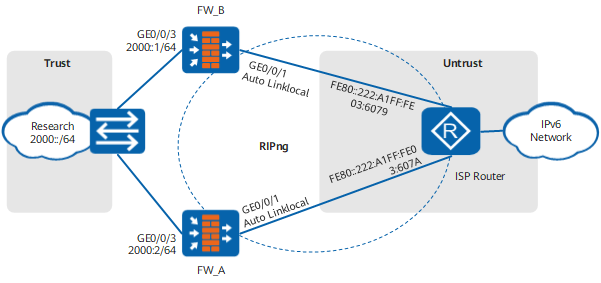
Configuration Roadmap
The configuration roadmap is as follows:
- Assign IP addresses to FW interfaces and add the interfaces to security zones.
- Configure RIPng on the FWs.
- Configure security policies on the FWs so that the devices of the research and development department can access the IPv6 network.
- Configure RIPng on the ISP device. This operation is performed by the ISP. Therefore, the configuration details are not provided.
- Configure two default gateways on the PC of the R&D department, namely, 2000::1 and 2000::2. The configuration is completed by the administrator, and therefore the configuration details are not provided.
Configuration Verification
The following example uses the display on FW_A.
Check the IPv6 status of GigabitEthernet 0/0/1.
[FW_A] display ipv6 interface GigabitEthernet 0/0/1
GigabitEthernet0/0/1 current state : UP
IPv6 protocol current state : UP
IPv6 is enabled, link-local address is FE80::222:A1FF:FE00:2
  No global unicast address configured
  Joined group address(es):
    FF02::9
    FF02::1:FF00:2
    FF02::2
    FF02::1
  MTU is 1500 bytes
  ND DAD is enabled, number of DAD attempts: 1
  ND reachable time is 30000 milliseconds
  ND retransmit interval is 1000 milliseconds
  Hosts use stateless autoconfig for addresses
The preceding command output shows that the IPv6 status of GigabitEthernet 0/0/1 is UP.
View the RIPng routing table.
[FW_A] display ripng 1 route
   Route Flags: A - Aging, S - Suppressed, G - Garbage-collect
 ----------------------------------------------------------------

 Peer FE80::222:A1FF:FE03:607A  on GigabitEthernet0/0/1
 Dest 3000::/64,
     via FE80::222:A1FF:FE03:607A, cost  1, tag 0, A, 15 Sec
 Dest 3001::/64,
     via FE80::222:A1FF:FE03:607A, cost  1, tag 0, A, 15 Sec
 Dest 3002::/64,
     via FE80::222:A1FF:FE03:607A, cost  1, tag 0, A, 3 Sec
The preceding command output shows that RIPng-enabled FW_A has learned routes with destination addresses 3000::/64, 3001::/64, and 3002::/64 and next-hop address FE80::222:A1FF:FE03:607A.
Check whether PCs in the research and development department can use IPv6 addresses to access the IPv6 network.
- If they can access the IPv6 network, the configuration is successful.
- If they cannot access the IPv6 network, modify the configuration and try again.
Configuration Scripts
Configuration script for FW_A:
#
 ipv6
#
 sysname FW_A
#
interface GigabitEthernet0/0/1
 ipv6 enable
 ipv6 address auto link-local
 ripng 1 enable
#
interface GigabitEthernet0/0/3
 ipv6 enable
 ipv6 address 2000::2 64
 ripng 1 enable
#
firewall zone trust
 set priority 85
 add interface GigabitEthernet0/0/3
#
firewall zone untrust
 set priority 5
 add interface GigabitEthernet0/0/1
#
ripng 1
#
security-policy
  rule name policy_sec_1
    source-zone trust
    destination-zone untrust
    source-address 2000:: 64
    action permit
#
return
Configuration script for FW_B:
#
 ipv6
#
 sysname FW_B
#
interface GigabitEthernet0/0/1
 ipv6 enable
 ipv6 address auto link-local
 ripng 1 enable
#
interface GigabitEthernet0/0/3
 ipv6 enable
 ipv6 address 2000::1 64
 ripng 1 enable
#
firewall zone trust
 set priority 85
 add interface GigabitEthernet0/0/3
#
firewall zone untrust
 set priority 5
 add interface GigabitEthernet0/0/1
#
ripng 1
#
security-policy
  rule name policy_sec_1
    source-zone trust
    destination-zone untrust
    source-address 2000:: 64
    action permit
#
return