Web: Example for Configuring User- and Application-based Security Policies
This section provides an example for configuring security policies to implement access control by user, time range, or application.
Networking Requirements
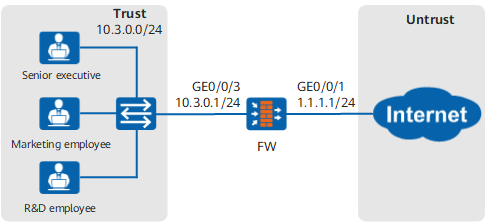
As shown in Figure 1, the FW is deployed at the network border of an enterprise as a security gateway.
Based on their ranks and functions, employees of the enterprise are divided into three user groups: senior executives, marketing employees, and R&D employees. The permissions granted to them are as follows:
- Senior executives are granted the full Internet access permission.
- Marketing employees are granted the access to the Internet, but they cannot play online games or watch online videos.
- R&D employees are granted the access only to the TortoiseSVN application.
Data Planning

Users in this example are already added to the FW, and the authentication configuration is complete.
Item |
Data |
Description |
|---|---|---|
Security policy for senior executives |
|
Security policy policy_sec_management grants senior executives the full access to the Internet. |
Security policy 1 for marketing employees |
|
Security policy policy_sec_marketing_1 does not allow marketing employees to play online games or watch online videos. Game indicates playing online games. Media_Sharing indicates watching online videos. |
Security policy 2 for marketing employees |
|
Security policy policy_sec_marketing_2 allows marketing employees to access the Internet. |
Security policy 1 for R&D employees |
|
Security policy policy_sec_research_1 allows R&D employees to access the TortoiseSVN application for version control. |
Security policy 2 for R&D employees |
|
Security policy policy_sec_research_2 does not allow R&D employees to access other Internet applications. |
Procedure
- Set the IP address and security zone of the interface.
- Click
 of GE0/0/1> and set the parameters as follows:
IP Address
1.1.1.1
Mask
255.255.255.0
Zone
untrust
- Click
- Configure the security policy for senior executives.
- Choose .
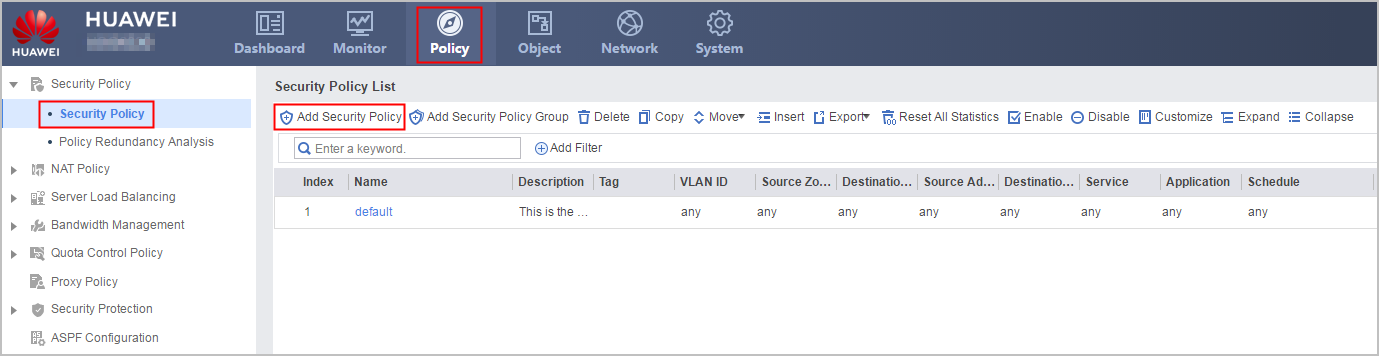
- Choose .
- Configure security policies for marketing employees.
- Configure the security policy for R&D employees.
Verification
- Check whether senior executives can access the Internet without any restrictions. If yes, the security policy for senior executives is successfully configured.
- Check whether marketing employees can access the Internet but cannot use the game and media_sharing applications which FW defines. If yes, the security policies for marketing employees are successfully configured.
- Check whether R&D employees can access only the TortoiseSVN application. If yes, the security policies for R&D employees are successfully configured.
- Choose and check whether senior executives, marketing employees, and R&D employees match the desired security policies.
Configuration Scripts
#
interface GigabitEthernet0/0/1
 undo shutdown
 ip address 1.1.1.1 255.255.255.0
#
interface GigabitEthernet0/0/3
 undo shutdown
 ip address 10.3.0.1 255.255.255.0
#
firewall zone trust
 add interface GigabitEthernet0/0/3
#
firewall zone untrust
 add interface GigabitEthernet0/0/1
#
security-policy
 rule name policy_sec_management
  source-zone trust
  destination-zone untrust
  user /default/management
  action permit
 rule name policy_sec_marketing_1
  source-zone trust
  destination-zone untrust
  user /default/marketing
  application category Entertainment sub-category Game
  application category Entertainment sub-category Media_Sharing
  action deny
 rule name policy_sec_marketing_2
  source-zone trust
  destination-zone untrust
  user /default/marketing
  action permit
 rule name policy_sec_research_1
  source-zone trust
  destination-zone untrust
  user /default/research
  application app TortoiseSVN
  action permit
 rule name policy_sec_research_2
  source-zone trust
  destination-zone untrust
  user /default/research
  action deny