Configuring a Security Policy Group
This section describes how to configure a security policy group.
- Move security policy groups to change the priorities of security policies in batches.
- Enable or disable security policy groups in batches, without changing the original status of security policies.
- Delete security policy groups. You can delete only security policy groups or delete both security policy groups and their security policies.
Configuration on the Web UI
- Choose .
- Click Add Security Policy Group,
configure the following parameters for the security policy group:
Parameter Description Name Name of the security policy group. The name must be unique. Description Description of a security policy group. Start Policy Start policy in the security policy group. If this parameter is not specified, an empty policy group is created. End Policy End policy in the security policy group. If this parameter is not specified, all rules behind the start rule belong to this policy group.
If Start Policy is not specified, End Policy is not required.
The start rule must be in front of the end rule, and the rules between the start and end rules cannot be added to any other policy group.
For example, an enterprise administrator creates a security policy group named marketing, and adds security policies related to the marketing department to this security policy group to facilitate the search and management of related control rules of the marketing department.
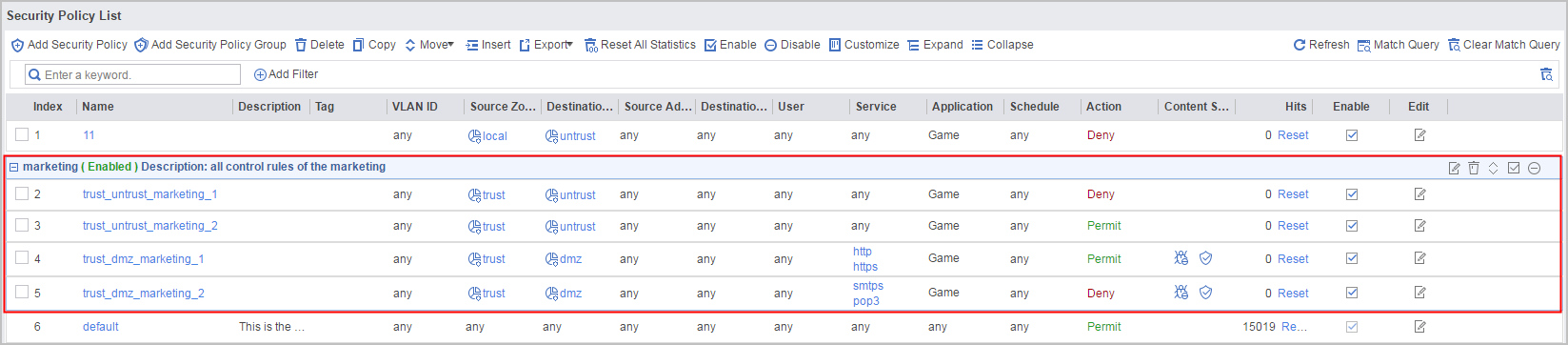
When the enterprise administrator wants to search for a marketing policy, he can directly search for the marketing policy group. In addition, he can delete, move, enable, or disable the security policy group.

Configuration on the CLI
- Access the security policy view from the system view.
- Create a security policy group and specify the start and
end rules in the security policy group.
group name [ from rule-name1 [ to rule-name2 ] ]
- When you create a policy group, the start rule must be in front of the end rule, and the rules between the start and end rules cannot be added to any other policy group.
- If from rule-name1 is not specified, an empty policy group is created.
- If to rule-name2 is not specified, all rules behind the start rule belong to this policy group.
- Create a security policy rule and access the security policy
rule view.
rule name rule-name
- Specify a security policy group for the policy rule.
parent-group group-name
After you add the policy rule to a security policy group, the policy rule is placed behind all policy rules in the security policy group.