CLI: Example for Configuring Security Policies Based on User Access Modes and Device Types
Networking Requirements
- The Agile Controller identity authentication mechanism is enabled on the intranet, and information about users and user group is saved on a Controller.
- Intranet users can use different devices (such as PCs and mobile phones) and access modes (wireless access mode, wired access mode, through the Portal, and through the client that supports 802.1X authentication) for the authentication.
- The Agile Controller server can identify users' access modes and device types and send them to the FW.

In this example, the Agile Controller is called Controller for short.
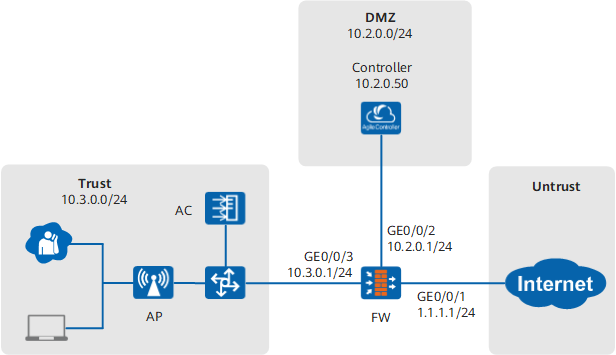
- Users on the intranet can access HTTP services without proactively accessing the Agile Controller portal authentication page, because their HTTP requests will be automatically redirected to the Agile Controller portal authentication page.
- After being authenticated by entering correct Agile Controller accounts and passwords, intranet users can access network resources.
- Only the intranet users whose PCs are physically connected are allowed to access the Internet after being authenticated on the portal authentication page.
Configuration Roadmap
- Add the FW on the Agile Controller server and configure the Agile Controller server on the FW to enable the FW and Agile Controller server to communicate.
- Configure a policy to import user information from the Agile Controller server to the FW.
- Set the URL of the redirected authentication page to the address of the Agile Controller portal authentication page for the users who directly access HTTP services.
- Configure an authentication policy to authenticate users before they access the Internet.
- Set Agile Controller SSO parameters on the FW.
- Configure new user options in the authentication domain. After being authenticated, a new user goes online as a temporary user in a specified user group.
- Because the FW is deployed between users and the Agile Controller server, authentication packets pass through the FW. Therefore, to implement SSO, configure an authentication policy to disable the FW from authenticating the authentication requests destined for the Agile Controller server and configure security policies to ensure normal communication between the FW and Agile Controller server.
- Configure a security policy to ensure that users, the Agile Controller server, and the FW can communicate properly.
- Import devices from the Agile Controller server to the FW.
- Configure a security policy to allow the intranet users whose access mode is wired-portal and device type is pc device group to access the Internet.
Data Planning
Item |
Data |
Description |
|---|---|---|
Agile Controller server |
On a FW, set the parameters for communication with a Agile Controller server. The parameter settings on the FW must be consistent with those on the Agile Controller server. |
|
User information import policy |
Import users from the Agile Controller server to the FW. |
|
Parent group of new users |
After being authenticated, a new user goes online as a temporary user in the default user group. |
All users passing Agile Controller authentication are new users for the FW. |
Agile Controller authentication portal address |
http://10.2.0.50:8080/portal |
This address must be the same as the setting on the Agile Controller server. |
Agile Controller SSO |
Set SSO parameters on the FW and configure the FW to receive the user login and logout information from the Agile Controller server. |
|
Importing devices |
|
Only Agile Controller SSO devices can be imported. |
Security policy 1 |
|
This policy is used to enable user authentication on the Agile Controller server. |
Security policy 2 |
|
This policy is used to allow communication between the Agile Controller server and FW. |
Security policy 3 |
|
This policy is used to allow communication between the Agile Controller server and FW. |
Security policy 4 |
|
This policy is used to permit the DNS packets for the HTTP service. |
Security policy 5 |
|
This policy is used to allow the intranet users whose PCs are physically connected to access the Internet after being authenticated on the portal authentication page. |
Procedure
- Set the IP address and security zone of the interface.
# Set interface IP addresses.
<FW> system-view
[FW] interface GigabitEthernet 0/0/1
[FW-GigabitEthernet 0/0/1] ip address 1.1.1.1 24
[FW-GigabitEthernet 0/0/1] quit
[FW] interface GigabitEthernet 0/0/2
[FW-GigabitEthernet 0/0/2] ip address 10.2.0.1 24
[FW-GigabitEthernet 0/0/2] quit
[FW] interface GigabitEthernet 0/0/3
[FW-GigabitEthernet 0/0/3] ip address 10.3.0.1 24
[FW-GigabitEthernet 0/0/3] quit
# Assign interfaces to security zones.
[FW] firewall zone trust
[FW-zone-trust] add interface GigabitEthernet 0/0/3
[FW-zone-trust] quit
[FW] firewall zone dmz
[FW-zone-dmz] add interface GigabitEthernet 0/0/2
[FW-zone-dmz] quit
[FW] firewall zone untrust
[FW-zone-untrust] add interface GigabitEthernet 0/0/1
[FW-zone-untrust] quit
- Configure security policies to ensure the communication among the users, Agile Controller server, and FW.
- Configure a security policy between the Trust zone (users) and DMZ (Agile Controller server) for users to get authenticated by the Agile Controller server.
[FW] security-policy
[FW-policy-security] rule name policy_sec_tsm
[FW-policy-security-rule-policy_sec_tsm] source-zone trust
[FW-policy-security-rule-policy_sec_tsm] source-address 10.3.0.0 24
[FW-policy-security-rule-policy_sec_tsm] destination-zone dmz
[FW-policy-security-rule-policy_sec_tsm] destination-address 10.2.0.50 32
[FW-policy-security-rule-policy_sec_tsm] action permit
[FW-policy-security-rule-policy_sec_tsm] quit
If the URL of the authentication page is a domain name and a DNS server for resolving the URL is deployed in the DMZ, you need to enable the DNS service from the Trust zone to DMZ.
- Configure a security policy for the Trust (users) -> Untrust (Internet) interzone to permit DNS packets (resolving the URLs of HTTP services).
[FW-policy-security] rule name policy_sec_dns
[FW-policy-security-rule-policy_sec_dns] source-zone trust
[FW-policy-security-rule-policy_sec_dns] source-address 10.3.0.0 24
[FW-policy-security-rule-policy_sec_dns] destination-zone untrust
[FW-policy-security-rule-policy_sec_dns] service dns
[FW-policy-security-rule-policy_sec_dns] action permit
[FW-policy-security-rule-policy_sec_dns] quit
[FW-policy-security] quit
Enable the DNS service for the Trust -> Untrust interzone to allow HTTP domain name resolution packets through.
- Configure a security policy between the Trust zone (users) and DMZ (Agile Controller server) for users to get authenticated by the Agile Controller server.
- Add the FW on the Agile Controller server.
The Controller updates with versions. Therefore, in this example, the Controller configuration is for reference only. For details, refer to the configuration manual of the Controller.
Choose , click Add and set the following parameters. Then click OK.
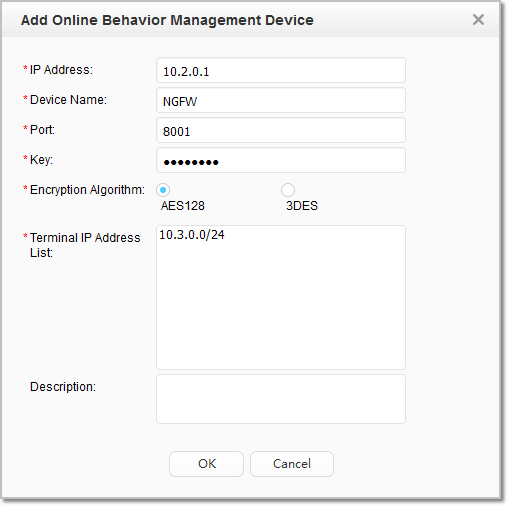
If the FWs work in hot standby mode, you need to add Online Behavior Management Device twice on the Agile Controller server. The IP Address parameters must be set respectively to the real IP addresses of the active and standby device interfaces connecting to the Agile Controller server.
- On the FW, set the parameters for communication with a Agile Controller server.
The parameter settings on the FW must be consistent with those on the Agile Controller server. In most cases, the server port of Agile Controller is 8084.
[FW] tsm-server template auth_server_tsm
[FW-tsm-auth_server_tsm] tsm-server ip-address 10.2.0.50
[FW-tsm-auth_server_tsm] tsm-server port 8084
[FW-tsm-auth_server_tsm] tsm-server encryption-mode aes128 shared-key Admin@123
[FW-tsm-auth_server_tsm] test tsm-server template auth_server_tsm
[FW-tsm-auth_server_tsm] quit
- Configure a policy to import user information from the Agile Controller server to the FW.
[FW] user-manage import-policy policy_import from tsm
[FW-import-policy_import] server template auth_server_tsm
[FW-import-policy_import] server basedn root
[FW-import-policy_import] destination-group /default
[FW-import-policy_import] import-type user
[FW-import-policy_import] import-override enable
[FW-import-policy_import] time-interval 120
- Apply the import policy to import users to the FW.
[FW] execute user-manage import-policy policy_import - Configure the portal authentication page.
[FW] user-manage portal-template portal
[FW-portal-template-portal] portal-url http://10.2.0.50:8080/portal
The portal URL must be consistent with that of the Controller.
- Configure the action in the authentication policy for users to access the Internet as portal authentication so that the users' HTTP service access traffic triggers authentication. Configure the action in the authentication policy for users to access the Agile Controller server as no-authentication so that the users' authentication packets can go through the FW to the Agile Controller server.
[FW] auth-policy
[FW-policy-auth] rule name auth_policy_tsm
[FW-policy-auth-rule-auth_policy_tsm] source-zone trust
[FW-policy-auth-rule-auth_policy_tsm] destination-zone dmz
[FW-policy-auth-rule-auth_policy_tsm] source-address 10.3.0.0 24
[FW-policy-auth-rule-auth_policy_tsm] destination-address 10.2.0.50 32
[FW-policy-auth-rule-auth_policy_tsm] action none
[FW-policy-auth-rule-auth_policy_tsm] quit
[FW-policy-auth] rule name auth_policy_service
[FW-policy-auth-rule-auth_policy_service] source-zone trust
[FW-policy-auth-rule-auth_policy_service] destination-zone untrust
[FW-policy-auth-rule-auth_policy_service] source-address 10.3.0.0 24
[FW-policy-auth-rule-auth_policy_service] action auth portal-template portal
- Set SSO parameters on the FW.
[FW] user-manage single-sign-on tsm
[FW-sso-tsm] enable
- Set a new user authentication option for the authentication domain.
[FW] aaa
[FW-aaa] domain default
[FW-aaa-domain-default] service-type internetaccess
[FW-aaa-domain-default] new-user add-temporary group /default
[FW-aaa-domain-default] quit
[FW-aaa] quit
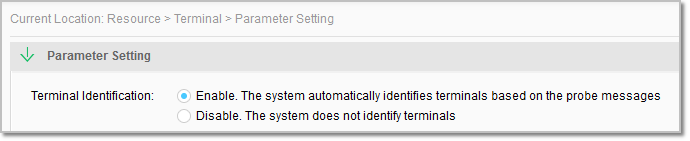
- Enable device identification on the Agile Controller server.
Choose . In Terminal Identification, select Enable.
- Import devices from the Agile Controller server for security policies to reference.
[FW] update device-category tsm-server template auth_server_tsm import-overwrite The FW can import only Agile Controller SSO devices.
- Configure a security policy to allow the intranet users whose access mode is wired-portal and device type is pc device group to access the Internet.
[FW] security-policy
[FW-policy-security] rule name policy_sec_user
[FW-policy-security-rule-policy_sec_user] source-zone trust
[FW-policy-security-rule-policy_sec_user] destination-zone untrust
[FW-policy-security-rule-policy_sec_user] source-address 10.3.0.0 24
[FW-policy-security-rule-policy_sec_user] access-authentication wired-portal
[FW-policy-security-rule-policy_sec_user] device-classification device-group pc
[FW-policy-security-rule-policy_sec_user] action permit
[FW-policy-security-rule-policy_sec_user] quit
Configuration Verification
- Run the display user-manage user commands on the FW to display information about users.
- Run the display user-manage online-user commands on the FWto display information about online users.
- Wired intranet users can use browsers on PCs to access the Internet after portal authentication. However, in other conditions, they cannot access the Internet, as shown in the following table.
Table 1 Verification of intranet user access to the Internet under different conditions Device
wired-802.1x
wireless-802.1x
wired-portal
wireless-portal
PC
N
N
Y
N
Other devices
N
N
N
N
- Y indicates that intranet users can access the Internet, and N indicates that they cannot access the Internet.
- wired-802.1x indicates wired Internet access from clients that support 802.1x authentication. wireless-802.1x indicates wireless Internet access from clients that support 802.1x authentication. wired-portal indicates wired Internet access from clients after portal authentication. wireless-portal indicates wireless Internet access from clients after portal authentication.
Configuration Scripts
#
 sysname FW
#
 user-manage single-sign-on tsm
  enable
 user-manage portal-template portal 0
  portal-url http://10.2.0.50:8080/portal
#
tsm-server template auth_server_tsm
 tsm-server encryption-mode aes128 shared-key %$%$|5<h@/062'gA|%:9CO.2/JA8%$%$
 tsm-server ip-address 10.2.0.50
#
interface GigabitEthernet0/0/1
 ip address 1.1.1.1 255.255.255.0
#
interface GigabitEthernet0/0/2
 ip address 10.2.0.1 255.255.255.0
#
interface GigabitEthernet0/0/3
 ip address 10.3.0.1 255.255.255.0
#
firewall zone trust
 add interface GigabitEthernet0/0/3
#
firewall zone untrust
 add interface GigabitEthernet0/0/1
#
firewall zone dmz
 add interface GigabitEthernet0/0/2
#
security-policy
 rule name policy_sec_tsm
  source-zone trust
  destination-zone dmz
  source-address 10.3.0.0 24
  destination-address 10.2.0.50 32
  action permit
 rule name policy_sec_dns
  source-zone trust
  destination-zone untrust
  source-address 10.3.0.0 24
  service dns
  action permit
 rule name policy_sec_tsm_1
  source-zone local
  destination-zone dmz
  action permit
 rule name policy_sec_tsm_2
  source-zone dmz
  destination-zone local
  action permit
 rule name policy_sec_user
  source-zone trust
  destination-zone untrust
  source-address 10.3.0.0 24
  access-authentication wired-portal
  device-classification device-group pc
  action permit
#
auth-policy
 rule name auth_policy_tsm
  source-zone trust
  destination-zone dmz
  source-address 10.3.0.0 24
  destination-address 10.2.0.50 32
  action none
 rule name auth_policy_service
  source-zone trust
  destination-zone untrust
  source-address 10.3.0.0 24
  action auth portal-template portal
#
 user-manage import-policy policy_import from tsm
 server template auth_server_tsm
 server basedn root
 destination-group /default
 import-type user
 import-override enable
 time-interval 120
#
aaa
 domain default
  service-type internetaccess
  new-user add-temporary group /default

# The following configuration takes effect only one time and is not saved into the configuration file.
 execute user-manage import-policy policy_import
 update device-category tsm-server template auth_server_tsm import-overwrite
 test tsm-server template auth_server_tsm