Configuration Flow
This section uses a configuration flowchart to describe the SLB configuration method and items.
Figure 1 shows the SLB configuration procedure.
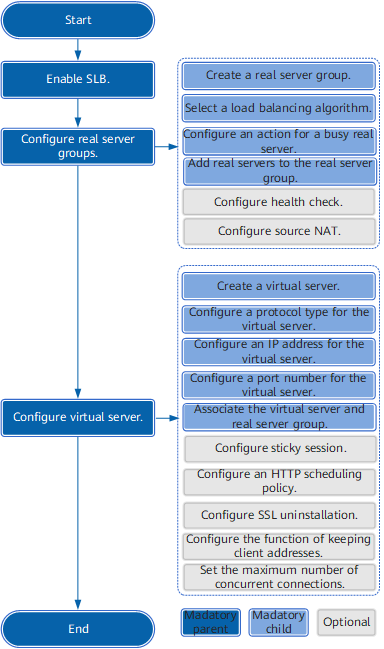
Table 1 describes the configuration flowchart.
No. |
Task |
Subtask |
Description |
|---|---|---|---|
1 |
Enabling SLB |
- |
SLB configurations take affect only after SLB is enabled. |
2 |
Configuring a Real Server Group |
Creating a real server group |
A real server group consists of one or more real servers and works as a logical server to provide services. |
Selecting a load balancing algorithm |
The load balancing algorithm determines how the FW distributes traffic to real servers. The FW supports six load balancing algorithms. One real server group can use only one load balancing algorithm. The default algorithm is round robin. The FW supports the following load balancing algorithms:
|
||
Configuring policies for a busy server |
When a real server is overloaded and the number of concurrent connections reaches the maximum value, three policies can be configured to deal with the overloading situation.
|
||
Adding real servers to a real server group |
One real server can join multiple real server groups. A real server group provides only one type of service; therefore, a real server supporting multiple types of services can be added to multiple real server groups. To configure a real server, the maximum number of connections on the real server can be configured. The policies for a busy server are configured based on the maximum number of connections on a real server. |
||
(Optional) Configuring service health check |
The service health check function checks whether a real server is available to prevent traffic from being distributed to a server that does not function properly and causing request failure or service interruption. |
||
(Optional) Configuring Source NAT |
After Source NAT is enabled, the FW translates the source addresses of packets sent to a real server into addresses in the address pool or the IP address of the interface connecting to the real server. |
||
3 |
Configuring Virtual Service |
Creating a virtual server |
A real server group appears a virtual server externally. A client sends service requests only to the virtual server. |
Configuring the protocol type for a virtual service |
By default, the FW supports all types of protocols. To improve server security, you are advised to set the protocol type based on services. |
||
Setting an IP address for a virtual server |
When SLB is configured in the root system, the IP address of a virtual server must be different from any of the following IP addresses:
When SLB is configured in a virtual system, the virtual server IP address must be a public IP address (global IP address) different from any of the following IP addresses:
|
||
Configuring the protocol type for a virtual server |
By default, the FW supports all types of protocols. To improve server security, you are advised to set the protocol type based on services. |
||
Setting a port number for a virtual server |
By default, a virtual server uses a random port number (any). To enhance network security, set a port number for a virtual server. NOTE:
If the protocol type of a virtual server is set to any, a port number cannot be set for it. |
||
Associating the virtual server with the real server group |
After a virtual server is associated with a real server group, the real server group acts as the virtual server. A virtual server can be associated with only one real server group. The real server group cannot be associated with other virtual groups. |
||
(Optional) Configuring the sticky session function |
The sticky session function allows multiple connections of a client to be allocated to the same real server within a specific period of time. The FW supports the following sticky session methods: source IP address-based sticky session, SSL session ID-based sticky session, and HTTP Cookie-based sticky session. The HTTP Cookie-based sticky session method includes Cookie-insert, Cookie-passive, and Cookie-rewrite. |
||
(Optional) Configuring an http scheduling policy |
Traffic is allocated to a server based on the HTTP scheduling policy.
NOTE:
This applies only to HTTP and HTTPS (SSL uninstallation must be configured for HTTPS). |
||
(Optional) SSL uninstallation configuration file |
The SSL uninstallation function is configured based on the SSL uninstallation policy to send encryption and decryption of HTTPS packets to the FW. |
||
(Optional) Enabling Keep Client Address function |
After this function is enabled, the FW inserts the X-Forwarded-For field into the HTTP header of each HTTP packet sent from the client. This field carries the real IP address of the client to the real server that supports X-Forwarded-For. NOTE:
This function is available only when the virtual server protocol is HTTP or HTTPS (SSL uninstallation must be configured for HTTPS). |
||
(Optional) Maximum number of concurrent connections |
Specify the maximum number of connections on a virtual server. |