CLI: Example for Configuring a Session Persistence Algorithm to Ensure Service Continuity
This example describes the configuration of HTTPS server load balancing based on SSL.
Networking Requirements
As shown in Figure 1, an enterprise has three HTTPS servers: Server1, Server2, and Server3. The hardware performance of the servers decreases in sequence. Server1 performance is twice of Server2 performance. Server2 performance is twice of Server3 performance. SLB is configured to allow the three servers to provide HTTPS services as a whole. The carried services match the server hardware performance. In addition, the health check function is configured to monitor the work of the servers.
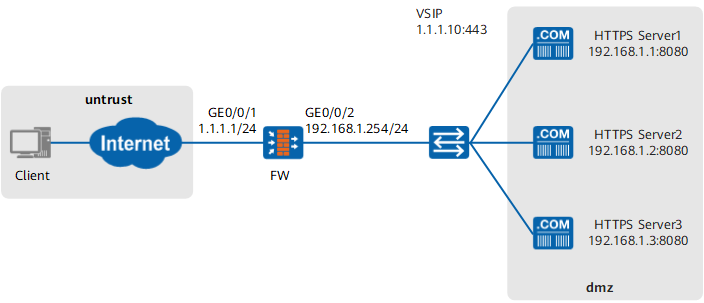
Configuration Roadmap
- Set the load balancing algorithm to weight-least-connection for performance-based SLB. As Server1 performance is twice of Server2 performance and Server2 performance is twice of Server3 performance, the weight ratio of the servers is 4:2:1.
- Configure the health check function on the FW to check server connectivity. In this example, the protocol type is set to ICMP for health check. You can also use TCP. To allow the FWto send health check packets, configure a Local -> DMZ security policy (the servers reside in the DMZ).
- Configure the sticky session function on the FW because a client may need to establish multiple connections to a server for one task. In this manner, the connection requests from the client can be allocated to the same server. As the servers provide HTTPS services, the sticky session mode can be set to session-id.
Procedure
- Set the IP addresses of the interfaces and add the interfaces to security zones.
<FW> system-view
[FW] interface GigabitEthernet 0/0/1
[FW-GigabitEthernet0/0/1] ip address 1.1.1.1 24
[FW-GigabitEthernet0/0/1] quit
[FW] interface GigabitEthernet 0/0/2
[FW-GigabitEthernet0/0/2] ip address 192.168.1.254 24
[FW-GigabitEthernet0/0/2] quit
[FW] firewall zone untrust
[FW-zone-untrust] add interface GigabitEthernet 0/0/1
[FW-zone-untrust] quit
[FW] firewall zone dmz
[FW-zone-dmz] add interface GigabitEthernet 0/0/2
[FW-zone-dmz] quit
- Configure security policies.
# Configure an Untrust -> DMZ security policy to allow Internet users to access HTTPS servers on the enterprise network. The destination IP address specified in the policy must be the IP address of the virtual server.
[FW] security-policy
[FW-policy-security] rule name policy1
[FW-policy-security-rule-policy1] source-zone untrust
[FW-policy-security-rule-policy1] destination-zone dmz
[FW-policy-security-rule-policy1] destination-address 1.1.1.10 24
[FW-policy-security-rule-policy1] action permit
[FW-policy-security-rule-policy1] quit
[FW-policy-security] quit
# Configure a Local -> DMZ security policy to allow the FW to send health probe packets to the real servers.
[FW] security-policy
[FW-policy-security] rule name policy2
[FW-policy-security-rule-policy2] source-zone local
[FW-policy-security-rule-policy2] destination-zone dmz
[FW-policy-security-rule-policy2] destination-address range 192.168.1.1 192.168.1.3
[FW-policy-security-rule-policy2] action permit
[FW-policy-security-rule-policy2] quit
[FW-policy-security] quit
- Configure SLB and health check.
# Enable SLB.
[FW] slb enable# Configure the sticky session function.
[FW] slb
[FW-slb] persistence 0 Session
[FW-slb-persistence-1] type session-id aging-time 600
[FW-slb-persistence-1] quit
# Configure a load balancing algorithm.
[FW-slb] group 0 Rserver
[FW-slb-group-0] metric weight-least-connection
# Set the weights of Server1, Server2, and Server3 to 4, 2, and 1 separately.
[FW-slb-group-0] rserver 0 rip 192.168.1.1 port 8080 weight 4 description server1
[FW-slb-group-0] rserver 1 rip 192.168.1.2 port 8080 weight 2 description server2
[FW-slb-group-0] rserver 2 rip 192.168.1.3 port 8080 weight 1 description server3
# Configure the health check function.
[FW-slb-group-0] health-check type icmp tx-interval 5 times 3
[FW-slb-group-0] quit
# Configure a protocol type for the virtual server.
[FW-slb] vserver 0 vs-ssl-1.1.1.10
[FW-slb-vserver-0] protocol ssl
# Assign an IP address and a port number to the virtual server.
[FW-slb-vserver-0] vip 0 1.1.1.10
[FW-slb-vserver-0] vport 443
# Configure the sticky session function.
[FW-slb-vserver-0] persistence Session# Associate the virtual server with the real server group.
[FW-slb-vserver-0] group Rserver
[FW-slb-vserver-0] quit
Verification
Check static server map entries on the FW. If corresponding server map entries exist, the server load balancing is successfully configured.
[FW] display firewall server-map static
 Current Total Server-map : 1
 Type: SLB,  ANY -> 1.1.1.10:443[vs-ssl-1.1.1.10/0],  Zone:---,  protocol:tcp
 Vpn: public -> public
On the client, access https://1.1.1.10. The client can connect to an HTTPS server.
Send a lot requests to the servers. After a period of time, view the running status of the virtual server and real servers on the FW. The total and concurrent session ratios of the three servers are about 4:2:1.
[FW] display slb vserver verbose vs-ssl-1.1.1.10
Virtual Server Information(Total 1)
-------------------------------------------------------------------------------------------
  Virtual Server Name      : vs-ssl-1.1.1.10
  Virtual Server ID        : 0
  Virtual Server IP        : 1.1.1.10
  Protocol                 : ssl
  Virtual Server Port      : 443
  Http X-forward Enable    : Disable
  Virtual Server Max-conn  : -
  Persistence Name/ID(Type): Session/0(session-id)
  Group Name               : vs-ssl-1.1.1.10
  Group ID                 : 0
  Virtual Server Statistics
   Current Connection       :89
   Total connection         :200
   Total Flow               :3478.00_B
---------------------------------------------
[FW] display slb group verbose Rserver
Group Information(Total 1)
--------------------------------------------------------------------------------
----------------------------
  Group Name               : Rserver
  Group ID                 : 0
  Metric                   : weight-least-connection
  Source-nat Type          : NA
  Health Check Type        : icmp
  Real Server Number       : 3
    RserverID  IP Address       Weight  Max-connection  Status               Rat
io  TotalSession  CurSession
    0          192.168.1.1      4       -               Admin-Active         58.
10%            3112        48
    1          192.168.1.2      2       -               Admin-Active         28.
11%            1512        30
    2          192.168.1.3      1       -               Admin-Active         14.
04%            732         11
--------------------------------------------------------------------------------
----------------------------
Configuration Scripts
#
interface GigabitEthernet 0/0/1
 ip address 1.1.1.1 24
#
interface GigabitEthernet 0/0/2
 ip address 192.168.1.254 24
#
firewall zone untrust
 add interface GigabitEthernet 0/0/1
#
firewall zone dmz
 add interface GigabitEthernet 0/0/2
#
security-policy
 rule name policy1
  source-zone untrust
  destination-zone dmz
  destination-address 1.1.1.10 24
  action permit
 rule name policy2
  source-zone local
  destination-zone dmz
  destination-address range 192.168.1.1 192.168.1.3
  action permit
#
slb enable
#
slb
 group 0 Rserver
  metric weight-least-connection
  health-check type icmp tx-interval 5 times 3
  rserver 0 rip 192.168.1.1 port 8080 weight 4 description server1
  rserver 1 rip 192.168.1.2 port 8080 weight 2 description server2
  rserver 2 rip 192.168.1.3 port 8080 weight 1 description server3
 persistence 0 Session
   type session-id aging-time 600
 vserver 0 vs-ssl-1.1.1.10
  vip 0 1.1.1.10
  protocol ssl
  persistence Session
  vport 443
  group Rserver