Redundant Policy Analysis
This section describes how to use the redundant policy analysis tool.
Context
The redundant policy analysis tools identify redundant policies by analyzing all policy match conditions, including:
- Source Zone
- Destination Zone
- Source Address or Region
- Destination Address or Region
- User
- Access Mode
- Device
- Service (Service object and service group, does not contain user-defined protocol)
- Application
- URL Categories
- Schedule
The device compares policies from the highest priority to the lowest priority. If a policy meets either of the following conditions, the policy is considered redundant.
- If all match conditions are the same, the policy with a lower priority is considered redundant.
- If policy A is more specific than policy B and the priority of policy A is lower than that of policy B, policy A is considered redundant.
Redundant policy analysis can be performed after security policies are configured, regardless of whether traffic is passing through the FW.
Default policies are not included in redundant policy analysis. Security profiles referenced in security policies are not analyzed. Only the match conditions and actions of security policies are analyzed.
Redundant Policy Analysis
- Choose .
- Click Start.
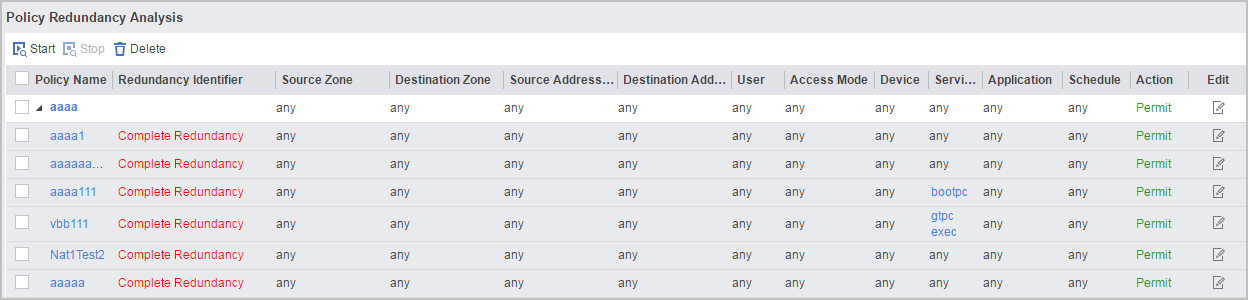
As shown in the following figure, the policies and their redundant policies are displayed from the highest priority to the lowest priority.
Solution
Security policies are matched top down. The policy on the top has more significant implications than other policies. Therefore, verify the policies from the top down to the bottom. You can modify or delete redundant policies as needed.
- To modify a redundant policy, click
 of the policy.
 - To delete a redundant policy, select the check box before the policy and click the delete icon.
After a redundant policy is modified or deleted, the redundant policy analysis result automatically updates.