CLI: Example for Configuring the Device to Communicate with an NM Station Using SNMPv2c
This section provides an example on how to enable the FW to communicate with NMSs using SNMPv2c and how to control a specific NMS to manage specific MIB nodes on the FW.
Networking Requirements
As shown in Figure 1, the FW connects to NMS1 and NMS2. Because of the large network scale and high security requirement, the administrator hopes that the NMSs use SNMPv2c to manage the FW to meet the following requirements:
- Only NMS1 can manage the system node of the FW. NMS2 cannot manage the FW.
- The FW sends trap messages in Inform mode to the NMSs to ensure alarm receiving reliability.
- The contact information of the FW administrator must be specified on the FW so that the NMS administrator can notify the FW administrator of the faults that occur on the FW.
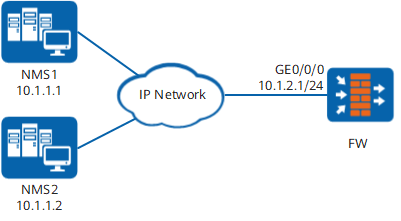
Configuration Roadmap
The configuration roadmap is as follows:
Set IP addresses for interfaces on the FW, assign the interfaces to security zones, and configure the interface access management function to allow the SNMP protocol to pass.
If the interface access management function is not used, you need to configure related security policies. Before disabling interface access management, configure security policies for remote management protocols to prevent the failure to remotely manage the FW.
- Set the SNMP version on the FW to SNMPv2c.
- Configure the SNMP NMS access permission on the FW.
- Configure the SNMP trap function on the FW.
- Configure SNMP administrator contact information on the FW.
- Configure the NMSs.
Procedure
- Set an IP address for interface GE0/0/0 on the FW, assign the interface to a security zone, and configure interface access management.
# Set an IP address for interface GE0/0/0 and configure interface access management.
<FW> system-view
[FW] interface GigabitEthernet 0/0/0
[FW-GigabitEthernet0/0/0] ip address 10.1.2.1 24
[FW-GigabitEthernet0/0/0] service-manage snmp permit
[FW-GigabitEthernet0/0/0] quit
# Add interface GE0/0/0 to a security zone.
[FW] firewall zone dmz
[FW-zone-dmz] add interface GigabitEthernet 0/0/0
[FW-zone-dmz] quit
# Configure a security policy.
[FW] security-policy
[FW-policy-security] rule name local_dmz
[FW-policy-security-rule-local_dmz] source-zone local
[FW-policy-security-rule-local_dmz] destination-zone dmz
[FW-policy-security-rule-local_dmz] source-address 10.1.2.1 24
[FW-policy-security-rule-local_dmz] service snmptrap
[FW-policy-security-rule-local_dmz] action permit
[FW-policy-security-rule-local_dmz] quit
[FW-policy-security] quit
- Configure the SNMP version on the FW.
[FW] snmp-agent sys-info version v2c Warning: SNMPv1/SNMPv2c is not secure, and it is recommended to use SNMPv3. - Configure the SNMP NMS access permission on the FW.
# Configure an ACL.
[FW] acl 2001
[FW-acl-basic-2001] rule permit source 10.1.1.1 0
[FW-acl-basic-2001] rule deny source 10.1.1.2 0
[FW-acl-basic-2001] quit
# Configure the MIB view.
[FW] snmp-agent mib-view include b system# Reference the ACL and MIB view in the community name.
[FW] snmp-agent community write cipher private@123 mib-view b acl 2001 - Configure the SNMP trap function on the FW.
[FW] snmp-agent target-host inform address udp-domain 10.1.1.1 params securityname private@123 v2c
[FW] snmp-agent trap enable
Warning: All switches of SNMP trap/notification will be open. Continue? [Y/N]:y
- Configure SNMP administrator contact information on the FW.
[FW] snmp-agent sys-info contact call Operator at 010-12345678 - Configure the NMSs.
You need to refer to the configuration guide of the NMS that is deployed. The NMS authentication parameters must be consistent with those on the FW. Otherwise, the NMS may fail to manage the FW.
Configuration Scripts
#
acl number 2001
 rule 5 permit source 10.1.1.1 0
 rule 15 deny source 10.1.1.2 0
#
interface GigabitEthernet0/0/0
 undo shutdown
 ip address 10.1.2.1 255.255.255.0
 service-manage snmp permit
#
firewall zone dmz
 set priority 50
 add interface GigabitEthernet0/0/0
#
security-policy
 rule name local_dmz
  source-zone local
  destination-zone dmz
  source-address 10.1.2.1 24
  service snmptrap
  action permit
#
 snmp-agent
 snmp-agent local-engineid 800007DB03DCD2FC2616AE
 snmp-agent community write cipher %^%#bge!SaO<d)7.R;B)NaMHp&ZD9S,OUF@"v^-YoEo+9m9n"-v4qD&wg:2&#)9LmNLt132fqVleQvCqUaRS%^%# mib-view b acl 2001
 snmp-agent sys-info contact call Operator at 010-12345678
 snmp-agent sys-info version v2c v3
 snmp-agent target-host inform  address udp-domain 10.1.1.1 params securityname cipher %^%#YwU|MS4tjR_Da)F_ump/fV06Xs6w>R[pS^GC.*gX%^%# v2c
 snmp-agent mib-view included b system
 snmp-agent trap enable
#
return