FAQs
This section provides FAQs about the SSL VPN feature.
Why Does a User Automatically Log Out a While After Logging in to the SSL VPN Gateway Through the Web UI?
The default session timeout time of the SSL VPN gateway is 5 minutes. If a user does not perform any operations within 5 minutes, the user automatically logs out.
You can take the following steps to change the session timeout time:
- Choose .
- Click the SSL tab.
In Session Timeout, enter a value you want to set.
The session timeout time, also called the aging time, is the time when a user connection is terminated because no traffic is transmitted. After the timeout time elapses, the server and client must re-authenticate each other, and the user must re-log in.

To allow users to use the same user account but different IP addresses to log in to the SSL VPN gateway, use the default value of Session Timeout (5 minutes).
Why Does the System Displays "The Page Cannot Be Displayed" When a User Logs In to the SSL VPN Virtual Gateway Using a Browser?
The remote user may have used a browser that uses 128-bit keys to access the virtual gateway that supports only browsers with 256-bit keys by default. To resolve the problem, the user can either use a browser that uses 256-bit keys or use a 1024-bit key certificate as the local certificate on the virtual gateway. Between the two methods, the former is easier and is therefore recommended.
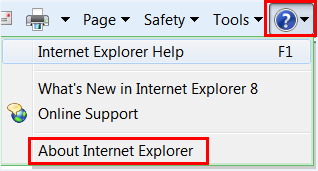
- Open the Internet Explorer, click the help icon, and select About Internet Explorer.
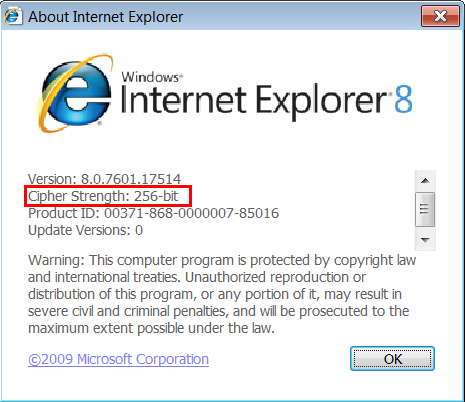
- Check the Cipher Strength field for the key length used by the browser.
Why Is a User Still Displayed Online on the SSL VPN Gateway After the User Closes the SSL VPN Gateway Page on a Client?
The user may only close the current tab or the browser without clicking Logout.
After the previous operation, the user account is still displayed as an online user on the SSL VPN gateway. Wait a period of time and you can see that the user account is deleted from the user list. This waiting period is the session timeout time.
How Can I Perform Certificate Authentication and What Is the Difference Between Certificate-Anonymous Mode and Certificate-Challenge Mode?
Certificate authentication verifies the identities of SSL VPN users using a CA certificate in either of the following modes:
- Certificate-anonymous mode: The SSL VPN gateway extracts user information carried in the CA certificate to verify the identities of SSL VPN users.
- Certificate-challenge mode: The SSL VPN gateway verifies the identities of SSL VPN users by extracting user information carried in the CA certificate and meanwhile implementing local or server authentication.
What If a Certificate Expires?
Contact the certificate issuer. Do not change the certificate-related configurations on the FW.
Why Is a Certificate Filtering Failure Message Displayed When a User Logs In to the Virtual Gateway Using a Browser in Certificate Authentication Mode?
By default, the protected mode is enabled for Internet Explorer. In this case, when a user uses Internet Explorer to log in to the virtual gateway in certificate authentication mode, the user certificate added on Internet Explorer cannot be displayed, and a message is displayed indicating that valid certificate filtering fails.
The solution is as follows:
- Choose .
- Deselect .
- Click and restart Internet Explorer.
Can SSL VPN Users Log In Without Being Authenticated?
No. SSL VPN users can log in only after being authenticated.
Why Does the System Display a Message Indicating the Name of a User's Security Certificate Is Invalid or Is Not Aligned With the Website Name When the User Is Logging to the SSL VPN Gateway?
When the local certificate for the SSL VPN gateway is made, the CN field value of the local certificate must be the same as the IP address or domain name of the SSL VPN gateway. If they are different, the system displays a message indicating the name of a user's security certificate is invalid or is not aligned with the site name.

If the CN field value is the IP address of the SSL VPN gateway, the system also displays the above-mentioned message when users are logging in to the SSL VPN gateway using the domain name. Similarly, if the value for the CN field is the domain name of the SSL VPN gateway, the system also displays the above-mentioned message when users are logging in to the SSL VPN gateway using the IP address.
Do I Have Other Ways to Access Web Proxy Resources, Apart from Clicking the Link on the SSL VPN Gateway Page?
Yes. You can enter the URL in Internet Explorer.
Which Permission Is Required to Install and Run the ActiveX Control?
Administrator permission.
Why Are Web Proxy Resources of the Domain Name Type Inaccessible on the Windows 7 Operating System?
The Windows 7 operating system has modified the DNS processing mechanism for enhanced security. Due to such modifications, web proxy components cannot block DNS requests. As a result, the IP addresses of web proxy resources are unavailable, and users cannot open the page for web proxy resources on the Windows 7 operating system.
To resolve this issue, enable the Automatic resolution for web proxy resources.
How Can I Resolve the Problem If the Virtual Gateway Prompts Me to Install the SSL VPN IE Control Everytime I Access or Log Out from the Virtual Gateway?
Close the browser, open the browser again, and reset it. Specific procedures are as follows(the flowing uses the Internet Explorer 8 as an example):
- Choose .
- Click Reset.
- In the Reset Internet Explorer Settings dialog box that is displayed, select Delete personal settings.
- Click Reset and restart the browser.
How Can I Resolve the Problem If the System Displays an SVNCMgr.exe Program Anomaly When I Use the Browser in the Vista System to Log In to the SSL VPN Virtual Gateway?
The Vista system cannot run the Windows VS2008 runtime library. You need to install the specified runtime library.
- For the Vista 64-bit operating system, install the Microsoft Visual C++ 2008 Redistributable X64 or X86 runtime library.
- For the Vista 32-bit operating system, install the Microsoft Visual C++ 2008 Redistributable X86 runtime library.
Why Is a Message Displayed Indicating an IP Address Obtaining Error When Network Extension Is Enabled?
Check whether Allow Users to Share this Account to Log In is selected in the user configuration on the virtual gateway. If not, select it.