Installing the ActiveX Control
Context
When a terminal user uses a IE kernel browser to log in to the virtual gateway and use the SSL VPN service, the ActiveX control needs to be downloaded and installed. In versions earlier than V600R007C20SPC300, the control must be uploaded by the administrator to the FW in advance except the USG6610E/6620E, USG6630E/6650E, USG6680E and USG6712E/6716E. For V600R007C20SPC300 and later versions, the control must be uploaded by the administrator to the FW in advance for all models.
Procedure
- Obtain the ActiveX control.
The administrator can log in to Huawei technical support website(http://support.huawei.com/enterprise) , search for or go to the corresponding version path to find and download the ActiveX control installation package clientpatchmain.
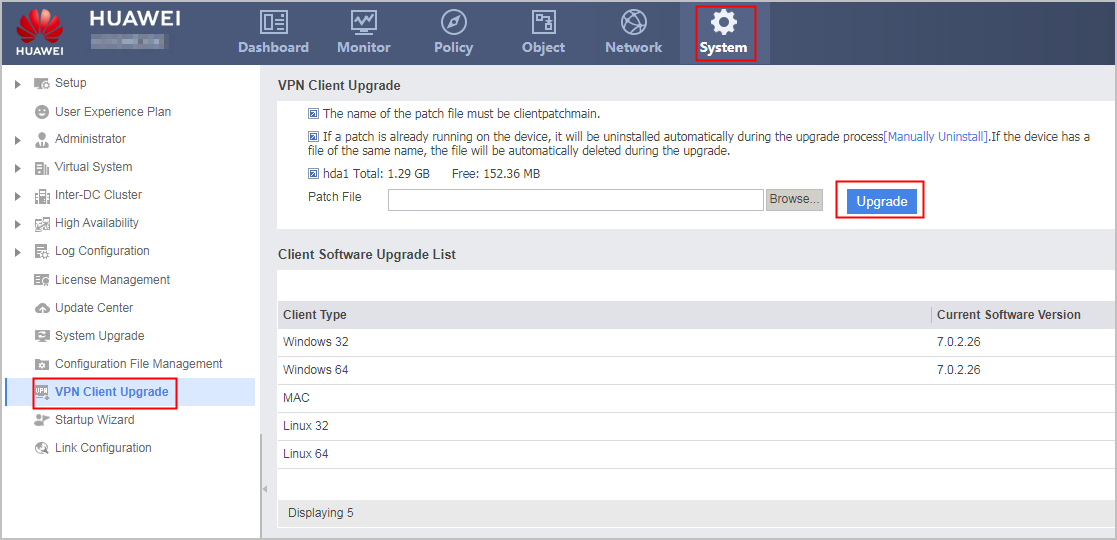
- Upload and install the ActiveX control.
Choose .
- Click Browse to upload the ActiveX control package.

The name of the ActiveX control package must be clientpatchmain.
Click Upgrade.