Introduction
Concept
SSL VPN is an SSL-based VPN remote access technology.
Purpose
With SSL VPN, remote users can access resources on their enterprise intranet anytime anywhere. To ensure the security of intranet resources, multiple user authentication methods and fine-grained access permission control are needed.
Although earlier VPN technologies, such as IPSec and L2TP, support remote access, the networking is not flexible, and remote users need to install specified client software, complicating network deployment and maintenance. Moreover, fine-grained access control cannot be implemented for remote users.
As a new lightweight remote access solution, SSL VPN can address these problems and ensure secure and efficient remote access to the resources on enterprise intranets.
As shown in Figure 1, FW functions as the enterprise egress gateway and is connected to the Internet. It provides SSL VPN access services for remote users. After an SSL VPN tunnel is established between the mobile terminal (such as a laptop, tablet, or smartphone) and the FW, the mobile terminal can remotely access resources such as the web, file, and mail servers on the enterprise intranet through the SSL VPN tunnel.
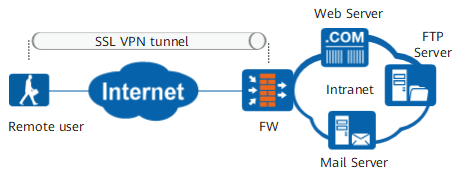
To control the access permissions in a fine-grained manner, intranet resources are classified into four types: web, file, port, and IP resources. An access method is provided for each type of resources. For example, the web proxy service is used to access web servers, and the file sharing service is used to access file servers. For details, see Table 1.
Service |
Description |
|---|---|
Web proxy |
Used for accessing web resources on an intranet. |
File sharing |
Used for accessing file servers on an intranet, such as a Server Message Block (SMB)-capable Windows system or Network File System (NFS)-capable Linux system. Users can create and view folders as well as upload, download, rename, and delete files using a web browser, just as they do locally on the file systems. |
Port forwarding |
Used for accessing TCP resources on an intranet. Port forwarding applies to TCP services, such as Telnet, remote desktop, FTP, and email. Port forwarding is a port-level security mechanism for accessing resources on an intranet from the Internet. |
Network extension |
Used for accessing IP resources on an intranet, including web, file, and TCP resources. The network extension service is enabled when network resource types are not distinguished. |