Understanding Web Proxy
Concept
The FW can function as a proxy for accessing the web (URL) resources on an intranet.
Service Interaction Process
Figure 1 show the procedure for a remote user to access the web server on an enterprise network using the web proxy function.
- The remote user accesses the virtual gateway using the domain name (https://gateway-domain).
- After logging in, the remote user views a list of accessible web resources and clicks the link of a desired web resource.
The FW rewrites the URL of the desired web resource (http://website/resource.html) when listing the web resource. After the remote user clicks the URL of the desired web resource, an HTTPS request is sent to the FW. The requested link is the rewritten URL (a combination of two URLs: https://gateway-domain and http://website/resource.html.
- After receiving the requested URL, the FW initiates a new HTTP request to the web server. The HTTP request is the actual URL (http://website/resource.html) of the intended web resource.
- The web server returns the requested resource page to the FW using HTTP.
- The virtual gateway relays the resource page returned by the web server to the remote user using HTTPS.
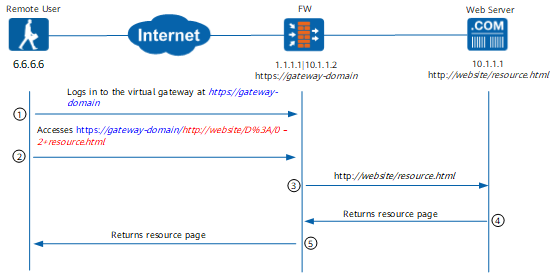
As shown in the service interaction process, the web proxy implementation process is divided into two phases. I phase 1, the remote user establishes an HTTPS session with the virtual gateway on the FW. In phase 2, the virtual gateway on the FW establishes an HTTP session with the web server. The virtual gateway rewrites and forwards the web requests during the process.
Web proxy can be implemented using web rewriting or web link as follows:
- Web rewriting
Rewriting has two meanings: The first meaning is encryption, that is, the virtual gateway encrypts the actual URL after a remote user clicks a lin in the resource list. For example, in step 2 in Figure 1, the actual URL requested by the user is http://website/resource.html. After web rewriting, the URL may be displayed as http://website/D%3A/0–2+resource.html. The rewritten URL is displayed instead of the actual URL so that the address of the web server on the enterprise network is hidden from outsiders. In web rewriting, the virtual gateway encrypts not only the URLs of the requested web resources, but also the URLs of objects, such as Flash content, PDF files, or Java Applets, referenced by the web resources.
The other meaning is adaptation. Various types of terminals use different types of operating systems and browsers and therefore support different types of Web resources. To mask the differences of terminals, the FW must also adapt the requested web resources to the terminals. The FW automatically adapts requested web resources to requesting terminals after the web proxy function is enabled. If the adaptation does not work for certain HTML objects or ActiveX controls after the web proxy is enabled, administrators need to manually configure adaptation policies.
- Web link
The web link function does not perform encryption or adaptation and only transparently forwards the requests of remote users.
Because encryption and adaptation are missing in the web link function, the service processing efficiency is higher than that in the web proxy function. Due to the encryption and adaptation, the security of the web rewriting function is higher than those in the Web link function.

- Figure 1 shows the process of the web rewriting function. The process of the web link function is similar. The only difference is that web link does not rewrite requested resources.
- Note that web link applies to the environment where the Internet Explorer is used in the Windows operating system.
Packet Encapsulation
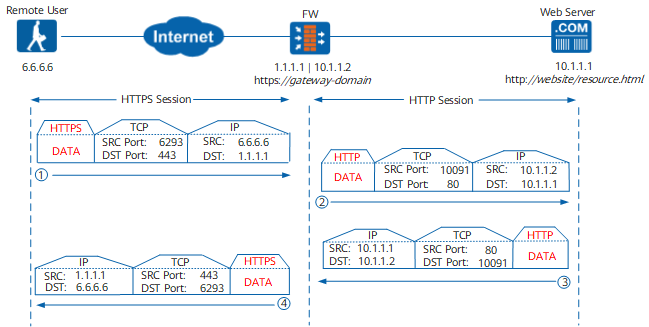
Figure 2 shows the packet encapsulation process when a remote user accesses web resources on the enterprise network. The process involves two sessions, one HTTPS session and one HTTP session. A random port (6293 in this example) is used as the source port to establish an HTTPS session from the remote user to destination port 443 on the virtual gateway. A random port (10091) is used as the source port to establish an HTTP session from the virtual gateway to destination port 80 on the web server.
Security Policy
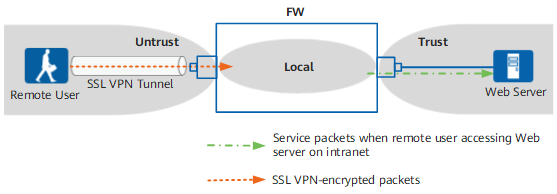
Figure 3 shows the FW security zones that packets pass through.
When a remote user accesses an enterprise web server, packets passing through the FW are classified into two types, and the corresponding security policies are as follows:
- Encrypted SSL VPN packets between the remote user and the FW.
The encrypted SSL VPN packets pass through the Untrust zone to the Local zone.
- Service packets involved when the remote user accesses the enterprise web server.
The decrypted service packets pass through the Local zone to the Trust zone.