Understanding Port Forwarding
Concept
Port forwarding enables the client to obtain TCP packets with a specified destination IP address and port number to access specified intranet resources.
Service Interaction Process
Remote users can use port forwarding to access TCP resources on an intranet. TCP resources refer to upper-layer applications based on TCP, such as Telnet, remote desktop, FTP, and email. The following example illustrates the process.
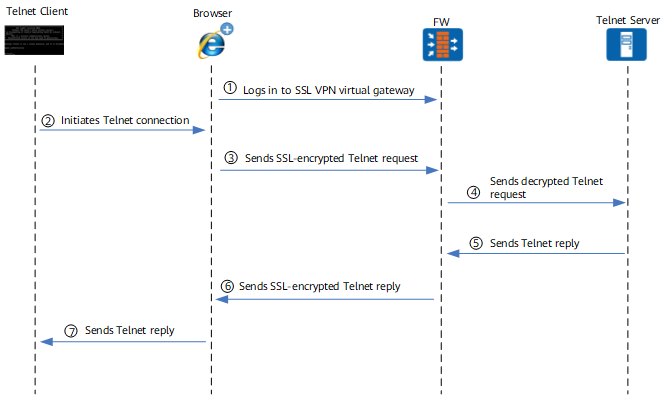
- A remote user logs in to the virtual gateway of the SSL VPN using a browser.
After the login is successful, the remote user enables the port forwarding service on the virtual gateway page. Then, the virtual gateway delivers an instruction to the browser of the remote user so that the Active control of the browser starts to monitor the local Telnet access requests in real time.
- The Telnet client sends a connection request to the Telnet server.
- The Telnet connection request is sent to the virtual gateway through the encrypted SSL VPN tunnel.
The ActiveX control of the browser needs to capture the Telnet connection request first so that the request can be forwarded to the virtual gateway through the port forwarding. The detailed process is as follows. The ActiveX control monitors the Telnet service all the time. Once the ActiveX control finds that the Telnet client initiates a Telnet request, it changes the destination address of the Telnet request to its loopback address and port to another port. For example, if the IP address of the Telnet server is 10.1.1.1 and the port number is 23, the ActiveX control changes the destination address to the loopback address 127.0.0.1 and the destination port number to 1047 (1024+23). In this way, the Telnet connection request is captured. After the Telnet request is captured, the real Telnet request is transmitted to the virtual gateway through the SSL-encrypted tunnel.
- The FW decrypts the Telnet connection request and forwards the original request to the Telnet server.
- The Telnet server sends a response to the FW.
- The FW sends the Telnet response to the browser through the encrypted SSL VPN tunnel.
The ActiveX control of the browser decrypts the Telnet response.
- The decrypted Telnet response is returned to the Telnet client.
Security Policy
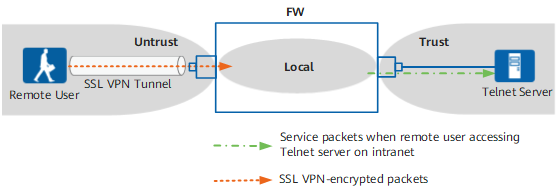
Figure 2 shows the FW security zones that packets pass through.
When a remote user accesses a Telnet server, the packets that pass through the FW are classified into two types, and the corresponding security policies are as follows:
- Encrypted SSL VPN packets between the remote user and the FW.
The encrypted SSL VPN packets pass through the Untrust zone to the Local zone.
- Service packets involved when the remote user accesses the enterprise Telnet server.
The decrypted service packets pass through the Local zone to the Trust zone.