CLI: Example for Enabling Remote Users to Access Enterprise Web Servers Through Web Proxy (Web Link)
Networking Requirements
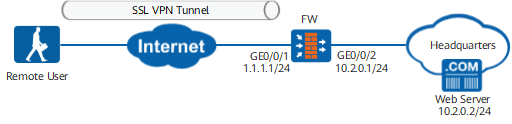
As shown in Figure 1, remote users need to access the enterprise Web servers through SSL VPN.
Local authentication is used on the FW to authenticate users. Authenticated users can access internal servers.
Procedure
- Set an IP address for each interface, assign interfaces to security zones, and complete basic parameter settings.
# Set IP addresses of interfaces.
<FW> system-view
[FW] interface GigabitEthernet 0/0/1
[FW-GigabitEthernet0/0/1] ip address 1.1.1.1 24
[FW-GigabitEthernet0/0/1] quit
[FW] interface GigabitEthernet 0/0/2
[FW-GigabitEthernet0/0/2] ip address 10.2.0.1 24
[FW-GigabitEthernet0/0/2] quit
# Assign interfaces to security zones.
[FW] firewall zone untrust
[FW-zone-untrust] add interface GigabitEthernet 0/0/1
[FW-zone-untrust] quit
[FW] firewall zone trust
[FW-zone-trust] add interface GigabitEthernet 0/0/2
[FW-zone-trust] quit
- Configure user objects and authentication.
# Configure the authentication domain.
[FW] aaa
[FW-aaa] domain default
[FW-aaa-domain-default] authentication-scheme default // Authentication scheme default uses local authentication by default.
[FW-aaa-domain-default] service-type ssl-vpn
[FW-aaa-domain-default] quit
[FW-aaa] quit
# Create user groups and users.
[FW]user-manage group /default/group1
[FW-usergroup-/default/group1]quit
[FW]user-manage user user0001 domain default
[FW-localuser-user0001]password Password@123
[FW-localuser-user0001]parent-group /default/group1
[FW-localuser-user0001]quit
- Configure an SSL VPN virtual gateway.
# Create an SSL VPN virtual gateway.
[FW] v-gateway gateway interface GigabitEthernet 0/0/1 private
[FW] v-gateway gateway udp-port 443
[FW] v-gateway gateway authentication-domain default
- Configure web link.
# Enable web link.
[FW] v-gateway gateway
[FW-gateway] service
[FW-gateway-service] web-proxy enable
[FW-gateway-service] web-proxy web-link enable
# Configure web link resources.
[FW-gateway-service] web-proxy link-resource Web-Server http://10.2.0.2:8080 show-link - Configure role authorization.
# Add user groups to a virtual gateway.
[FW-gateway] vpndb
[FW-gateway-vpndb] group /default/sslvpn
[FW-gateway-vpndb] quit
# Create a role.
[FW-gateway] role
[FW-gateway-role] role role
# Bind the role to corresponding user groups.
[FW-gateway-role] role role group /default/sslvpn# Enable web link for role role.
[FW-gateway-role] role role web-proxy enable
[FW-gateway-role] role role web-proxy resource Web-Server
[FW-gateway-role] quit
[FW-gateway] quit
- Configure security policies.
# Configure an Internet-to-FW interzone security policy to allow remote users to log in to the SSL VPN gateway.
[FW] security-policy
[FW-policy-security] rule name policy01
[FW-policy-security-rule-policy01] source-zone untrust
[FW-policy-security-rule-policy01] destination-zone local
[FW-policy-security-rule-policy01] destination-address 1.1.1.1 24
[FW-policy-security-rule-policy01] service https
[FW-policy-security-rule-policy01] action permit
[FW-policy-security-rule-policy01] quit
# Configure a FW-to-intranet security policy to allow remote users to access resources at the Headquarters.
[FW-policy-security] rule name policy02
[FW-policy-security-rule-policy02] source-zone local
[FW-policy-security-rule-policy02] destination-zone trust
[FW-policy-security-rule-policy02] destination-address 10.2.0.0 24
[FW-policy-security-rule-policy02] action permit
[FW-policy-security-rule-policy02] quit
Verifying the Configuration
- Enter https://1.1.1.1:443 in the address bar of Internet Explorer to access the SSL VPN login page.
Install the control as prompted upon the first login.

The Active control version required on clients depends on the version of the virtual gateway. If you need to change the Active control version, you must uninstall the old version before installing the new one. Otherwise, the browser will be stuck at the control loading page.
If the client is a PC, run the following commands to uninstall the control:
PC> regsvr32 SVNIEAgt.ocx -u -s
PC> del %systemroot%\SVNIEAgt.ocx /q
PC> del %systemroot%\"Downloaded Program Files"\SVNIEAgt.inf /q
PC> cd %appdata%
PC> rmdir svnclient /q /s
- In the login window, enter the user name and password, and then click Login.
After the login succeeds, the web resource links are displayed on the virtual gateway page. You can click a link to access the resource.
Configuration Script
#
aaa
 authentication-scheme default
 authorization-scheme default
 domain default
  service-type ssl-vpn
  internet-access mode password
  reference user current-domain
#
interface GigabitEthernet 0/0/1
 ip address 1.1.1.1 255.255.255.0
#
interface GigabitEthernet 0/0/2
 ip address 10.2.0.1 255.255.255.0
#
firewall zone trust
 set priority 85
 add interface GigabitEthernet 0/0/2
#
firewall zone untrust
 set priority 5
 add interface GigabitEthernet 0/0/1
#
v-gateway gateway authentication-domain default
#
#****BEGIN***gateway**1****#
v-gateway gateway
 basic
  ssl version tlsv11 tlsv12
  ssl timeout 5
  ssl lifecycle 1440
  ssl ciphersuit custom aes256-sha aes128-sha
 service
  web-proxy enable
  web-proxy web-link enable
  web-proxy link-resource Web-Server http://10.2.0.2:8080 show-link
 security
  policy-default-action permit vt-src-ip
  certification cert-anonymous cert-field user-filter subject cn group-filter subject cn
  certification cert-anonymous filter-policy permit-all
  certification cert-challenge cert-field user-filter subject cn
  certification user-cert-filter key-usage any
  undo public-user enable
 hostchecker
 cachecleaner
 vpndb
  group /default
  group /default/group1
 role
 role default
  role default condition all
 role role
  role role condition all
  role role web-proxy enable
  role role web-proxy resource Web-Server
#****END****#
#
security-policy
 rule name policy01
  source-zone untrust
  destination-zone local
  destination-address 1.1.1.0 mask 255.255.255.0
  service https
  action permit
 rule name policy02
  source-zone local
  destination-zone trust
  destination-address 10.2.0.0 mask 255.255.255.0
  action permit
#
# The following configurations are saved in the database and are not displayed in the configuration file.  user-manage user user0001 domain default
 password %$%$j@p.U.0bwNQv9nE#tf]G-+"v%$%$
  parent-group /default/group1
 v-gateway gateway
  role
   role role group /default/group1