CLI: Example for Enabling Mobile Employees to Access the Headquarters Through SSL VPN Tunnels (MAC Address Authentication)1
Networking Requirements
On the enterprise network shown in Figure 1, mobile employees access resources at the headquarters through SSL VPN tunnels. The mobile employees are required to use the specified devices to access resources at the headquarters, which prevents unauthorized devices from accessing the enterprise network. To meet the requirement, the network administrator at the headquarters needs to configure MAC address authentication on the virtual gateway to authenticate the MAC addresses of user devices.
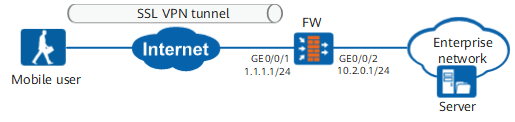
Procedure
- Set IP addresses for interfaces and assign the interfaces to security zones.
# Set IP addresses for interfaces.
<FW> system-view
[FW] interface GigabitEthernet 0/0/1
[FW-GigabitEthernet0/0/1] ip address 1.1.1.1 24
[FW-GigabitEthernet0/0/1] quit
[FW] interface GigabitEthernet 0/0/2
[FW-GigabitEthernet0/0/2] ip address 10.2.0.1 24
[FW-GigabitEthernet0/0/2] quit
# Assign the interfaces to security zones.
[FW] firewall zone untrust
[FW-zone-untrust] add interface GigabitEthernet 0/0/1
[FW-zone-untrust] quit
[FW] firewall zone trust
[FW-zone-trust] add interface GigabitEthernet 0/0/2
[FW-zone-trust] quit
- Configure user objects and authentication.
# Configure the authentication domain.
[FW] aaa
[FW-aaa] domain default
[FW-aaa-domain-default] authentication-scheme default   //Authentication scheme default uses local authentication by default.
[FW-aaa-domain-default] service-type ssl-vpn
[FW-aaa-domain-default] quit
[FW-aaa] quit
# Create user groups and users.
[FW]user-manage group /default/group1
[FW-usergroup-/default/group1]quit
[FW]user-manage user user0001 domain default
[FW-localuser-user0001]password Password@123
[FW-localuser-user0001]parent-group /default/group1
[FW-localuser-user0001]quit
- Configure the SSL VPN gateway.
- Create the SSL VPN virtual gateway named gateway.
[FW] v-gateway gateway interface GigabitEthernet 0/0/1 private
[FW] v-gateway gateway udp-port 443
[FW] v-gateway gateway authentication-domain default
- Configure network extension.
[FW-gateway] service
[FW-gateway-service] network-extension enable
[FW-gateway-service] network-extension keep-alive enable
[FW-gateway-service] network-extension keep-alive interval 120
[FW-gateway-service] network-extension netpool 172.16.1.1 172.16.1.100 255.255.255.0
[FW-gateway-service] netpool 172.16.1.1 default
[FW-gateway-service] network-extension mode manual
[FW-gateway-service] network-extension manual-route 10.2.0.0 255.255.255.0
[FW-gateway-service] quit
- Configure role binding.
[FW-gateway] vpndb
[FW-gateway-vpndb] group /default/group1
[FW-gateway-vpndb] quit
[FW-gateway] role
[FW-gateway-role] role default network-extension enable
[FW-gateway-role] role default condition all
[FW-gateway-role] quit
- Configure MAC address authentication.
[FW-gateway] security
[FW-gateway-security] authentication-mode cert-none
[FW-gateway-security] mac-authentication enable
[FW-gateway-security] mac-group mac-group
[FW-gateway-security-macgroup-user-group] mac-address 286e-d488-dc67
[FW-gateway-security-macgroup-user-group] quit
[FW-gateway-security] bind user-group /default/group1 mac-group mac-group
[FW-gateway-security] quit
[FW-gateway] quit
- Create the SSL VPN virtual gateway named gateway.
- Configure a security policy to allow mobile employees to access resources at the headquarters.
[FW] security-policy
[FW-policy-security] rule name policy01
[FW-policy-security-rule-policy01] source-zone untrust
[FW-policy-security-rule-policy01] destination-zone local
[FW-policy-security-rule-policy01] service https
[FW-policy-security-rule-policy01] destination-address 1.1.1.0 24
[FW-policy-security-rule-policy01] action permit
[FW-policy-security-rule-policy01] quit
[FW-policy-security] rule name policy02
[FW-policy-security-rule-policy02] source-zone untrust
[FW-policy-security-rule-policy02] destination-zone trust
[FW-policy-security-rule-policy02] destination-address 10.2.1.0 24
[FW-policy-security-rule-policy02] action permit
[FW-policy-security-rule-policy02] quit
Verifying the Configuration
- Enter https://1.1.1.1:443 in the address box of the browser to access the SSL VPN login page.
- On the login page, enter the user name and password and click Login.
If you use the specified device with MAC address 286e-xxxx-xxxx for login, the login succeeds.
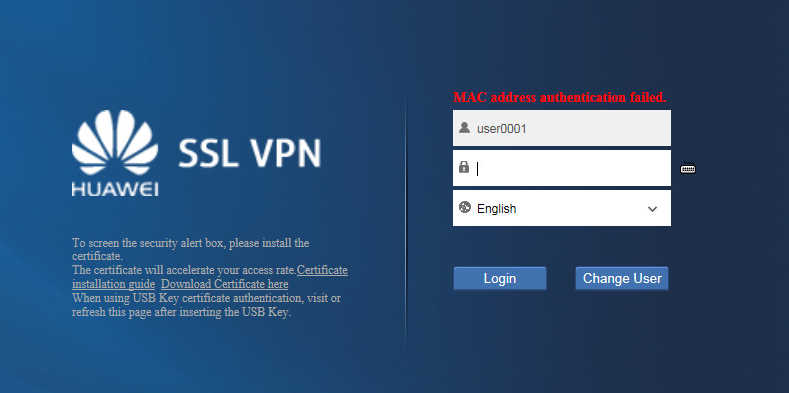
If you use an authorized device whose MAC address is not 286e-xxxx-xxxx for login, the system displays MAC address authentication failed.
Configuration Scripts
#
aaa
 authentication-scheme default
 authorization-scheme default
 domain default
  service-type ssl-vpn
  internet-access mode password
  reference user current-domain
#
interface GigabitEthernet0/0/1
 ip address 1.1.1.1 255.255.255.0
#
interface GigabitEthernet0/0/2
 ip address 10.2.0.1 255.255.255.0
#
firewall zone trust
 set priority 85
 add interface GigabitEthernet0/0/2
#
firewall zone untrust
 set priority 5
 add interface GigabitEthernet0/0/1
#
 v-gateway public ssl version tlsv11 tlsv12
 v-gateway public ssl ciphersuit custom aes256-sha aes128-sha
 v-gateway gateway interface GigabitEthernet0/0/1 private
 v-gateway gateway authentication-domain default
#****BEGIN***examole**1****#
v-gateway gateway
 basic
  ssl version tlsv11 tlsv12
  ssl timeout 5
  ssl lifecycle 1440
  ssl ciphersuit custom aes256-sha aes128-sha
 service
  network-extension enable
  network-extension keep-alive enable
  network-extension keep-alive interval 120
  network-extension netpool 172.16.1.1 172.16.1.100 255.255.255.0
  netpool 172.16.1.1 default
  network-extension mode manual
  network-extension manual-route 10.2.0.0 255.255.255.0
 security
  policy-default-action permit vt-src-ip
  certification cert-anonymous cert-field user-filter subject cn group-filter subject cn
  certification cert-anonymous filter-policy permit-all
  certification cert-challenge cert-field user-filter subject cn
  certification user-cert-filter key-usage any
  authentication-mode cert-none
  undo public-user enable
  mac-authentication enable
  mac-group mac-group
   mac-address 286e-d488-dc67
  bind user-group /default/group1 mac-group mac-group
 hostchecker
 cachecleaner
 role
 role default
  role default condition all
 role role
  role role condition all
  role role network-extension enable
#****END****#
#
security-policy
 rule name policy01
  source-zone untrust
  destination-zone local
  service https
  destination-address 1.1.1.0 mask 255.255.255.0
  action permit
 rule name policy02
  source-zone untrust
  destination-zone trust
  destination-address 10.2.0.0 mask 255.255.255.0
  action permit
# The following configurations are stored in the database, not described in the configuration file.
 user-manage user user0001 domain default
 password %$%$j@p.U.0bwNQv9nE#tf]G-+"v%$%$
  parent-group /default/group1
 v-gateway gateway
  vpndb
   group /default/group1
  role
   role role1 group /default/group1