Understanding the Configuration of Multiple Virtual Gateways
Multiple virtual gateways can be created on a FW device. An enterprise can create a virtual gateway for each department. The accessible resources and services and applicable access control rules vary with departments. The virtual gateways can be independently managed, each having its own users, resources, and policies.
By creating a virtual gateway on the FW for each department, service management is easier and clearer.
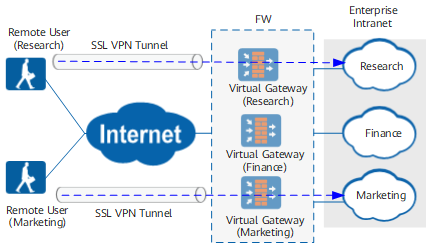
As shown in Figure 1, three virtual gateways are created on the FW for the research, finance, and marketing departments, respectively. Mobile employees of each department can access their own virtual gateway and access desired resources.
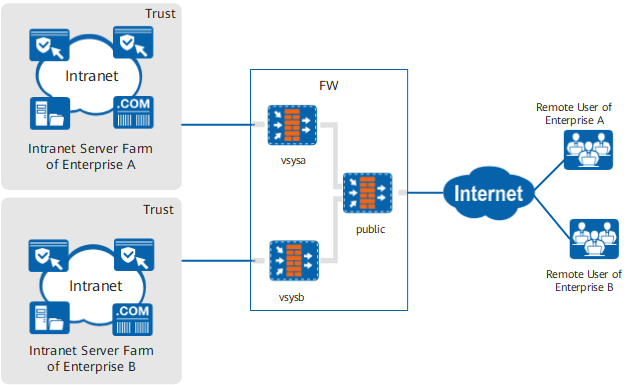
A service provider can create multiple virtual systems on a FW for different tenants. Each tenant has its own virtual system and virtual gateways. The virtual systems of different tenants are separated. As shown in Figure 2, multiple virtual systems on the FW device share a physical WAN interface. However, each virtual system has its own virtual interfaces. These virtual gateways use the public IP address and are distinguished by domain names/child domain names and port numbers. Remote users of each enterprise can access their own virtual gateways.
In the preceding scenarios, you can configure virtual gateways in either of the following ways:
- Exclusive virtual gateway
Exclusive virtual gateways can be configured in the root system. In this case, multiple virtual gateways are available on the FW for external users. Users can access the corresponding virtual gateways through their own IP addresses and ports. Exclusive virtual gateways can also be configured in different virtual systems using the public IP address on the FW. Each virtual system exclusively occupies a domain name and a port number, and users can access the corresponding virtual gateways through their own domain names and ports.
- Shared virtual gateway
Shared virtual gateways can be configured in the root system and different virtual systems using the public IP address. In this case, the virtual gateways share the same IP address and domain name, and are differentiated by child domain name. For example, gateway1 and gateway2 are shared virtual gateways. They share the IP address and port (1.1.1.1:443). However, one virtual gateway is accessed through www.gateway.com/1 and the other through www.gateway.com/2.