SSL-Encrypted Traffic Detection Profile
This section describes basic concepts and functions of the SSL-encrypted traffic detection profile.
The SSL-encrypted traffic detection function of the FW is implemented by using the SSL-encrypted traffic detection policy and detection profile. The detection policy determines whether to decrypt or block the encrypted packets that match the detection policy. The detection profile determines how the FW processes the encrypted packets that match the detection policy. The detection profile takes effect only when it is referenced by the detection policy. You can choose Policy > Encrypted Traffic Detection > Detection Profile on the web UI to view the information.
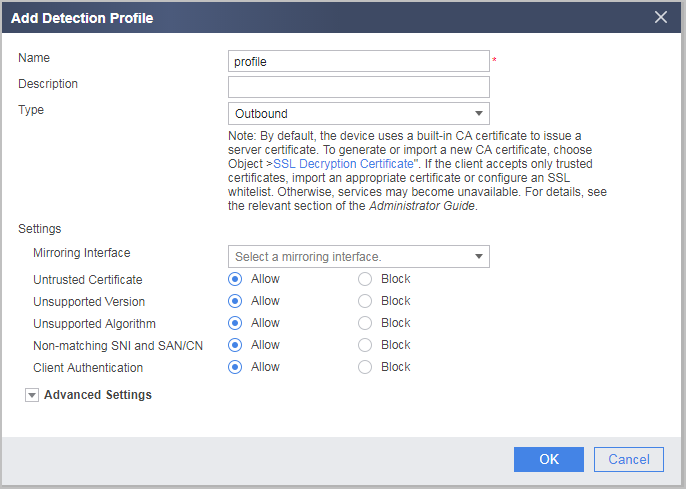
The detection profile contains different contents in different scenarios. The following table describes detailed contents in each scenario.
Scenario |
Description |
|---|---|
Inbound (applicable to the server protection scenario) |
The inbound detection profile contains the following information:
NOTE:
The SSL encryption algorithm supported by SSL-encrypted traffic detection comes from the OpenSSL library. Currently, the OpenSSL library version is V1.1.1. For details about the list of supported SSL encryption algorithms, see the corresponding OpenSSL library. |
Outbound (applicable to the client protection scenario) |
The outbound detection profile contains the following information:
Allow: indicates that the FW does not serve as an SSL proxy, but allows the client and server to directly establish an SSL connection instead. Block: indicates that the FW directly terminates the current SSL connection. The default action is Allow. |
No decrypt (applicable to the SSL decryption-exempted scenario) |
The decryption-exempted profile can be used to control whether to allow or block the SSL connection between the FW and the client or server when the server certificate is untrusted or the SNI is inconsistent with the SAN/CN in the certificate. The default action is Allow. |
After SSL-encrypted traffic detection is enabled, the FW serves as a proxy to establish an SSL connection with the client and server, respectively. SSL session negotiation and subsequent packet encryption and decryption consume a lot of CPU resources. In addition, the consumed CPU resources increase with the security requirement. Therefore, the administrator can configure the encryption algorithms and versions separately for these two SSL connections based on network features. For example, use low-security algorithms and versions for secure and trusted internal networks, and use high-security algorithms and versions for complex external networks to balance performance with security.
When configuring an SSL-encrypted traffic detection profile, you cannot configure the same processing rule for all traffic. Instead, you can create one or more independent detection profiles as required. For example, for high-security URLs, if the SSL protocol version or encryption algorithm used for establishing an SSL connection between the client or server and the FW is not supported by the FW, you can configure the detection profile to allow the traffic to pass through. On the contrary, if security risks exist, you can configure a detection profile to block the traffic.

It is recommended that you block traffic transmitted using some unknown SSL protocol versions or encryption algorithms because it may pose high security risks. If you need to permit the traffic for certain reasons, create an independent detection profile for the traffic and configure the detection policy to reference the detection profile for the traffic. For example, you can block insecure traffic from a source IP address or a specified user, and do not allow all traffic to pass through.