Configuring Mirroring of SSL-Decrypted Packets
This section describes mirroring of SSL-decrypted packets and how to configure this function.
Application Scenario
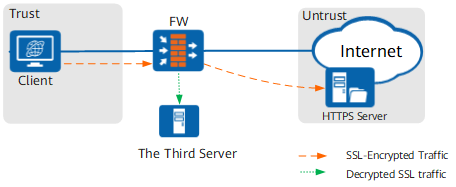
The scenario of decrypted packet mirroring is generally applied when the FW is deployed at the enterprise egress. After the mirroring interface for packet decryption is specified, the FW sends the decrypted plaintext data to the third-party detection device through the mirroring interface, and the third-party detection device performs security check on the mirrored data. The decrypted packet mirroring function enables multiple devices to perform security detection and audit on the decrypted content, extending the detection scope of the third-party device and maximizing the value of existing devices.
The decrypted packets are sent to the third-party device through the mirroring interface for detection, and the packets detected by the third-party device are not sent to the FW.
The decrypted packet mirroring function can be used in both the protection server and client protection scenarios. The following figure shows the server protection scenario where the SSL-decrypted packet mirroring function is enabled.
Configuring Mirroring of SSL-Decrypted Packets Using the Web UI
- Choose Policy > Encrypted Traffic Detection > Detection Profile. Click Add to configure a detection profile.
- Set Type to Inbound or Outbound to configure a mirroring interface.
If you select a mirroring interface, the decrypted traffic is sent to a third-party device through the mirroring interface. Currently, the mirroring interface supports only Layer 3 Ethernet interface, Layer 2 Ethernet interface, Ethernet sub-interface, Eth-Trunk interface, and tunnel interface.
This section describes only the operations related to decrypted packet mirroring. If this function is used in server protection and client protection scenarios, you also need to configure certificates, detection policies, and detection profiles. For details, see the corresponding sections.
Configuring Mirroring of SSL-Decrypted Packets Using the CLI
The following uses the configuration of mirroring interface GigabitEthernet 0/0/2 for SSL-encrypted traffic as an example.
<sysname> system-view
[sysname] profile type decryption name profile1
[sysname-profile-decryption-profile1] detect type outbound
[sysname-profile-decryption-profile1] mirror-interface GigabitEthernet 0/0/2