Understanding Client Protection
This section describes the application scenario and packet processing of SSL-encrypted traffic detection for client protection.
Application Scenario
Client protection prevents enterprise users from transmitting sensitive enterprise information in encrypted mode, causing asset loss and protecting intranet users from being attacked by external malicious websites.
As shown in Figure 1, an HTTPS server on the Internet is a malicious website. An intranet user (client) initiates an access request to the website. To protect the client of the intranet user from being attacked by the external malicious website, the network administrator enables SSL-encrypted traffic detection on the FW. When the access request of the user reaches the FW, the FW decrypts the access request, checks the content, abstracts the URL to be accesses from the access request, and blocks the traffic once identifying the malicious website address. In this way, SSL-encrypted traffic detection protects the intranet user.
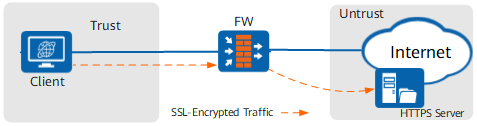
In the client protection scenario, the FW serves as a man-in-the-middle. After receiving a request from the client, the man-in-the-middle proxies a client to establish a connection with the server and meanwhile serves as a server to establish a connection with the client. This actually turns SSL handshake into two completely independent processes. Therefore, the FW serves as a man-in-the-middle to obtain the complete content in the interaction with the client and server so as to process the content.
Packet Processing in the Client Protection Scenario
Figure 2 shows the process for establishing SSL connections between the FW and a client and between the FW and a server, and the process for SSL-encrypted traffic decryption in the client protection scenario.
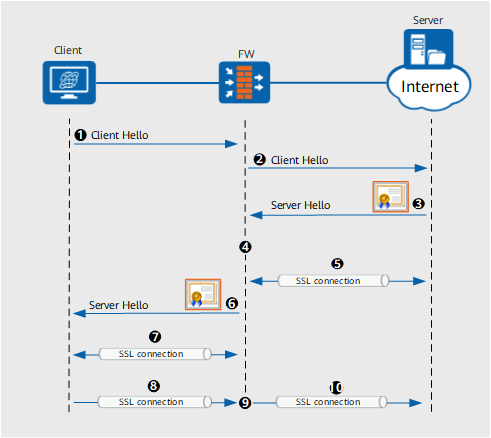
- A client sends a Client Hello packet to a server to initiate a new SSL connection.
- The FW resolves and buffers the Client Hello packet sent from the client, and sends its own Client Hello packet to the server.
Upon resolving the Client Hello packet, the FW abstracts the Server Name Indication (SNI) field from the packet.
- The server responds to the Client Hello packet and sends a Server Hello packet and a server certificate to the FW.
- The FW verifies the validity of the server certificate, and re-issues a server certificate using the SSL Decryption Certificate according to the content of the server certificate. For details about SSL decryption certificates, see SSL-Encrypted Traffic Detection Certificate.
In addition to verifying the server certificate and re-issuing a server certificate, the FW abstracts the SAN/CN field from the server certificate (true server certificate) to perform SNI and SAN/CN consistency check, and therefore determines whether to establish the SSL connection with the server.
- The FW implements SSL handshake with the server and establishes the SSL connection as a proxy client.
After the SSL connection is established, the FW and the server negotiate a symmetric key. This symmetric key is used for encryption or decryption when service traffic is transmitted between the FW and the server.
- The FW sends its own Server Hello packet and the server certificate generated in #sec_admin_ssldecrypt_0003_6/sslproxystep04 to the client.
- The client verifies the new server certificate, implements SSL handshake with the FW, and establishes the SSL connection.
After verifying the server certificate, the client generates a local symmetric key. After encrypting the symmetric key using the public key of the server certificate generated in #sec_admin_ssldecrypt_0003_6/sslproxystep04, the client sends the symmetric key to the FW. Upon receiving the encrypted symmetric key, the FW decrypts it using the private key in the new server certificate. This symmetric key is used for encryption or decryption when service traffic is transmitted between the client and the FW.
- The client sends the SSL-encrypted (using the symmetric key) traffic to the server.
- The FW decrypts SSL traffic sent from the client using the symmetric key, and checks the content security of the decrypted traffic.
- The FW re-encrypts the traffic that passes the content security check to the server.
The FW re-encrypts the symmetric key negotiated with the server. When the encrypted traffic reaches the server, the server decrypts the traffic using the symmetric key again.