Understanding a Certificate
This section describes functions and principles of the SSL-encrypted traffic detection certificate.
Functions and Principles
A certificate, also known as a digital certificate, is an ID card on the network. The certificate associates the identity information of the certificate holder with the public key to ensure that the holder can be identified through the certificate. Certificates are issued by authoritative, impartial, and trusted third-party organizations, also called Certificate Authorities (CAs).
In most phishing attacks, a forged website that is extremely similar to the real website is sent to users to trick them into entering key information such as the user name and password. Considering that the forged websites use certificates that are not trusted by the client browsers, such as Internet Explorer and Chrome, the browsers display alarms on the untrusted certificates in the access to the forged websites. However, there are also some nonstandard websites with untrusted certificates on the live network, and phishing attackers forge the untrusted certificates of the encrypted websites to be almost the same as those of the real websites. Users may carelessly ignore alarms on the clients and choose to continue their access, falling into the traps of the attackers.
A server certificate is imported by a server administrator. It can be a locally generated certificate, a certificate purchased from an external authoritative organization, or a certificate generated by a self-built server for issuing certificates. In the client protection scenario configured with SSL-encrypted traffic detection, you need to import a server CA certificate to the device and verify the server certificate. If the certificate expires or is issued by an untrusted CA (depending on the administrator to import third-party trusted CA certificates on the device), the device directly blocks traffic based on the administrator's configuration to protect internal users from attacks.
In the client protection scenario, the FW serves as the SSL proxy but fails to obtain the private key of the server. However, it must send a certificate to the client to indicate the identity. Instead of directly sending the true server certificate to the client or sending its own certificate to the client, the FW re-issues a new Server Certificate to the client using the SSL decryption certificate according to the content of the server certificate because:
- If the FW directly sends the true server certificate to the client, because the FW does not have the private key corresponding to the public key in the true server certificate, the FW cannot decrypt the encrypted information of the public key, cannot obtain the symmetric key generated by the client, and cannot decrypt the SSL traffic sent from the client.
- If the FW directly sends its own certificate to the client, the client prompts a security alert, indicating inconsistent site names in the certificate, because the identity information of the holder in the FW certificate is inconsistent with the real server, thereby affecting user experience.
SSL Decryption Certificate
The SSL decryption certificate is a CA certificate. It can be imported from an external authority or generated by the embedded CA of the FW. Because the FW locally stores the private key corresponding to the public key of the certificate, the FW can decrypt the encrypted information of the public key, obtain the symmetric key generated by the client, and decrypt the SSL-encrypted traffic sent from the client subsequently. As shown in Figure 1, when the FW re-issues a certificate using the SSL decryption certificate, the public key of the server certificate is replaced with a local RSA public key of the FW. The client encrypts the symmetric key using the public key in the certificate and sends the encrypted symmetric key to the FW.
When the FW uses the SSL decryption certificate to re-issue a certificate, the Subject field in the new certificate is still consistent with that in the true server certificate. In this manner, the client does not generate the security alert indicating inconsistent site names in the certificate.
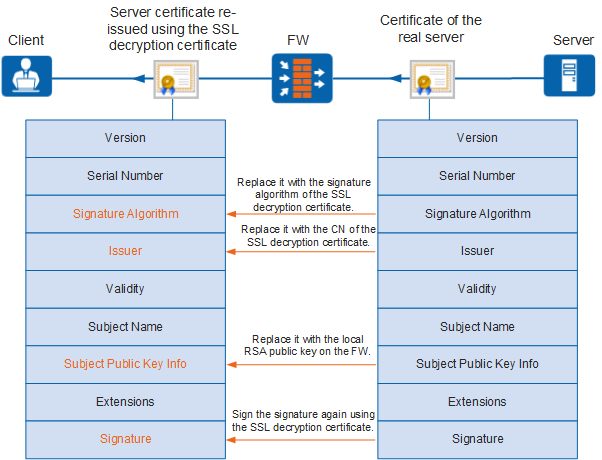
Based on the validity of the server certificate, the FW marks the SSL decryption certificate as trusted or untrusted. When the FW uses the SSL decryption certificate to re-issue a new certificate, the new certificate will also be marked with trusted or untrusted.
- Untrusted: The SSL decryption certificate is not trusted by the client.
Upon receiving a true server certificate, the FW verifies the certificate. If the true server certificate is illegal (not issued by a trusted CA or is revoked), the FW re-issues a certificate using an untrusted SSL decryption certificate to the client. Because the SSL decryption certificate is not trusted by the client, client applications identify the certificate as illegal. In such a case, an application of the client prompts a security alert, indicating that the server certificate is illegal. Users can release the alert or terminate the access. In this way, the FW correctly delivers the information about the illegal certificate of the server to the client, so that users can learn possible security risks.
- Trusted: The SSL decryption certificate is imported to the client browser and is trusted.
If the true server certificate is valid, the FW re-issues a certificate using the trusted SSL decryption certificate to the client. Because the SSL decryption certificate is trusted by the client, client browsers identify the certificate as valid.
SNI and SAN/CN Consistency Check
The FW supports SNI and SAN/CN consistency check to prevent unauthorized behaviors of some users. In actual applications, the SNI and SAN/CN of some traffic are inconsistent, but the traffic is normal. Therefore, the consistency check is only an option for SSL-encrypted traffic management. You can configure the FW to allow or block the traffic based on actual requirements when the SNI and SAN/CN are inconsistent.
SNI is for the server name identifier. The SNI carried in the Client Hello packet is the DNS host name of the server. Upon resolving the Client Hello packet sent from the client to the server, the FW abstracts the SNI field from the packet. In addition to verifying the server certificate and re-issuing a server certificate, the FW abstracts the SAN/CN field from the server certificate (true server certificate) and performs SNI and SAN/CN consistency check, therefore determining whether to establish the SSL connection with the server.
For example, when you enter a domain name in a browser to access a server, the SNI in the Client Hello packet sent by the client is the input domain name. Subject Alternative Name (SAN) and Common Name (CN) are fields in the server certificate. When applying for a server certificate, you can use the DNS host name of the server as the SAN and CN. Therefore, SNI and SAN/CN used for accessing the server are consistent. The FW verifies the consistency of the SNI and SAN/CN to cope with exceptions.
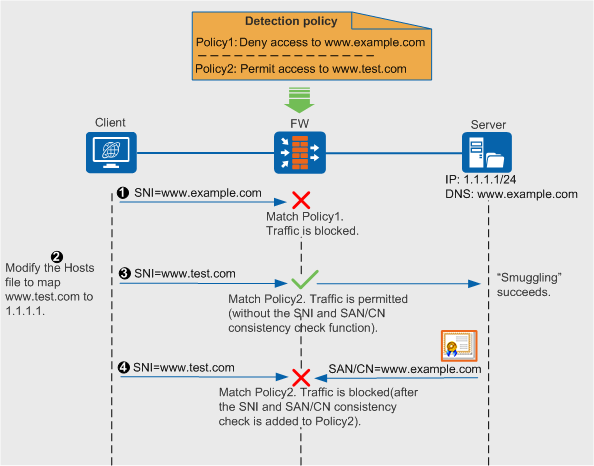
As shown in Figure 2, when a user accesses illegal website www.example.com using the Internet Explorer browser in the Windows system, you can set SSL-encrypted traffic detection policies on the FW to ban the accesses. However, if the user learns that the FW allows the access to website www.test.com, the user can add the mapping between the www.test.com and IP address 1.1.1.1 to system file Hosts. Then, the user accesses website www.test.com. According to policy2 that allows the access to www.test.com, the FW allows the access requests. In this way, the user successfully accesses the illegal server with IP address 1.1.1.1 by modifying the mapping rule.
To avoid the preceding situation, the FW adds the verification of consistency between the SNI and the SAN/CN to SSL-encrypted traffic detection. In SSL-encrypted traffic detection scenario, after the user modifies the Hosts system file, the SNI carried in the Client Hello packet is changed accordingly. However, the SAN/CN in the server certificate remains unchanged. In this way, the SNI in the Client Hello packet is inconsistent with the SAN/CN in the server certificate. Based on the consistency check results, the FW identifies and blocks abnormal traffic (although the traffic is released according to policy2, it is still blocked after the consistency check on the SNI and SAN/CN matches the blocking policy).

When checking the consistency of the SNI and SAN/CN, the FW preferentially compares the SAN with the SNI. If the SAN is null, the FW compares the CN with the SNI. The CN is mandatory for applying for the certificate. Therefore, it is impossible that both SAN and CN are null.